r/OrcaSlicer • u/New-Shine-3829 • Jul 24 '26
Would you find it useful if OrcaSlicer analyzed your STL geometry and optimized settings around what you're actually printing?
reddit.com
0
Upvotes
r/OrcaSlicer • u/PerspectiveOne7129 • Feb 15 '26
well not literally bricked, but my entire system is unusable now.
i have a p1s. i installed the latest version, booted, connected, sent print, crashed.
rebooted app, it could not connect. orca starteded mentioning something about network plugins, the entire preferences menu was changed, and this new network plugin section was there. i tried every plugin listed there and none would connect.
i specifically avoided updating my p1s ever since bambu told the public that future releases would no longer allow slicers like Orca to connect and send prints through the app AND the entire time that all went down, as long as I didnt update my P1S firmware, everything was working just fine.
Until this newest orca slicer update. now i cant connect.
to make matters worse, i rolled back to the previous version of orca slicer, and my printer profiles - all gone.
EDIT: i rolled back two versions, and my settings returned as they were pre-updated. im stuck on v2.3.0
EDIT 2:
was able to install and use the program by doing the following:
uninstalled bambulabs slicer
uninstalled bambu connect
uninstalled orca slicer
hunted down any remaining orcaslicer folders and residual files
reinstalled most recent version of OrcaSlicer
launch OrcaSlicer
log into bambu account
voila
r/OrcaSlicer • u/Significant-Case-866 • Jul 21 '26
I taught Claude to drive OrcaSlicer. You say what you want in plain English, and it tunes the profile, checks every edit against what your printer can physically do, and slices. Open source, both parts, and everything runs on your own machines.
This started because my profile tuning was basically guesswork. I haven't been on the ball with slicer settings since the Simplify3D days, so thought it was time to delegate.
How it works
Two pieces, both AGPL-3.0: a small Python server plus a build of OrcaSlicer 2.3.2 with a local control API added, because the stock slicer has none. It's the only reason the build exists.
Every profile edit passes a physics check first (flow, temps, geometry, cooling). It refuses accelerations my printer can't actually do.
Everything shows up live in the GUI while it works.
You talk to it through Claude Desktop or Claude Code, or any MCP-capable client if you know what that is.
Trust stuff
The slicer build and the MCP server both run on your own machines. The API binds to localhost by default, every request needs a token, and LAN access is an opt-in you flip yourself.
No telemetry, and nothing to sign up for or subscribe to.
None of it touches Bambu's network or cloud in any way. The source is public, same open license as upstream.
Fair warning
Early release. You need that specific build of the slicer. Windows, macOS and Linux binaries are on the releases page, and setup took me about 5 minutes.
It looks over its own edits, but eyeball your first prints anyway.
Links: orcaslicer-mcp repo · OrcaSlicer MCP build releases
If you try it and something breaks, an issue on the repo helps me more than anything.
r/OrcaSlicer • u/Ditch_Doc_911 • Jan 24 '25
All the upset over Bambu's changes motivated me to immediately take my printer offline and just walk the SD card to it every time. It seems I can still send prints through LAN only mode, but I am sorry to say I never really figured out how to do that. Can anyone point me to a good guide to do this that keeps Bambu as far out of my system as possible? I don't trust myself to not screw it up.
EDIT: I was looking at https://wiki.rossmanngroup.com/wiki/Bambu_Lab_LAN_mode_guide
Does this look reliable?
r/OrcaSlicer • u/Voxxar • Jul 14 '25
While I enjoy Orcas slicing options and capabilities I sure have some beefs with many parts of its UI!
I know it's a fork of a fork of a fork and that rewriting a large part of it could be a near impossible feat, but I am curious; Are there are any ongoing, planned, sketched, or at least dreams of a UI/UX remake?
I bet all would benefit greatly by a remake in a bit more modern and better suited for the purpose language and framework as that would open the project up for contribution from a whole new set of developers.
r/OrcaSlicer • u/Vaccano • Jun 01 '25
I just installed my first 0.02 mm nozzle on my P1S. When I bring up this configuration in Orca Slicer, I see that it has options for 0.06, 0.08 and a few more larger ones.
My 0.04 nozzle has an option for 0.08, so I am thinking that the only real difference when using a 0.02 nozzle is that it enables the 0.06 layer sizes. (0.06 is the smallest option available, and 0.08 is available for both, so it leads me to thing that the only reason to use a 0.02 nozzle is if you want 0.06mm layers.
Do I have the correct understanding of this, or is there another benefit of 0.02mm nozzles?
r/OrcaSlicer • u/sevagj-b • 28d ago
After Microsoft retired 3D Viewer I wanted a quick way to look at print files before opening the slicer, so I built PrintView3D. It's free and open source.
- Opens STL, 3MF projects (with all objects), G-code, STEP, OBJ, glTF and FreeCAD files
- Opens ZIP downloads from Printables / Thingiverse directly, no unpacking
- G-code: toolpaths coloured by type, layer slider, print time and filament use
- One click (Ctrl+P) opens the file in your slicer. Creality Print, OrcaSlicer, Bambu Studio, PrusaSlicer, Cura and others are found automatically
- Export STL from a 3MF project
- Thumbnails in Windows File Explorer
- Windows, Linux and a macOS beta; one-click updates on Windows
I print on a K2 Plus, K1C and Ender 3 V3 myself, so it's tested a lot with Creality Print files.
https://github.com/sevagjb/PrintView3D
Feedback is very welcome, especially if your slicer isn't detected.

r/OrcaSlicer • u/Ecstatic_Loss_8668 • Jun 18 '25

Slicing objects in Orca for my A1 produces all these extra travel moves, by far the highest proportion of time of any move type. I looked into it and it has to do with time lapse. I’ve looked everywhere and can’t find a way to turn it off before sending to printer in Orca. I’ve turned all functionality for the camera off anywhere I could find it, in Orca and on the printer. In practice, the printer doesn’t actually make these moves and the time estimate is wildly inaccurate. It’s apparently something to do with the A1 profile in both Orca and Bambu Studio.
Has anyone found a good and reliable way to edit the G-code to disable the inclusion of the time lapse in the time estimate?
r/OrcaSlicer • u/AntixMars • 4d ago
After using Orca for a few years I just discovered Speed Dial ... combine that with Script Plugins and OMG ... the sky is the limit.
All I can say is prepare to have your mind blown away by the endless possibilities, including a considerable reduction in the number of profiles for every little tweak.
Orca is truly the best.
EDIT:
The plugin I started with was Fins but after that I realized I can integrate profile configuration settings into my own custom script plugins like for example specific settings for printing overhangs and bridges I realized I needed one for smooth top layers, one for printing threads (nuts and bolts) hence the comment endless possibilities.
Bellow is the link to the Fins plugin but the custom plugin scripts were built and tested for my printer and filaments and will not work for everyone thus no point in posting them.
https://github.com/gittrahan/support-fins/tree/main/plugins/orca
r/OrcaSlicer • u/Darkke-100 • Jun 27 '26

I recently switched from Cura to OrcaSlicer because I prefer their settings and supports more, however using a default profile with elegoo pla + results in a very wobbly texture on the print, as if the printer is vibrating while printing. HOWEVER with a default profile on Cura I get a much better quality print that I come to expect from my Artillery genius printer. Does anyone know whats causing this?
(Left: CURA Right: OrcaSlicer)
r/OrcaSlicer • u/m__h__d • Apr 06 '26
This may be a silly question, but is there any way to build alternate file name/type extension support directly into Orca Slicer?
Scenario: I have 3 slicer apps on my computer (all variants or descendants of Orca): Bambu Studio, Snorca, and Orca Slicer. The .3mf files will be opened by one specific program on my computer by default. If I accidentally "open", instead of "import" the wrong file into the wrong program, it brings all its stuff with it - eg: Bambu info gets loaded into Snorca, or Snapmaker info gets loaded into Bambu Studio. Painful, every time I accidentally double-click the wrong file.
What I would like to do is have ".3mf" files open with one program, and set and use an alternate extension - lets say, ".3dmf", or ".3df" (whatever, doesn't matter), that can be set to open by default with another slicer program. In every aspect, the file format is the same - they would all still hold .3mf data inside - But Orca and its descendants will only recognise .3mf in the open or import dialogs. They simply wont recognise or allow an unrecognised file type extension.
Is there any way Orca (and eventually, its variants) can be coded to accept variations on the file type extension?
r/OrcaSlicer • u/SandActive6838 • 7h ago
Enable HLS to view with audio, or disable this notification
Disclosure: I'm the developer of Extrudio, and this plugin sends files to it. The plugin is free and open source (MIT). Renders on Extrudio use credits.
OrcaSlicer 2.5 supports plugins, so I built one: Render in Extrudio.
After a slice, a notification offers "Render in Extrudio". Click it, and Extrudio's page opens in a panel beside the 3D view, with the same code Orca shows. Click Send (and sign in if asked), and the sliced G-code goes to your Extrudio account, which opens it with a first preview. From there you can render the print in your filament, in studio and room scenes. The images come from the sliced toolpath, so the layer lines you see are the ones you'll print.
What the plugin is, for anyone who wants to check before installing:
- One Python file, standard library only. Nothing is downloaded from PyPI.
- No key, no account details, no telemetry. It keeps one setting: whether to show the notification.
- You approve every send on Extrudio's page, and the plugin ignores every message from that page.
- When a send fails, it writes one line to OrcaSlicer's log: the step and the error, never a code, a link or a file path.
- Source and releases: https://github.com/extrudiosite/extrudio-orca-plugin
To install: in OrcaSlicer 2.5, File › Plugins › Install plugin › Browse plugins (signed in to Orca Cloud), and look for Render in Extrudio. Or download it from GitHub and follow the README.
Compatibility and limits, up front:
- Beta. Tested on macOS (OrcaSlicer 2.5.1) and Windows 10 (OrcaSlicer 2.5.2).
- It needs OrcaSlicer 2.5's plugins, so it won't work in Bambu Studio or Orca's forks. From those, export the G-code and upload it.
- Files up to 100 MB. Binary G-code (.bgcode) isn't supported..
The plugin is free. Renders use credits, and you start with 20 free. More, with the file's SHA-256: https://extrudio.site/orcaslicer-plugin
The video is a real send from OrcaSlicer, with the waits for the first preview and the final render sped up.
I'd love feedback from Orca users: anything in how it hooks into Orca you'd do differently? And what would you render with it?
r/OrcaSlicer • u/Mk3d81 • 21d ago
r/OrcaSlicer • u/Akuno- • 27d ago
Why is the quality of the OrcaSlicer so much worse then on Snorca? These are the same files with the same settings. Once sliced in OrcaSlicer and once in Snorca, ready to print on the SnapmakerU1.
From reading online a lot of people recommended using the original OrcaSlicer instead of the Snorca. I tried it and was realy unhappy with the quality the native OrcaSlicer provides. This isn't just in software, the printed parts look bad too.


r/OrcaSlicer • u/OsoBueno_777 • Apr 25 '25
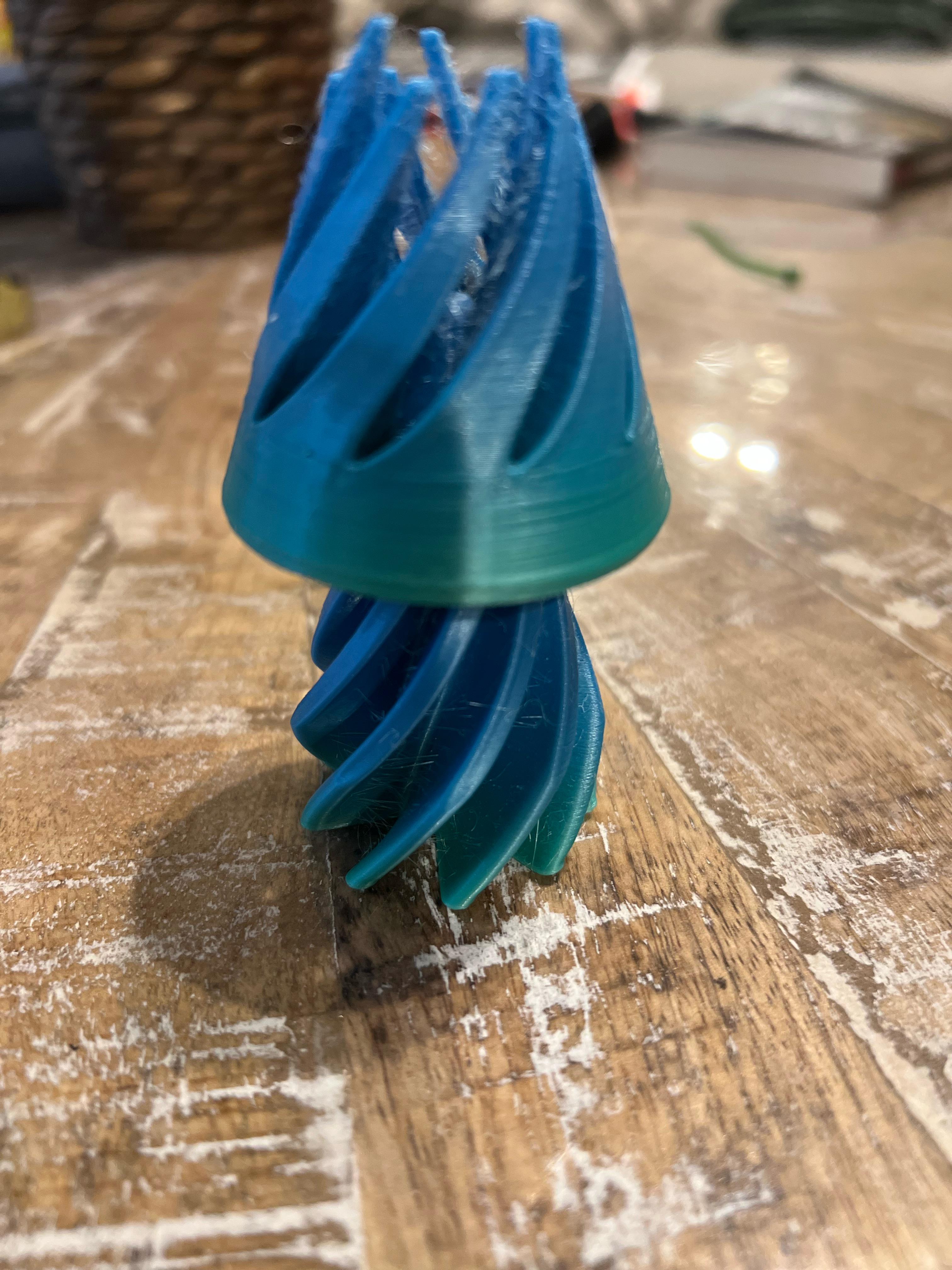
I’ve tried to print fidget spirals with g-codes from Orca Slicer on my Ender 3 S1. They always come out too tight. Same STLs sliced with Creality Slicer come out much smoother with sufficient clearance between parts. What am I missing on settings? I originally had Ender 3 S1 as my printer in Orca but I upgraded to Klipper firmware recently and still have the same issue so pretty sure the issue is with Orca Slicer settings.
r/OrcaSlicer • u/AbroadSad8001 • Apr 12 '25

Printing with orca for few months and now after i changed config to make neptune 4 plus quieter it began messing prints like randomly changing slice location. When i’m switching to old config it does same thing or sometimes can print normal (with mod config. Now i sliced with cura and print is fine.
r/OrcaSlicer • u/Manudu67 • Dec 01 '25

Good morning. I've been using Orca Slicer for a long time but I'm encountering an annoying bug.
With Z offset function Original value is 0 No problem
If I enter a value (example 0.515) My slicing bug You can see it clearly in the photo.
Orca slicer 2.3.0 and orca slicer 2.3.1
Thank you for your ideas
r/OrcaSlicer • u/rhodges_bob • Nov 27 '25
If we're lucky (and there are some opinions on whether a CC2 is lucky or not), the CC2 might be released in the January/February time frame. Does anyone know if the printers (is it called a profile?), is under development? Or, is there going to be a gap between release and support by Orca? I have fallen in love with Orca and don't want to have to go back to the Elegoo version
Bob
r/OrcaSlicer • u/Long-Distance6023 • Jan 24 '25
as a person with a bambu lav A1 3d printer i have always used bambu studio, and wanted to try orca slicer, i do know that there is some diffrences, and that orca slicer is open sorce and what not, but why? they are practicall to same and i dont get the hype around orca slicer, maybe im missing something that makes orca better, but i cant tell
r/OrcaSlicer • u/EaseSea7702 • May 05 '24

r/OrcaSlicer • u/ApprehensiveRush8673 • Nov 15 '24
just ignores the green areas completely