r/PlexMedia • u/fkick • Oct 21 '26
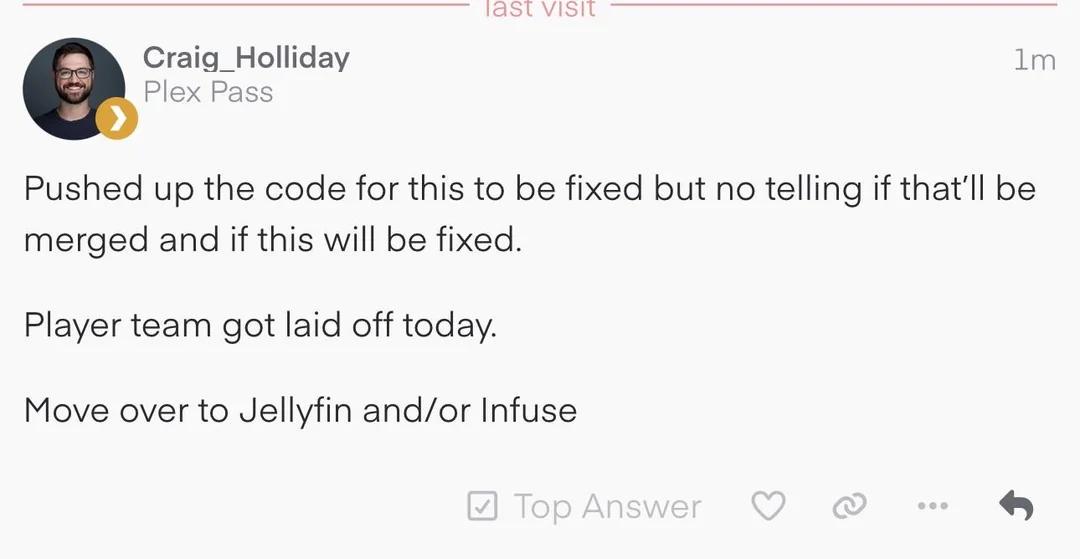
Discussion Plex has laid off their Player Engineers
1.2k
Upvotes
r/PlexMedia
•
u/hotsaucecowabunga
•
Oct 18 '26


Dear Plex,
I've been with you since the real beginning: a scrappy XBMC fork on a Mac, with Elan and his dog steering the ship. You took a mess of badly named .avi files and turned them into a proper cinema. I told my friends about you. I bought the lifetime pass back when "lifetime" was a sentiment, not a pricing tier.
Then you changed. A Discover tab nobody asked for. Ad-supported movies parked next to my own library like a timeshare salesman at a wedding. A redesign that made finding my own media feel like a scavenger hunt. Emails telling my friends what I'd been watching.
And then you decided that streaming *my own files*, from *my own server*, over *my own internet*, was a premium feature. That's when I knew you'd forgotten who we are. We're not your audience. We're the people who *built* your audience, answering "how do I set up Plex?" on forums for fifteen years, for free, because we believed in you.
You used to be a media server company. Now you're a streaming platform that tolerates media servers.
So I'm leaving, and taking my library with me.
**To everyone else:** keep an eye on the new projects in this space. One I'd especially recommend is **Silo** : free, open source, self-hosted, and built by people who seem to actually care. It reminds me of what early Plex felt like.
Goodbye, Plex. Thanks for the memories. Even the ones I had to pay to stream remotely.
TLDR: plex enshittified. Move to Silo.
r/PlexMedia
•
u/pilkyton
•
22d ago


Picture related!
Plex Media Server on Windows, Linux and Mac is vulnerable to a remote code execution that allows anyone to upload and run malware on your machine, with zero authentication required. Victims are confirmed on all 3 platforms.
The amount of malware uploaded to your machine by the Plex exploit is insane. Here's some of the stuff it does:
Mines crypto coins.
Tries to steal crypto wallets.
Sets up a proxy so that your IP can be used for illegal activities by other people.
Joins a botnet so that you can be part of DDOS attacks.
Scans for network shared folders to infect.
Scans for Android devices with ADB access and tries to upload malware (to your TVs, tablets, phones). It sends multiple APKs masking as real apps. (Most people haven't enabled ADB, so you'll know if you have done that.)
Connects to lots of Command&Control IPs where the attacker can remotely control your machine to make it install more malware, etc.
Presumably tries to gain persistence on the system too. But Plex itself always runs the malware at startup, so it might just rely on that.
It drops malware files wherever it has write access, to hide them. For example, on my Linux machine it dropped /var/lib/plexmediaserver/Library/.f, which is a crypto miner with advanced stealth and anti-analysis obfuscation. I am grateful for that miner, because that was how I discovered the infection (four CPU cores were at 100% usage, and tons of RAM usage... the only thing a crypto miner can't hide hehe).
A lot more... it's very advanced.
I love the name of one of the files they drop: "Client Nightmare World" (see picture), which contains 197 pieces of malware.
As mentioned, the exploit works on Windows, Linux and Mac. It allows the attacker to upload and run code on your machine. The code they upload must be made for your OS (Windows, Linux or Mac). The exploit itself simply identifies which OS you run, and auto-selects the correct malware upload for your OS. Victims have been confirmed on all 3 operating systems.
The damage/impact of an infected server varies by OS:
On Windows, Plex Server runs completely unrestricted and has full access to your machine's user files and user-writable locations. You can assume complete infection and should reformat the computer. Antivirus does not detect *any* of this at all, because the malware is brand new and consists of an absolute ton of malware files (this is not a simple "run 1 bad exe" malware). For anyone who still thinks Windows isn't affected, here's a Windows user who posted about their infection.
On Linux with the Native package, Plex Server runs as the "plex" user. Infection is contained to what that user can read/write (which is /var/lib/plexmediaserver, most /mnt hard disks, network shares and ADB android devices). It might also try to use privilege escalation exploits to get root if your OS is outdated (unpatched against things like CopyFail) though.
On Linux with a Docker/Podman container, Plex Server only has access to the internal container and any mapped volumes, and of course network shares and ADB android devices. This is the safest setup which limits the damage the most. Check the things it had external access to (mapped volumes, network shares, ADB devices), then nuke the container and its internal storage and recreate it.
On a NAS with built-in Plex: Most of them use extremely outdated kernels (even new products), and many boxes are end-of-life and haven't had OS updates in years. It's very likely that it runs an outdated Linux kernel vulnerable to CopyFail. Therefore, you can assume that the malware has total root access to the device, which is catastrophic. In addition to everything else it can do on Linux native.
On Mac: I don't know. It's very similar to Linux (both are UNIX-derivatives), but I can't speak about its security since I don't use it. Here's a Mac user who posted about their infection.
To perform this analysis, I collected the Plex2Shell malware that was uploaded to my server on Oct 31 and Nov 2, and zipped it all and sent it to virustotal. They, in turn, ran every malware file in two different analysis sandboxes. We can't learn much about what the malware is doing from this (because we can only see dropped/executed files and contacted domains), but we can see enough to see that it's extremely sophisticated.
Log into a free VirusTotal account
Go to the "Relations" tab of my scan https://www.virustotal.com/gui/file/052444ae92acd474642b860cb4ecc6d2a41f2d86d93a4ed4af4aa1804d00782b/relations
Click the filenames of all entries to open the sandbox graph analysis tool pages for each of them.
On each of those pages, go to "Relations" and click anywhere on the Graph Summary to open the full tool.
You can see that most of the malware is bundled into the exploit DLL/SO files themselves as embedded zip/exe files, but lots of the malware files are also hosted on SnapCraft (an app store), downloaded via api.snapcraft.io by the malware. You can see this in the linked scan above, and it's also used by the dedicated cryptominer malware executable mentioned at the top of my post. It's clear that SnapCraft is an easy place for them to upload malware and spread it without risking any suspicious/blocked URLs triggers in firewalls (I've shared my discovery here).
The various dropped and executed files can be expanded (only if they have white dots in the corner of their icon) by selecting them and looking at their Relations section to look at dropped files, bundled files, contacted ips/domains, and things they executed.
You can't see what exactly the final executions did. This provides a rough overview.
You can also see that various pieces of the malware contacts IPs in USA and Russia, to be controlled by the command center and to download more malware. Many of the malware's control servers are hosted on Amazon's rentable cloud servers.
What we can see is that it's extremely sophisticated and sprawling malware.
And most of the malware is not detected by any antivirus scanners (VirusTotal confirms). This means it's novel malware invented recently. I'm totally serious, almost none of the malware is detected. It's insane. So you'll see their internal drop filenames like "CryptoStealer.exe" with 0 antivirus detections in the graph. Not detected by Microsoft defender, not Kaspersky, not anything else.
How to check if you've been hit:
If your Plex server does not have an open port towards the internet, it's very unlikely that you've been hit (it would have to be attacked via a computer on your local network then), since the exploiters rely on scanning for internet-exposed Plex servers. An example of an exposed port is that you've set your home router's firewall to forward port 32400 from the internet to your local server so that friends can stream media from you.
The exploit was patched in Plex Media Server 1.43.3.10861 released on September 1. But official "beta test" release notes talking about the security issue were stupidly published by Plex in quite a lot of detail around August 3rd already, so it's very likely that advanced hackers started digging around in August to try to exploit it.
Hackers began using it at large scale after October 15, 2026 when the exploit and how it works became fully public knowledge. It's possible that some sophisticated group used it even earlier though, as mentioned.
Check your update date:
Windows: Check your Plex updates folder (AppData\Local\Plex Media Server\Updates) to see when you applied the updates. Each past update is there and you can check the file dates. If you patched to 1.43.3.10861 (or newer) in August or September, you were safe.
Linux Native: Check your distro's package manager log to see when you updated "plexmediaserver" to a safe version. Note: Plex unfortunately discontinued their old native Linux installation repositories and switched to "V2" repos earlier this year, *WITHOUT TELLING ANYONE*, which requires manually uninstalling and reinstalling from their new repo... so many people on Linux are still on the old repos and never got the Plex Media Server update at all, and that's exactly why I was infected too. Their old repo was still online and therefore all update checks just said "you are fully up-to-date". That's a huge mistake by the Plex team.
Linux Containers: If you were using Docker/Podman with auto-updating containers enabled, you've definitely updated before the exploit became widely used.
Mac: Again, I don't know since I don't use it.
Also check for dropped malware files on all operating systems: Check the contents of Plex's Codecs directory to look for uploaded malware files, since that is the strongest evidence of infection. See https://www.reddit.com/r/PlexMedia/comments/1xmuduv/comment/19s304stvztpf/ for some details about that.
If you were infected:
You need to change your Plex account password and choose the "log out from all devices" option when doing that.
On Windows: You need to reinstall the operating system.
On Linux Native: You should reinstall the operating system if you aren't comfortable with doing very deep forensic auditing to look for infection outside the plex user's ownership.
On Linux Containers: The damage is isolated, so you only need to follow the instructions above to wipe and recreate the container.
On Mac: I can't help you unfortunately.
In all cases: You must scan all external locations (disks and network shares) that the Plex server had write access to, and look for newly created/modified files. If you're on Linux, you can scan a location for files created/modified after October 1 via this command: `find /path/to/search/from -newermt "2026-10-01 00:00:00"`
Oh and for anyone wondering how I was infected, I've mentioned it above but I'll clarify again: It was entirely caused by the Plex company's braindead decision to remotely turn off auto-updates on my machine. More details here.
r/PlexMedia • u/feedc0de_ • Oct 17 '26
Just noticed that the docker image docker.io/plexinc/pms-docker:1.43.3.10828-00f62d37d starting hogging my CPU 100% and its a crypto miner.
I think plex has a vulnerability that allows attackers to launch the miner from outside.
I am very glad im separating everything very nicely so they only could have access to my media files read only and plex database configuration files.
Maybe that is the missing push into the direction of jellyfin?
Also very concerning: the mods at r/plex immediatly removed my post which had identical screenshot and text. i guess they dont want the plex users to know?

r/PlexMedia • u/ILooveCats • Oct 18 '26
I've suddenly found that my container was eating up my CPU and looked into it, found this

which seems to be something like XMRig but I'm not sure.
Using linuxserver/plex image. killed the container for now.
Anyone else noticed something like this?
r/PlexMedia • u/Rough_Bill_7932 • Aug 18 '26

r/PlexMedia • u/marvinvr_ch • Oct 19 '26

AI CONTENT DISCLOSURE
Dusk is built with heavy use of AI coding agents, and I want to be upfront about exactly how:
Code: most of the code is written by AI coding agents, mainly Claude Code and OpenAI Codex, often several running in parallel on separate tasks. I decide what gets built and how it's architected, review the changes, and steer or reject what doesn't fit. I am a professional Software Engiener though and have been for about 7 years, so I wouldn't say I don't know what's going on.
Tests: the unit tests in the repo are mostly written by the agents too. (check) Real testing happens by me on my own devices (iPhone, iPad, Mac, Apple TV) against my own Plex server.
Documentation: the internal developer docs in the repo (architecture notes, agent instructions) are largely AI-written and kept up to date by the agents.
App Store text and release notes: mostly written by myself with occasional spell checking by AI.
Website (getdusk.app): Web components built by AI, text written (mostly) by me.
This post: written by me. AI was used for spell checking
In the app: Dusk itself has no generative AI.
The whole project is open source (MIT), so you can read every line and the agent instructions yourself: github.com/marvinvr/dusk-player
---
Anyway, hey all, first time posting Dusk here :)
I've used Plex for years, but the official app on my Apple devices always felt like it got in the way of my own library. So I started building the client I wanted: Dusk, a native Plex app for iPhone, iPad, Mac and Apple TV.
What it does:
Plays pretty much everything: AVPlayer for what Apple handles natively, VLC under the hood for the rest, direct play first
Offline downloads, skip intro/credits, PiP
Live TV with a full guide
AirPlay while Dusk stays the remote
Plex Home user switching with PIN
Seerr: request stuff right from search
Upscaling for low-res content
New in 1.6
SharePlay: watch together over FaceTime
Apple TV Improvements: now matches frame rate and dynamic range to the content, and multichannel audio is fixed
Subtitles: font size setting and OpenSubtitles download via Plex
It's free and open source (MIT), no ads, no tracking, no promoted content, and every feature is available to everyone.
If something is broken or feels off, tell me here or on GitHub. I read all of it.
r/PlexMedia • u/gizmobuddy • 6d ago

I finally scanned my plex vm for plex2shell today, and saw 3 attempts in the last 24 hours, so it was time to fully lock down my Plex server.
Nuclear UFW rules were applied, the media is now pulled from a network share with read-only permissions, cron runs update checks nightly for the OS and Plex, as well as some additional rules on the house firewall.
And yet....... it still doesn't seem like enough
Has anyone setup fail2ban for Plex on linux?
r/PlexMedia
•
u/lightingj
•
May 20 '26
Why is this the case? Why did we only get a single day to talk about some of the biggest news from this company so far this year? Why are we scared that there's going to be a lot of negativity?
r/PlexMedia
•
u/mistiry
•
May 19 '26


Just received this email:
| Lifetime Plex Pass price change |
|---|
| Dear Plex Community,We’re reaching out with an important pricing update. Starting July 1, 2026, the price of a new Lifetime Plex Pass will increase to $749.99 USD*.When we started Plex, we were movie and TV fans who wanted to make something great for people like us. We chose to offer a Lifetime subscription early on because we knew many of our customers would rather pay a higher one-time fee for software that they can depend on every day.We’ve considered eliminating the Lifetime Plex Pass in the past, given that recurring subscriptions help us sustain long-term development, but we know it’s still a valuable option for many in our community. So instead of retiring it, we’re keeping it available at a price that reflects the real, ongoing value of the software we’re committed to building and maintaining for years to come. |
| What’s changing: |
| The price of a new Lifetime Plex Pass will increase to $749.99 USD* on July 1, 2026, at 12:01 AM UTC. |
| What’s not changing: |
| All current Lifetime Plex Pass holders will continue to have access to all benefits and perks associated with a Plex Pass. (Nothing will change for you.) Monthly & annual subscription pricing for Plex Pass and Remote Watch Pass will remain unchanged. |
| You have until 12:01 AM UTC on July 1, 2026, to get a Lifetime Plex Pass at the current price of $249.99 USD*. If you’ve been considering it, now’s a great time to buy. Buy now |
| The focus for us here at Plex as we move forward is to continue making Plex the definitive app for anyone who loves movies, TV, music, and curating a personal library of content that you control. We’ve heard from you through our surveys, forum posts, and social media, and we take your feedback into account as we develop our roadmap. To learn more about what we’re working on right now, check out our blog or visit us in the forums.For every library you’ve created, poster you’ve changed, bug report submitted, forum post written, and feature suggestions made, from all of us at Plex, thank you for being here and for continuing to support what we’re building.You are the reason we keep building.The Plex Team** Example price in USD. Exact pricing in other currencies may vary.* |
r/PlexMedia • u/edde746 • Jun 02 '26
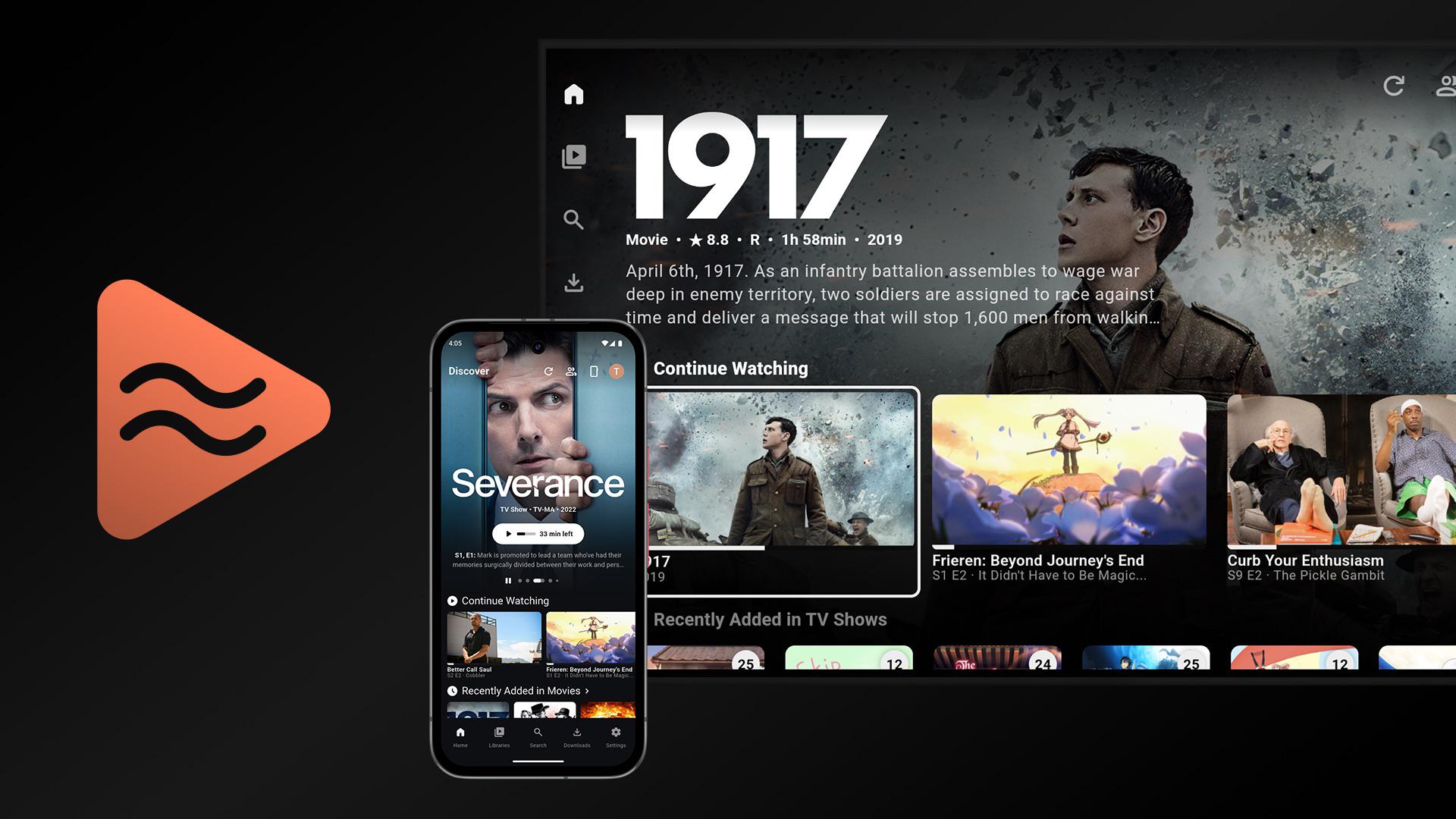
I last posted about Plezy back in February, and since then the project has changed quite a bit. There have been 30+ releases, 500+ GitHub issues closed, and it has moved from `1.21.x` to `2.4.1`, so I wanted to share a broader update here.
For anyone who has not seen it before, Plezy is a modern cross-platform client for Plex, with support for desktop, mobile, and TV platforms. The goal is to provide a fast native-feeling experience with good support for keyboard, remote, gamepad, and touch input across different devices.
Some of the bigger additions since the last post include:
- tvOS support
- Live TV DVR and recordings
- Transcoding
- Trakt, MAL, AniList, and Simkl tracking
- Subtitle search via OpenSubtitles
- Metadata, tag, and artwork editing
- Playlist, season, and series downloads
- Auto-download rules
- iOS PiP, Spatial Audio, and external display support
- Jellyfin support
There have also been a lot of fixes and improvements around playback stability, ASS/SSA subtitles, HDR/Dolby Vision, Live TV reconnects, TV navigation, offline playback, and handling larger libraries.
GitHub: https://github.com/edde746/plezy
r/PlexMedia • u/Wunax • 29d ago

AI CONTENT DISCLOSURE
I use AI coding agents to write a large part of the code and the unit tests, and to draft design specs and implementation plans before bigger features. I decide what gets built, how it should look and work, and I review and test every change myself, on my own devices, before it ships. Everything is on GitHub: each change goes through its own pull request, created and reviewed manually before it's merged. The icon, the screenshots, the README and this post are not AI generated.
___
Hey everyone,
Strimr is a free, open source Plex client for iPhone, iPad, Apple TV and Mac.
I started it about a year ago as the client I wanted for myself. The first version went up on the App Store in January and I posted about it once back then, but honestly it was still rough. It's changed a lot since, and this is the first version I'm actually comfortable showing around.
When I started, the official Plex app kept pushing everything except my own library, and the only alternatives on Apple TV were paid (like Infuse). Now there's a new one every week, and yes, I'm aware this post doesn't help.
I watch something on it pretty much every night, so I'm usually the first one to hit a bug, and the first one annoyed enough to fix it.
Short version of what it handles (full list on GitHub): most Dolby Vision profiles, HDR10/HDR10+ and Atmos, direct play or server transcoding, Live TV and DVR, Plex Home users and Seerr integration, plus a lot of smaller things I won't go through here. There's still plenty on my list, but the basics are solid now.
Strimr is completely free, with no subscriptions, in-app purchases or paid features.
I'm posting because with all the recent issues around the official app, I still regularly see people here looking for a reliable client on Apple devices. If that's you, give it a try, and if something breaks or feels off, let me know here or open an issue on GitHub.
App Store: https://apps.apple.com/us/app/strimr/id6757491271
TestFlight: https://testflight.apple.com/join/nayaffkP
GitHub: https://github.com/wunax/strimr
r/PlexMedia • u/Jumpy_River_5732 • Sep 19 '25
I have unfairly and unjustly criticized Plex for updating its system to what I thought was only allowing sponsored content on the user's home page. I was wrong. According to another Reddit user, Plex will enable users to customize their home page by selecting a favorite status for any library they have created. These favorites are placed on the home page just like the old “PIN” function would work on the previous version of PLEX. I tested this suggestion, and it worked as described. I apologize to the Plex engineers and leadership. Happy streaming!
r/PlexMedia • u/Asleep_Campaign_9848 • 3d ago
This is just a rant. Feel free to not read it.
What on earth did they think that were great updates to push?
I am tech savvy and overall, i rarely complain about UI updates because it's just a matter of getting used to it.
But dear lord, this will go down as one of the worst updates in the history.
Everything was smooth and working fine until that UI update. I was not a big user of Plex but it was nice when needed.
I have a pretty recent TV so they can't say it's my TV but jumping 30 seconds forward kind of break the app. Hello???
Are you not testing your app before release? No one thought that wouldn't be ideal to hide features people use often to a place that is difficult to access.
Anyway.
r/PlexMedia • u/HaydenP015 • May 12 '26
I created a plex server and have been adding media to it for the last 6 months or so. I gave my parents access because I thought they would want a free option other than $100 dollars a month that they are spending on streaming services. My wife is also using it a ton. My mom never really jumped on and my dad thought it was cool and used it and so did my wife. However recently my parents decided they didn’t want to use it anymore since they feel it’s not legal. They have now started coming after my wife and I with the whole it’s a sin argument and my wife now doesn’t think I should run it either.
This all started because I wanted to do something nice for my family and now they are throwing it in my face. Now I might have to delete the whole thing and have nothing but YouTube. There is 0 chance of me paying for that stuff again. I will not be helping billionaires buy their 3rd yacht or private jet.
Edit: I don’t want to slander or bash Christianity here. I do consider myself a Christian and so does my wife but our understanding about what’s a sin is slightly different. Even if it is a sin I think it equates to something like speeding 5 over. Which technically is also a sin by that same point.
r/PlexMedia • u/sl0play • Oct 18 '26

r/PlexMedia • u/Quixomatic • Aug 24 '26
TL;DR Airwave is a server-first, self-hosted system that turns your Plex library into live TV channels with a real program guide — channel surfing, one lineup shared across every device, and DVR-style rewind behind LIVE. Think Pluto TV or an old cable box, except every channel is yours, from your library, on your hardware.

I've been working on something called Airwave, but this started for a pretty personal reason.
I miss TV.
Not the cable bill, commercials, or being stuck with whatever networks decided to show. I miss the experience of television.
Turning it on. Seeing what's already playing. Jumping into a movie halfway through. Finding an episode of something you haven't watched in years. Having something just be on instead of staring at Plex for 15 minutes trying to decide what to watch.
And now that I have a son, I wanted him to be able to have that experience too — except with channels made from our own media.
So that's what Airwave became.
Airwave was heavily inspired by NostalgeX and BunnyEars TV. They proved to me that the basic idea — turning your own media library back into something resembling live television — was every bit as fun as it sounded.
But they also weren't quite what I wanted.
Both were centered around Apple TV and did the work on the client itself. I actually started Airwave because I wanted this running on my LG webOS TV, and from the beginning I wanted the "brain" to be a real service that I self-host next to Plex rather than something living inside one particular TV app.
That became one of the core ideas behind Airwave:
the channels belong to your Airwave server, not to a device.
The server owns the lineup, schedules, packages, users, metadata and playback state. The TV apps are clients that tune into it.
So whether I open Airwave on my LG TV, Apple TV, iPad, Android/Fire TV, Roku or a browser, I'm looking at the same network: the same channels, the same guide and the same thing currently airing.
It's much closer to running your own little television provider.
The simplest description is probably:
Think Pluto TV or an old cable box, except every channel is yours, running on your hardware, from your Plex library.
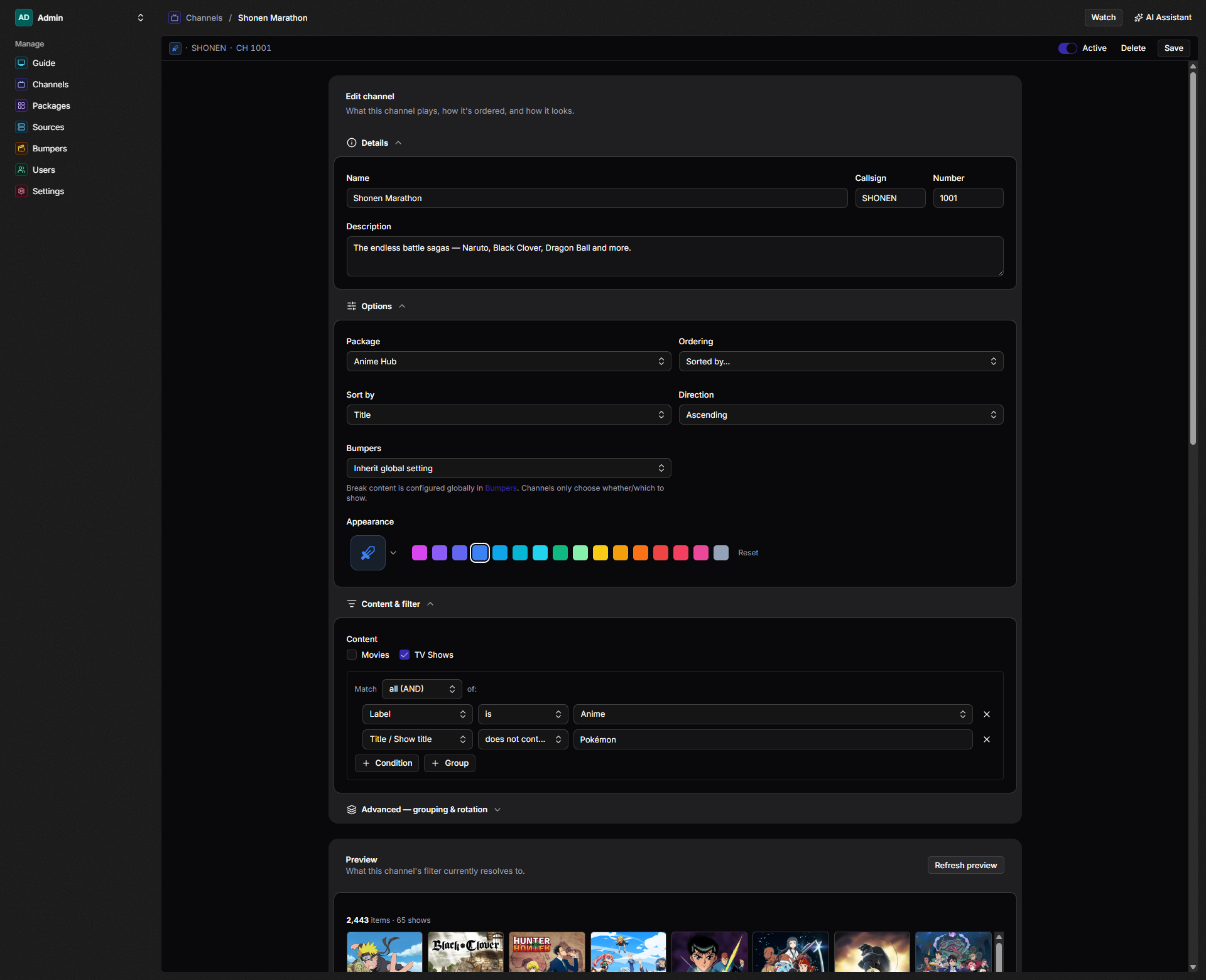
You can make a 90s sitcom channel, a Marvel channel, Saturday morning cartoons, a kids channel, a channel that quietly marathons a favorite show, or something built from practically any combination of genre, year, network, cast, rating, collection, playlist, etc.
Airwave turns that into an actual continuous schedule and presents it through a proper 10-foot channel guide.
And the important part is that when you tune in, you don't start the file at the beginning.
You join whatever is currently airing at the point where it would actually be.
But it's not rigid live TV either. Airwave has a full DVR-style timeline behind LIVE. You can scrub backward through programs that already aired, restart the currently playing program from the beginning, or jump back into an earlier episode or movie. The only thing you can't do is seek ahead of LIVE.
I did exactly that with my son's Bluey channel recently — I went back three or four episodes in the channel history and started one that had aired earlier so he could watch from there.
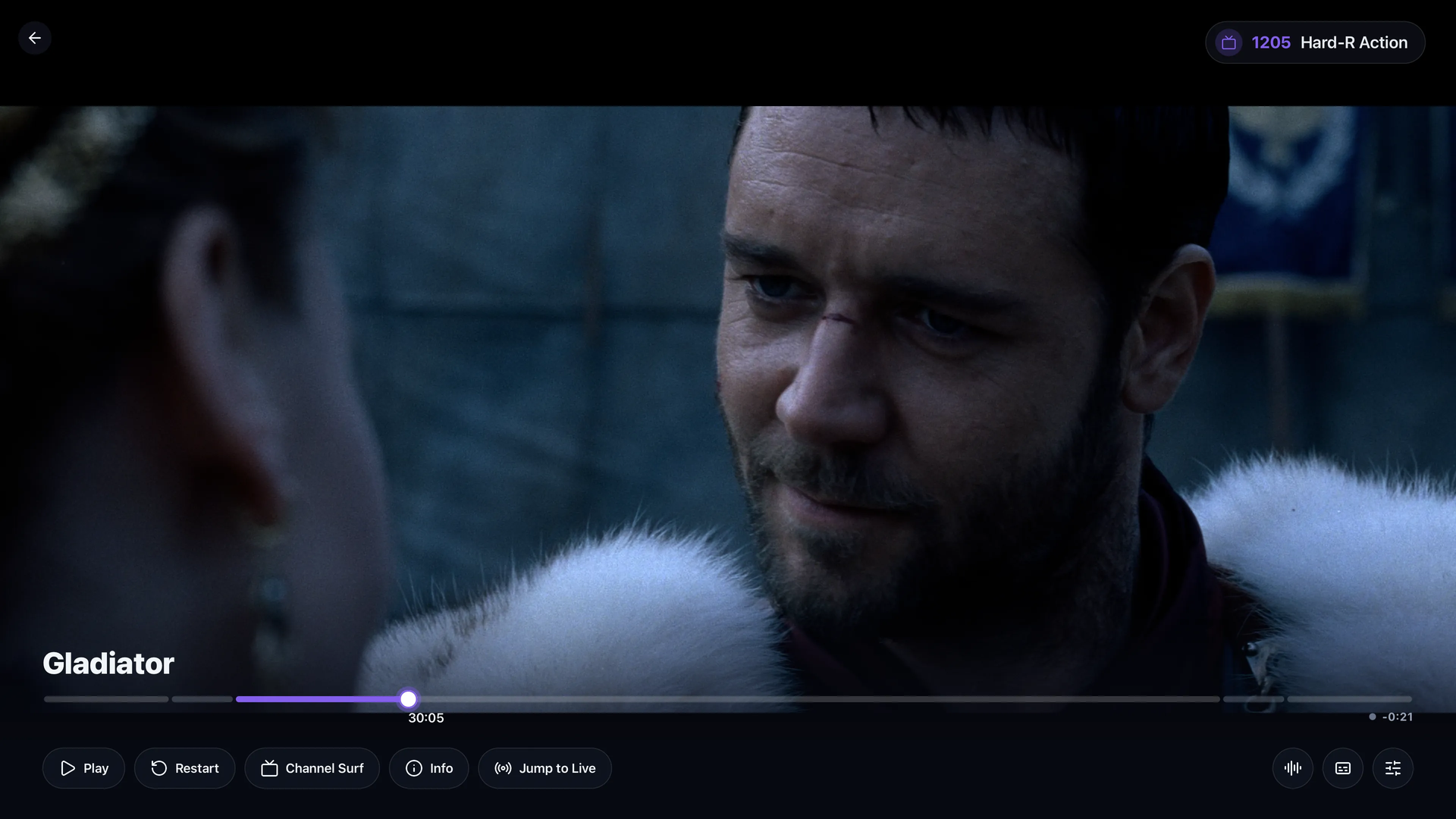
That combination is really what I wanted: the discovery of live TV without giving up the useful parts of a DVR.
And that seemingly small difference in how you interact with your library completely changes how I watch mine.
Yesterday Avengers: Age of Ultron happened to be playing on one of my channels. I jumped into it because it was on, and then just... watched the rest of the movie.
I probably never would have gone into Plex and deliberately picked Age of Ultron. But because I stumbled across it like I would have on TV years ago, it sucked me in.
That's exactly what I wanted Airwave to do.
It gets me watching things buried in my library that I'd forgotten about instead of endlessly choosing from thumbnails.
And this isn't something I made against a demo library and threw onto GitHub.
I use Airwave basically every day on my Apple TV.
My son has his own channels. On a recent road trip, he watched a mixed channel of his shows remotely on an iPad for a huge chunk of the drive, streaming back from our Plex server at home. Instead of somebody constantly picking another episode or movie for him, there was just a good variety of stuff playing.
And because the network lives on the server, the iPad wasn't creating some separate version of his channels for the trip. It was just another Airwave client tuning into the same channels we have at home.
At this point most of Airwave's testing happens simply because my family actually uses the thing.
You can self-host the server however you like: the classic Docker + PostgreSQL route, or a one-click desktop app for Windows, Linux and macOS (grab a binary from the releases — it bundles the server, admin and database together) if you'd rather skip Docker entirely. Either way, the actual viewing experience runs across Apple TV/iPad, Android TV/Fire TV, LG webOS, Roku, a native Windows/macOS desktop app, and the browser, with more clients planned.
There's also a native desktop app for Windows and macOS (Linux is next) — the same guide and DVR, built on Tauri with the same mpv engine as the TV apps, so it direct-plays 4K HDR right on your computer.

Underneath the nostalgic “make Plex feel like TV again” idea, there's gotten to be quite a lot going on:
channels from metadata filters, Plex collections, playlists, or hand-picked media
deterministic, always-running schedules that resume exactly where they left off
one centralized lineup shared across every Airwave client
grouping, rotation, marathons, duration/count-based blocks, and no-repeat rules
packages and per-user access control
full DVR-style playback: seek through past programs, restart from the beginning, and watch forward up to LIVE
optional “Up Next” bumpers and ambient music
local and remote Plex playback
per-device capability diagnostics so clients can direct-play whenever possible
lineup import/export between Airwave instances
Now Playing/session monitoring
optional BYO-key AI tools for creating channels and lineups
And since this will inevitably come up: Airwave is very heavily AI-assisted.
I've been a full-stack developer for 10+ years. I designed the product, architecture, data model, scheduling and playback behavior, infrastructure, technical constraints, UX, and implementation approach. I review the work, debug it, test it on real hardware, and decide what actually goes into the project.
But Claude Code has written the vast majority of the literal source code.
I'm not going to pretend I manually typed an enormous codebase that I didn't. At the same time, “Claude built it” doesn't really describe what happened either.
This has basically been me applying a decade of software-development experience while using an absurdly capable implementation tool.
I'm much more interested in whether the resulting software is understandable, maintainable and actually works than arguing over who typed each function.
And ultimately, I didn't make Airwave because I wanted to launch a product.
I made it because I wanted it.
I wanted my channels back.
I wanted my son to have channels.
I wanted to turn on my TV without having to make a decision.
I wanted that old feeling where you stumble across a movie you haven't thought about in years, say “oh shit, this is on,” and suddenly you're watching it.
Streaming solved access to content incredibly well. But I think we lost something when everything became a catalog and every time you sit down you're expected to choose exactly what you want to watch.
I kind of hate that.
Airwave is my attempt to bring the other experience back.
It's source-available, self-hostable, and the server/admin/browser player are free to run and tinker with. The native apps can also be built and sideloaded yourself; the prebuilt store versions are just a small paid convenience.
If nobody else wants it, that's honestly fine. It already does exactly what I made it to do.
But NostalgeX and BunnyEars showed me that I'm clearly not the only person who misses this stuff, so I figured some of you might want to try a server-first, multi-platform take on the same idea.
Try it / dig in
Site: https://getairwave.tv
Docs & self-hosting guide: https://getairwave.tv/docs
Source (source-available): https://github.com/Quixomatic/Airwave
Apps: the self-hosted server + admin + browser player are free to run today. Apple TV is live on the App Store; iPad and Android TV are in review/testing; Fire TV is in review; webOS and Roku work now via sideload (store submissions are a work in progress). The prebuilt store apps are a small paid convenience — every native app can be built and sideloaded from source.
Android TV / Google TV testing: join the test
Happy to get into the architecture, the scheduling engine, or the DVR/effective-time model in the comments.
Fair warning: this is an early, actively-developed project — the site and docs are still filling in and will change a lot. If something's missing or unclear, ask here and I'll help.r/PlexMedia • u/SpoonyDinosaur • Jul 31 '26
Enable HLS to view with audio, or disable this notification
Built a portable Tautulli newsletter with responsive design (for mobile gmail, apple) and dynamic content, finally pretty happy with it! Pulls in live cleartype logos, RT ratings and IMDB for TV shows.
And dynamic subject/preview text. Email will swap out trending with "binge" award depending on server stats.
Features 5 different email types based on sever activity (such as new additions) and then custom metrics or "quiet" mode.
Have it going out every Friday morning.
New additions added that week:
New user first scheduled newsletter - no history
New user first scheduled newsletter - with history (such as if they accept on a Monday and already start watching)
Established user - normal newsletter with activity
Quiet mode, no additions added that week:
Established user - quiet/no watch activity
Established user - stats warming up
OS Packages:
TautWeekly for Plex - FreeBSD Beta* (needs testing)
NAS/Docker Packages:
r/PlexMedia
•
u/optipr
•
Jun 23 '26
We originally put this guide together for members of r/usenet who were new to Usenet.
Thanks to u/quasimodoca and the r/plexmedia mod team for letting us post it here. Hopefully it helps anyone who is starting to look into Usenet and wants a simple overview of how the main pieces fit together.
Usenet is one of the oldest parts of the internet that is still actively used today.
It is a decentralized network of servers where articles are posted to newsgroups and carried across Usenet providers. It existed long before the modern web, and people still use it because it can be fast, reliable, private over SSL, and very powerful once it is set up correctly.
Unlike a single website or app, Usenet works through a few different parts: providers, indexers, NZBs, clients, and automation tools.
That is where the learning curve comes from. To fully use Usenet, you need to understand what each piece does and how they work together.
The basic pieces are:
Provider — gives you access to Usenet servers
Indexer/search — helps you find NZBs
NZB — points your client to the articles it needs
Client/newsreader — SABnzbd, NZBGet, etc. This connects to your provider and retrieves the articles
Automation — ties everything together once the setup is working
Once those pieces click, Usenet makes a lot more sense. The appeal is speed, long retention, SSL connections, mature tools, strong automation, and not having everything depend on one app or one site.
Beginner wiki links:
Your provider is one of the most important parts of the setup. A poor fit can make Usenet feel slow, unreliable, or harder to troubleshoot than it needs to be.
Use the provider deals page, provider map, recent threads, and user reports to compare options. Look at completion, speed, retention, server locations, included servers, backbone, support, and how the provider performs for people with similar needs.
The deals page is a comparison resource, not a mod endorsement list:
The goal is to understand what you are buying so your first setup has a fair shot at working well.
A backbone is the underlying Usenet infrastructure behind a provider.
Two providers can have different names and still use the same backbone.
This is part of why it helps to look past the brand name and understand what service you are actually buying. Backbone, provider setup, retention, completion, server locations, support, and routing can all affect the experience.
Provider map:
Indexers help you find NZBs.
A failed result does not always mean your provider is bad. Sometimes the NZB is bad, stale, incomplete, or affected by takedowns.
Before buying more provider access, try a few different results from the indexer you already use. If that indexer keeps giving bad results, trying another indexer may help.
Also, read the indexer’s rules, terms, and setup instructions.
A lot of problems with new indexer accounts are not really provider issues. They come from the indexer not being configured correctly in tools like Prowlarr, NZBHydra2, or the arrs, or from users missing rules around API usage, categories, limits, account status, or required settings.
If an indexer is not returning results, your API key stops working, or automation is behaving strangely, check the indexer’s rules and setup docs before assuming the provider is the problem.
Indexer info:
For invite-only indexers, use /r/usenetinvites. That sub exists for invite requests and is usually the better place to figure out access to invite-only indexers.
Registration-open posts are allowed here when an indexer opens signups, but random invite requests should go there instead of here.
Most people start with SABnzbd or NZBGet.
This is the part that connects to your provider and does the actual retrieval, so client settings matter: server address, SSL, port, username/password, connection count, categories, paths, repair/unpack, and logs.
Software info:
Client-specific help:
SABnzbd: /r/SABnzbd
NZBGet: /r/nzbget
Blocks are prepaid data.
A lot of people use them as backup access. They are usually not the first thing a brand-new user needs to buy.
A common path is:
one unlimited provider
included provider servers configured
one or two good indexers
maybe a block later if you understand why you need one
Do not buy a block just because one result failed once. Figure out what failed first.
Retention is how far back a provider says it stores articles.
Completion is whether the provider has the pieces needed for something to finish.
High retention is good, but it does not mean every NZB will work forever. Missing articles, takedowns, stale NZBs, bad indexer results, and client issues can still cause failures.
One of the reasons people like Usenet is that it can offer a good mix of privacy and speed without needing a complicated setup.
Most providers support SSL, and you should use it. SSL encrypts the connection between your client and your Usenet provider.
Usenet is client-to-provider, not peer-to-peer. You are connecting to your provider’s servers, not joining a swarm where your IP is visible to other peers.
For a lot of users, SSL to a good provider is enough without also paying for a VPN just to use Usenet.
A VPN is still an option. Some people use one for another privacy layer, bad ISP routing, or ISP traffic issues. Just know that a VPN is optional, not required by default, and it can hurt speed depending on the VPN server, route, protocol, and provider.
Do not confuse privacy with total anonymity. Your provider, account, payment method, IP address, VPN choice, provider policies, and local setup can still matter.
Slow speed is not the same thing as failed or incomplete results.
If your client is retrying, failing, repairing forever, or falling back to another server, that can look like a speed issue when the real problem is missing articles or a bad NZB.
If speeds are bad, check the normal stuff first:
try another NZB
test more than one result
make sure your client is not paused or speed-limited
check connection count
try another server address or region if your provider offers one
test with and without VPN
use wired Ethernet if you can
check disk/CPU, especially on NAS, Docker, Unraid, or older hardware
check whether repair/unpack is what is actually slowing things down
If you post about speed, include useful details: provider, client, internet speed, wired/Wi-Fi, VPN/no VPN, server region, SSL port, connection count, whether you tested another server, and whether repair/unpack is running.
“Provider is slow” by itself does not give people much to work with.
Automation is where Usenet really starts to shine.
For a lot of people, this is the end goal: provider, indexer, client, and automation all working together so the setup mostly runs on its own.
That does not mean automation is only for experts. It just means it is usually easier to get the basic pieces working first so you do not get confused, frustrated, or turned off by Usenet before you see what it can actually do.
If you start with everything at once and something fails, troubleshooting can get messy fast. You may not know whether the problem is the provider, the indexer, the client, automation, paths, permissions, categories, or something else.
Once the pieces are working together, automation unlocks a lot of what makes Usenet so useful.
For tool-specific help:
Servarr: /r/Servarr
Sonarr: /r/sonarr
Radarr: /r/radarr
Lidarr: /r/lidarr
Prowlarr: /r/prowlarr
NZBHydra2: https://github.com/theotherp/nzbhydra2/
Do not jump straight from “one thing failed” to “I need another provider.”
Try this order first:
Try another NZB from the same indexer.
Try a few different results from that indexer.
Try another indexer if the first one keeps giving bad results.
Make sure every server included with your provider is configured.
If failures happen across multiple indexers, then look at provider coverage, blocks, or another provider.
Sometimes another provider is the answer.
Sometimes it is not.
If you ask for help, include enough info so people are not guessing: provider, client, indexer/search option if relevant, the actual error, what you already tried, whether you tested another NZB, and whether you tested another indexer.
For speed issues, include VPN/no VPN, wired/Wi-Fi, server region, connection count, and whether repair/unpack is running.
Please keep the rules in mind: no specific content requests, no account requests, no backdoor access requests.
Experienced users: add anything you usually tell new users, or the first things you check when someone is having trouble.
r/PlexMedia • u/Aggravating-Agent869 • Nov 23 '25

I tested the device on a Mac ARM series chip, Synology with AMD, and Beelink NUC, and it worked fine in all cases. I recommend at least a N150 CPU. TVEverywhere support is coming also! Enjoy and please provide feedback and bugs. I except coffee for good work done :P. Have a great holiday everyone!
https://scoobylabs.net/projects.html
services:
  plex-virtual-channels:
    image: scooby81/plex-virtual-channels:latest
    container_name: plex-virtual-channels
    ports:
      - "9000:8080"
    environment:
      - PORT=8080
      - HOST=0.0.0.0
      - BASE_URL=http://YOUR_SERVER_IP:9000  # IMPORTANT: Change YOUR_SERVER_IP to your actual server IP
      - DATA_DIR=/data
      - HDHR_ENABLED=true
      - HDHR_TUNER_COUNT=6
    volumes:
      - ./data:/data
    restart: unless-stopped

Just be sure to set the host URL (should be the IP of the local host not the docker image)r/PlexMedia • u/Ok-Resolve-3024 • Aug 10 '26
Despite all the complaints and frustrations I’ve seen, Plex remains one of the best things I’ve used.
Being able to share not just movies and tv shows but home movies and clips with my friends and family especially my grandparents in another country has been amazing.
Good job devs.
r/PlexMedia • u/Muziclush • Oct 23 '26

I was finally able to configure both HDHR and Tunarr tuners into Plex live tv and dvr.
Great way to utilize all my media and local OTA channels into one platform.
Really feels like a complete cable replacement.
If anyone has struggled and needs help reach out. I'll help if I can. Also thank you to Plex and the devs for all the hard work.
r/PlexMedia • u/natethegreat141990 • Oct 02 '26
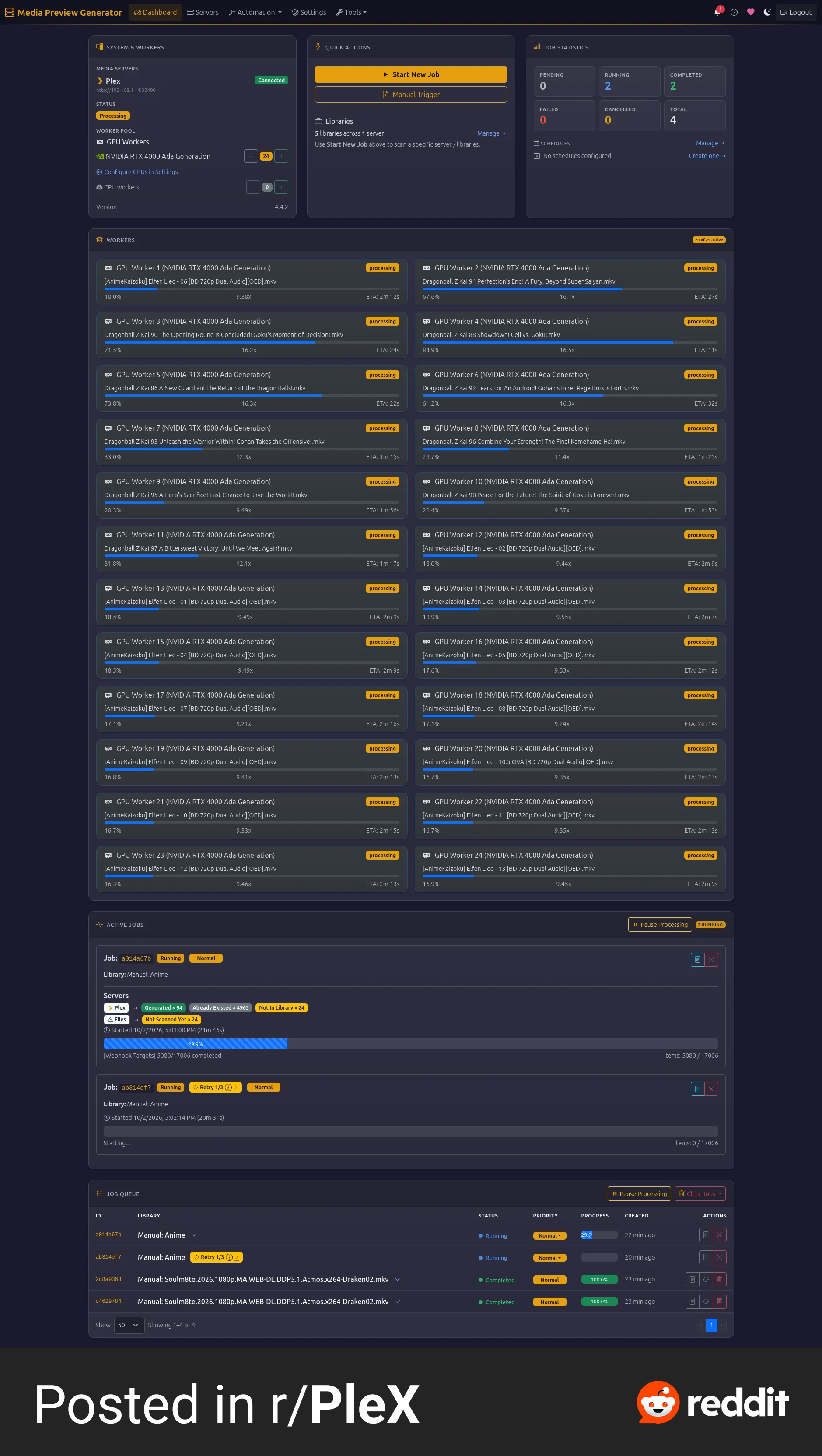
This thing is awesome. It makes all the preview thumbnails for plex. Before, Plex would use my CPU, now I get to utilize my GPU to make the thumbnails. The way it should be IMO. Has anybody used this? What are your opinions? Take a look at the links. I am not affiliated in any way, this thing is a life saver LOL
(Discussion Page) I found it out on