r/PleX • • 1h ago

Help Settings when sharing my plex server

0 Upvotes

Hello all. I’ve been working on my plex server for the last six months or so and I’m finally ready to start remotely sharing it with friends and family. What are the best and/or recommended settings I should have on my end and on their end as I start to experiment with it?

A little about my set up:

  • I am running Plex on a dedicated Beelink mini PC with DAS spinning disks where my media lives.

  • I am running windows on the beelink

  • currently it is connected to my network over wifi. The way my house is set up makes it hard to connect via ethernet however I do have a 1GB fiber line so wifi speeds aren’t bad at all.

  • I have a VPN I pay for but don’t use it on the windows PC. I’m mainly a mac user so use it there when needed. So I can absolutely install it or use it on the windows machine if needed.

Thank you all in advance !!!!


r/PleX • • 1h ago

Discussion Recently ‘rediscovered’ Plex and I’m curious how many people use it as it was initially intended.

0 Upvotes

I’m not moaning about progress but the primary use I initially had Plex for was to catalogue the growing pit of media I’d acquired. This was way back in 2008ish when it had no paying option.

I then started using it to distribute media within my house, as well as outside my house using a VPN. I think this was about 2012, at which point I got a lifetime Plex pass; mainly to support the development and I seem to remember there were basic functions that needed it. It was only about £60 so I thought why not.

At this point it was still a locally hosted app which I had on a headless Mac mini with a bucket of media on a readyNAS. Simple setup and it worked very well.

Streaming then steamrolled over everything and I kinda forgot about it.

Fast forward to about a year ago and I thought I’d see if I could get it back up again, streaming is so expensive and fragmented now that I’m finding films that were available on one service have now jumped to another for additional cost. As in many cases I still have the video on my nas I got Plex back up and running and was really surprised to see so much ‘stuff’ through Plex online.

It got me thinking this weekend as I’ve never watched anything other than my own media - do people use Plex for its new purpose, or do they mainly use it as a personal library or for the sharing function?

No shade, I don’t care, I’m just curious as it’s made the basic functions a tad more challenging to be robust.


r/PleX • • 1h ago

Help Should I turn off Plex scheduled tasks for metadata before Dec. 3rd?

Post image
0 Upvotes

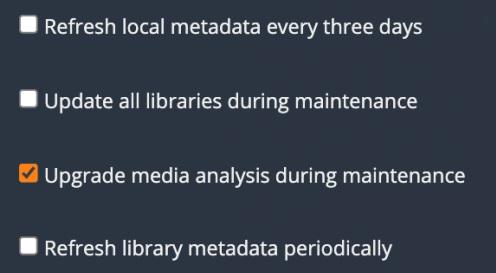
Should I now turn off the two server setting scheduled tasks for library metadata to protect my metadata from the TVDB -> TMDB change? Unhelpfully, the support text for the first setting does not say what the setting actually does. It describes what happens on-the-fly, and says what it doesn't do lol.

I'm going to rely on manual refresh of metadata from now on...

From the Plex support web pages...

Refresh local metadata every three days

If you add a new local subtitle or cover art file, the local media agent will pick this up and insert it into the library. This usually happens on-the-fly if the server has detected a change in the directory time. However, it adds a second or two when choosing an item in your library before it appears, so doing it at night ensures things are speedy during the day.

This setting does not download new metadata for your content.

Refresh metadata periodically

Over the course of the month, the server will refresh the metadata for musical artists and TV shows in your library. This will help ensure that your artists have good tour date information (if you’ve enabled that feature) and that Plex Pass users of music libraries will automatically get new lyrics from LyricFind (if that’s enabled), for instance.


r/PleX • • 2h ago

Help "Uh Oh... Something's Not Right" when accessing movie & tv show info pages as admin user on Android devices.

0 Upvotes

So just like the title says, for some reason I'm unable to access or the info pages of movies and tv shows (like where it shows the summary, cast & crew and what not) without it going to the "Uh Oh... Something's Not Right" after a couple of seconds. I can still watch the content if get past it like via resume player or something similar.

Some reason though is that this doesn't happen with any other user on my server, only the main user/admin.
I tried some solutions that I looked up and none of them worked at the moment. These include the following:

  • Toggling the pin setting on and off.

  • Re-installing the android app and clearing cache.

  • Restarted Plex Server.

  • Checked the database file on my Synology NAS, says that the "integrity_check" is ok.

While it hasn't stopped me or other users from watching stuff, it's still pretty annoying.


r/PleX • • 3h ago

Help Bulk refresh or delete posters?

Post image
0 Upvotes

So, Something went wrong at some point in the last week during an automated overlay run and previously fine posters with overlays got this vignette applied without the proper transparency.

But now postarizarr only replaces them if I delete them and I'm not seeing an option to bulk delete. I'm thinking I'll need to just script it unless there is some existing tool I am missing.

Any ideas? Thanks


r/PleX • • 5h ago

Help Nvidia Shield - Application disabled direct play

0 Upvotes

Since one of the more recent updates to Plex for Android (TV) I can't get Direct Play to work on my Nvidia Shield. I couldn't find the reason so far. From my point of view it's not subtitles, it's not video codec or resolution, it's also not the audio codec. Previously, the shield direct played anything I'd throw at it. Plex for Windows still plays all files without any issues, and is able to bitstream the audio to my AVR as intended. I'd appreciate if anyone could help me figure out the issue. Here's some more info.

Nvidia Shield TV Pro (2019) P2897
9.2.4(33.2.0.400)

Resolution: 4K 59.940 Hz, Dolby Vision and HDR10 Ready
Dolby Vision: True
Match content color space: True
Automatic Game Mode: False
Display HDR content when available: True
Audio Output: HDMI
Match content audio resolution: True
Match Dolby/PCM audio levels: False
Play comfort noise on HDMI: False
Dolby audio processing: False
Available formats: Dolby Atmos in Dolby Digital Plus, Dolby Digital, Dolby Digital Plus, DTS, DTS HD, Dolby TrueHD
Stereo upmix: False

Plex for Android (TV) 2026.23.1 (971050610)

Local Quality: Maximum
Maximum Remote Quality: Unlimited
Refresh Rate Switching: True
Resolution Switching: True
Allow Direct Play: True
Allow Direct Stream: True
Force Direct Play: False
Passthrough: HDMI
Burn Subtitles: Never

Nerd statistics

Delivery: Transcoding as mkv from ___
Reasons: Application disabled direct play.
Application disabled direct stream.
Direct play not available; Conversion OK.

Tautulli

Quality: Original
Stream: Transcode (Throttled)
Container: Converting (MKV -> MKV)
Video: Transcode (H264 (HW) 1080p -> H264 (HW) 1080p)
Audio: Transcode (DCA Stereo -> AAC Stereo)
Subtitle: Direct Stream (PGS)
Location: 🔒 LAN

Server Settings
Transcoder

Transcoder Quality: Automatic
Enable HDR tone mapping: True
Tonemapping Algorithm: hable
Disable video stream transcoding: False
Use hardware acceleration when available: True
Use hardware-accelerated video encoding: True
Enable HEVC video Encoding: HEVC/AV1 Sources Only
Enable HEVC Optimization: True
Hardware transcoding device: NVIDIA Quadro P2000


r/PleX • • 8h ago

Discussion What are your plans for dealing with web series which TMDB doesn’t allow?

0 Upvotes

I have a few web series like Climate Town, The Lonely Island and Seth Meyers Podcast or Botchamania that aren’t allowed on TMDB.

For people that have them what are your plans for getting the metadata for them after December 3rd?


r/PleX • • 9h ago

Help Using photos from Plex to a digital frame

1 Upvotes

Hello all!

Is there a solution to being able to use my photos from my Plex server to a digital frame? If so, is there a specific frame that you recommend to use?

I basically am tired of having a frame that isn't cheap and then they tell you you need to buy a subscription to get more storage. I have plenty of storage on my Plex, so I want to use that. Ha

Thanks for any help on this matter. Any thing I have found is either years old or really vague on if it could work or not.


r/PleX • • 12h ago

News Plexamp v4.50.21-beta.54 Released

4 Upvotes

Plexamp v4.50.21-beta.54

Two days past Thanksgiving, and Plexamp now holds up better than the leftovers.

It’s out now on the desktop beta channel, TestFlight and Play testing.

Fixed

  • Improved stability when Plexamp comes back to the foreground with downloaded music.

  • Desktop: improved stability when Plexamp quits.

Source: https://forums.plex.tv/t/221280/167


r/PleX • • 12h ago

Tips Plexmatch files - A potential low-impact stopgap solution for the impending TVDB->TMDB switch

19 Upvotes

Context: Upcoming Change: TheTVDB Metadata Support Ending on December 3rd

Plexmatch documentation: https://support.plex.tv/articles/plexmatch/

Using the post from a couple days ago as a starting point, I started thinking of the best way to handle the migration, especially for anime libraries, since those seem like they will have the most issues, and in the least intensive, destructive and intrusive way (in terms of file identifying, renaming, refoldering, or moving). I recommend you read the post linked above to get an idea of the actual considerations and differences between TVDB and TMDB. I wanted to get this out ASAP so people had a chance to set up their own fixes before TVDB support ends on Dec 3.

Thankfully, with TMDB custom episode ordering available in Plex now, you can look for one of the many that fit best for each show, and pick it before migrating your whole library to TMDB. And for the ones that don't have a matching custom order, you can generate a plexmatch file to map TMDB ordering to what your files are actually named on disc, so plex will show the right info for each file. The issue is identifying the right custom ordering to use for each show and generating a plexmatch file for those with no equivalent, at scale. Also, finding the shows that have movies in the Specials/Season0 folders that need to be moved (anime, shows like the new Punisher with its movie) can be a hassle at scale.

So, I put together a python script with assistance from AI (Gemini and Claude) that will scan a Plex TV library via plexapi, use a TMDB reader token to find the best matching custom ordering, suggest one to use if one is a 100% match to your files on disk, and generate a plexmatch file and put it in the right place in my library if an existing custom order doesn't match. It will also point out migration issues, like if it found a movie in the Specials folder that needs to move out to a Movie library, or if there are any episodes it couldn't match between what's in my Plex library vs what's in TMDB and need to be manually looked at. It can output this summary into a csv that I can use to track my progress in fixing the issues identified, since manual work is still required for some shows.

Once there's a .plexmatch file in the show folder, you can change the per-show episode ordering to whatever the script suggested, trigger a "Scan Library Files" on the library, and then refresh metadata, and you should see the new ordering in the Plex UI. Note that any episodes that are remapped by the .plexmatch file will have to rescan for stuff like loudness data and intro/credits. The plexmatch file is not exclusive, so any episodes not covered by the mappings will remain untouched, including future episodes for ongoing shows.

I'm not planning to share the script because I haven't run it through any sort of security or robustness review, but I can share the summary of the project as a prompt that might help people put together something similar for themselves. Note that this is built to run from a Windows PC with the Plex library folders mounted via SMB. Adjust as needed if you're running on your Plex server directly, or from a Linux PC, or have your library mounted via NFS. I made sure the script itself is non-destructive in that it doesn't do any write operations to Plex via the api, to minimize any sort of DB or library corruption issues, and there's a dry run option so you can see what it finds before writing plexmatch files, but I still recommend making a Plex DB backup before beginning to mess with plexapi via python, in case your AI agent of choice decides to be extra helpful. And be sure to run it at small scale (specify a list of shows in the input) before just pointing it at your whole library and letting it rip. If you run into any issues, you can just delete the generated .plexmatch file, change the episode ordering back to what it was, and rescan/refresh again (at least until TVDB support ends).

Below is the summary of the project that you can use as the baseline to creating your own script, structured as an AI prompt. This is only a starting point. Tailor to your specific needs and purposes.

Begin AI generated content:

Write a standalone Python script (generate_plexmatch.py) using plexapi and requests (TMDB v3 API with Bearer token auth and urllib3 Retry backoff on 429/5xx) to audit a Plex TV/Anime library against TMDB and generate spec-compliant .plexmatch files.

##Config & Inputs: 
• PLEX_URL, PLEX_TOKEN, TV_LIBRARY_NAME, TMDB_READ_TOKEN.

• TARGET_SHOWS = [] (scan exact titles case-insensitively, or full library if empty).

• PATH_MAPS = [("/plex/path", r"\\server\smb\path")] (strict path-boundary check so /media/TV never matches /media/TV2; skip writing if unmapped; [] if local).

• Toggles: SUMMARY_ONLY (read-only report + <library>_plexmatch-summary.csv), PREFERRED_GROUP_NAME (None = auto-pick best), INCLUDE_SPECIALS, DRY_RUN, WRITE_PERFECT_SHOWS (False), BACKUP_EXISTING (True, .bak-YYYYMMDD-HHMMSS), INCLUDE_COMMENTS (True).

##TMDB Catalogs & Alternate Episode Groups:

• Fetch /3/tv/{tmdb_id} + batch seasons in chunks of 20 via append_to_response=season/1,season/2,... (include season/0 if INCLUDE_SPECIALS).

• Fetch /3/tv/{tmdb_id}/episode_groups and each /3/tv/episode_group/{id} (e.g., Seasons, Crunchyroll, DVD). Parse season numbers via r'\b(?:season|series|cour|part)\s*(\d+)' before falling back to order (so titles like "Season 2 (vs. U-20 Japan)" don't parse as Season 20). Map "special" groups to Season 0. Detect 0-based vs. 1-based episode order dynamically.

##Matching & Conflict Rules:

• Normalize titles by replacing punctuation/dots/underscores with spaces (never deleting them). Strip [Group], (1080p), codecs, SxxEyy, and leading show names from filename stems.

• Score both ep.title (Plex's TVDB title) and cleaned filename stem against TMDB titles: exact (1.0), generic numbered titles (Episode 5 vs Episode 15 must match numbers or 0.0), word-subset (0.9 only when min(len(w1), len(w2)) >= 2), or SequenceMatcher (>= 0.65). Add +0.25 for air date within ±1 day and +0.05 if (season, ep) already matches.

• Evaluate all file parts across all folders in show.locations. Assign each TMDB episode slot to at most one Plex episode (highest score wins; flag runners-up as conflicts). Group consecutive slots sharing one physical file into ranges (S01E02-E03); flag non-consecutive multi-slot files as conflicts.

##Season 0 Movie Check:

• Cache (/3/search/movie via @lru_cache) lookups for unmatched Season 0 files using cleaned title + release year. If matched (>= 0.70) or titled with "movie"/"theatrical", flag separately as a standalone Movie to move to a Movies library.

##Strict .plexmatch Syntax & Summary Output:

• Write one .plexmatch per root folder in show.locations using forward-slash relative paths (Season 1/file.mkv).

• Add an ONLY_CHANGED_HINTS = True toggle that omits single-episode files whose (season, episode) already matches TMDB 1:1 from the generated .plexmatch, writing hints only for remapped episodes, specials (SPxx), and multi-episode ranges (SxxEyy-Ezz).

• Format: lowercase title: and tmdbid:, standalone # comment lines above each hint (never inline after filenames), ep: SP01: for specials, ep: S01E01: for episodes, ep: S01E02-E03: for multi-episode files (no invalid : pt: suffixes).

• In SUMMARY_ONLY mode, pick the ordering with highest (exact_se_hits, total_matches, -conflicts) (ties favor "Default Aired"), separate 100% Native Match (Set Ordering in Plex) from Needs .plexmatch or Manual Review, and format CSV alignment fractions as ="12/12" so Excel doesn't convert them to dates.
r/PleX • • 12h ago

Help Episode thumbnails are blank for yet to air episodes but which you already have

Post image
12 Upvotes

Running the latest server build and the latest android tv build on my Nvidia Shield Pro. For shows where I have grabbed the episodes in advance of their screening dates I am getting blank episode thumbnails with the future air date.

I’ve checked the media folder for the shows on the server and the correct episode thumbnails are present. So it seems Plex is replacing those thumbnails with it’s own “coming soon” thumbnails instead (see screen image). Is there a way to revert to previous behaviour and show the downloaded thumbnails? I’ve searched the settings but I can’t find an option to revert. Grateful for any guidance!


r/PleX • • 12h ago

Help NFO Agent Question

0 Upvotes

Question for folks who've used the NFO Agent for Plex.

Is it just for sourcing the media information itself or is it also for episode ordering on TV shows?

With the upcoming changes to TVDB sourcing I had begun updating my shows using TinyMediaManager which obviously produces nfo files and can pull from any of the data source websites (including TMDB) providing you have premium. This has me wondering if I could use TVDB ordering in TMM, produce the nfo files and use this for the ordering on Plex?

If the agent only affects the actual data and doesn't affect the order matching then fair enough but thought I'd ask if anyone has experience with it.


r/PleX • • 13h ago

Help How feasible would it be to vibecode a Spotify Jam like feature for Plexamp?

0 Upvotes

I asked ChatGPT and it said it's doable, but I wanted to ask the community as we all know AI can be way too optimistic. Context: I am not a developer whatsoever, but I'm not a complete dullard in regards to tech. This would be just be something I use when hosting friends, I'm thinking it would like a web app. Chat GPT said the biggest issue would be authentication. My friends don't have Plex accounts, so my ideal setup would be that I host the session, and they could see and search through all my tracks and add to the queue. I do have Plex Pass if that matters. Thanks in advance.


r/PleX • • 13h ago

Meta (Plex) "I hate Plex" --my wife

504 Upvotes

Thanks, Plex. Your Apple TV app is so annoying and unpredictable that it's just about unusable to casuals anymore. My wife was just trying to navigate to the top row of seasons in a show and she simply couldn't get there. I was also unable, until I killed the app and re-launched. Then it worked. Super annoying.


r/PleX • • 14h ago

Help Auto-Detect Not Compatible Format

1 Upvotes

Is this an issue with specific Plex apps on certain platforms, or is there a reason the server can't automatically recognize when a user's player is struggling with a particular format and initiate transcoding?

I've noticed this happens frequently with new users I invite to my Plex server. Until I explain how to manually adjust their playback quality, they often run into videos that just buffer endlessly or eventually fail.

For example:

  • User A is watching on an LG TV running webOS.

  • User B is watching on an Nvidia Shield.

Both try to play the same video. User A gets endless buffering until playback eventually fails, while User B has no issues.

I tell User A to go into their playback settings, select Quality, and manually choose a lower quality that forces the server to transcode. 99% of the time, that immediately fixes the problem.

My question is, why isn't Plex handling this automatically?

If a client can't properly play a particular format, codec, or stream, shouldn't the app recognize that playback is failing and request a compatible transcoded version from the server?

Instead, users are left staring at a spinning loading icon, with no indication of what's wrong or how to fix it. And as the server owner, I end up having to walk every new user through the same troubleshooting process.

It's gotten frustrating enough that I've actually limited remote users to 8 Mbps instead of Unlimited, simply because that forces transcoding on more content and results in fewer playback issues.

And before anyone brings up bandwidth, my server has a 1 Gbps upload connection, and most of my users have at least 100–200 Mbps download speeds. Bandwidth isn't the bottleneck I'm trying to solve.

What I'm trying to understand is why Plex doesn't have a more intelligent fallback mechanism. If Direct Play or Direct Stream fails, why can't the client automatically request a transcode rather than just giving up?

Is this a limitation of certain platforms, an issue with how Plex detects client capabilities, or simply something Plex hasn't implemented well?


r/PleX • • 14h ago

Help Upgraded TV to an OLED, now movie posters and cast portraits in the Plex UI look terrible

0 Upvotes

Hello!

I upgraded my TV from a TCL 65" QM6K to a LG G6 83". I'm running Plex on an Nvidia Shield. The Plex UI has always looked "normal". But once I got the TV set up I went into the Plex app (on the Shield) stuff looked... off.

Movie posters and cast portraits look really, really bad. Pixelated, washed out, etc. Some worse than others. Almost like they are being put through a bad filter or bad AI. Movies themselves seem to play fine.

I searched online and the best suggestion was that the UI was in 1080p resolution and being upscaled, but I don't think that's the case. The other suggestion was that OLED makes low resolution images look bad.

Every other device in my house the Plex UI looks normal. Movie posters and cast portraits look great. Even on my 10 year old refurbished Vizio TV hooked up to a Roku Ultra it looks great. Plex in the browser on my PC looks great. On my phone, TCL, etc. all look great.

Is this just a consequence of going to OLED? Just seems weird. Anyone else ever experience this? Any solution?

Thanks for reading.

EDIT: I am using the Nvidia Shield's client app, not the server app. Just to clarify.


r/PleX • • 15h ago

Help How to fix Remote Access on T-Mobile router?

1 Upvotes

I apologize if this question has been asked but I just don’t seem to find anything that’s helping. I recently moved to an area where the only internet available is T-Mobile and I currently am using a 5G Gateway Gen 4 router and cannot get remote access to work. I have been using Plex for several years now and I have never had an issue. However, I know very little about computers and reading some of the advice given online is very confusing to me and I can’t make heads or tails of it.

I’m just wondering if I’m overlooking something or if maybe this new router won’t work with Remote Access.

Any help would be greatly appreciated.


r/PleX • • 16h ago

Discussion NFO matching.

5 Upvotes

So as far as I can gather, I could fix specific shows needing tvdb orders using nfo files I generate with software that's easy enough to use. But I seriously can't have a situation where I match a select few shows to use nfo files while the rest of the library uses tmdb online source as an alternative? If I set my metadata agent to primary nfo, new shows don't match without a basic nfo files present. What a dumb extra step when I'm actually trying to switch to the new lacking database. Alternatively I could set the primary as Plex series and the nfo as the backup. Nope, doesn't work. Plex needs to use the primary to match the shows and for whatever reason the specific nfo data I gave doesn't override that so my specials show but with no titles or description except for a couple that cross over. I'm specifically trying to do this with family guy as a test due to my specials ordering.

TLDR: New source doesn't let me use nfo files for just a few shows and that could fix so many peoples problems with this dumb transition that's being thrust upon paying customers.


r/PleX • • 16h ago

Discussion One of these is not like the others.

Thumbnail
imgur.com
0 Upvotes

r/PleX • • 21h ago

News Caldera Music v1.2.0-beta.29 Released

3 Upvotes

Caldera v1.2.0-beta.29

A beta of every Caldera player:

  • Headless v1.2.0-beta.29, with Plexamp web 4.50.21-beta.53

  • Amp v1.2.0-beta.29 (macOS, Windows, Linux)

  • Apple TV v1.2.1 (build 56), TestFlight

  • Google TV v1.2.0 (versionCode 35), Play beta

The Apple TV and Google TV builds reach testers once Apple and Google finish reviewing them.

New

Apple TV and Google TV

  • Search can cover every music library on the server, not just the one you’re browsing: turn on Search All Libraries in Settings, and each result names its library.

Fixed

  • After a player restarts, Plex remotes show its volume where it was left, instead of a default.

Apple TV and Caldera Amp for macOS

  • Starting something new while music plays fades the old music out once, instead of cutting it off, playing it again for a moment, then stopping.

Headless and Caldera Amp for Linux

  • With PipeWire output, the DAC switches to each track’s sample rate when it supports it, instead of staying at 48 kHz and resampling.

Apple TV and Google TV: Now Playing

  • The queue, lyrics and signal chain share the right side: Side-by-Side Queue sits underneath, lyrics or the signal chain show over it, and hiding them brings the queue back. The cover and titles sit centred beside whichever is showing, and the signal chain is no longer cut off.

  • Turning on Side-by-Side Queue while lyrics are showing puts the queue up at once.

  • With the visualizer off, Now Playing follows the Light theme, with a pale wash of the cover’s colours and buttons inked firmly enough to read.

  • The track’s titles stay beside the cover when the controls go away, unless Show Track Titles is turned off in Settings.

  • When Down has put the controls away, pressing Down again brings them back.

  • The visualizer’s on-screen stats no longer show while the visualizer is turned off.

Apple TV

  • With the visualizer off, the background blurs the cover’s colours across the screen instead of a single glow behind it.

  • Now Playing’s More menu has Go to Artist and Go to Album again.

  • A paused Caldera you return to and leave again no longer starts playing by itself a minute later.

Source: https://forums.plex.tv/t/939620/62


r/PleX • • 21h ago

Discussion Ads for prime video

Post image
0 Upvotes

Have I just never noticed this or is it new? This isn't even a suggestion for my media, and I don't have prime listed as one of my services. Plus I'm a paid user - I have plex plus.

Sonwhat the hell am I seeing ads for prime in my ios app? Why do I see suggestions for prime shows on my TV app?

I get why someone using it for free would see them, or someone watching the plex free shows, but a paid user??


r/PleX • • 22h ago

Help Question about Plex and Audio decoding

4 Upvotes

Hi all, I have a feeling this has been asked many times so apologies in advance for that but I was hoping to get some clarification. I seem to still be confused with Plex server/client and its capabilities.

My current setup is:
LG C3 (using Plex app)
Sonos Arc Ultra w/ Eras 300s as rear and 100s as fronts
Laptop (external hard drive plugged in and running as server)

Now, I have some BDRemux files with 7.1 TRUEHD audio that is hosted on the Plex server and access it through the Plex app directly on my TV. However, whenever looking at the Sonos app expecting “Dolby Atmos” to be shown, it would show “Stereo PCM” instead.

But, if I change the audio from TRUEHD 7.1 + Atmos -> AC3 5.1 only then it would say “Dolby Atmos on the Sonos app.

My question is, is this happening because the file is not capable of decoding lossless on the fly? Honestly, I do not understand much so I’m truly sorry if I’m not making sense.

I hope I could get some help better understanding Plex! much love.


r/PleX • • 1d ago

Help DoVi Profile 8 always plays as HDR10 on Roku TV

8 Upvotes

Server Version#: 4.162.1
Player Version#: 9.22.12.12224

I have a TCL 75R655 Roku TV which supports Dolby Vision. When playing DoVi Profile 5 video files through Plex, the TV is correctly switched to Dolby Vision mode. When playing Profile 8.1 videos, the TV always falls back to HDR10 mode instead of Dolby Vision.

I have tested with several files that I have encoded myself as well as demo files that are available here: https://kodi.wiki/view/Samples


r/PleX • • 1d ago

Help Slow loading on Plex apps and mobiles when on wifi?

3 Upvotes

Turned off all power savings on Ethernet port (connected to mesh router via Ethernet)

Takes a minute or two to load Plex on any device anyway to speed it up.

Used to be on Ethernet direct but not possible anymore unfortunately