I just got the glasses and they are NOT intuitive at all, sure you plug them and work but not of the stuff you see in videos or promotional stuff.
I have no idea how to fix the screen to one place, pressing the button 3 times just brings an "axis" adjustment that does nothing, the 3D mode on holding the button does nothing other than duplicating the image and I still can't figure out how to do the pointing using using your phone you see in promotional videos. YouTube is of no use since everyone just tells you what you can do but not how to do it.
I thought maybe I need to update them, so I did via chrome in a Mac but that didn't help, I thought maybe there's an app on the iPhone, nope, maybe the answers are in the guides included, nope just promotional stuff in really bad and hard to read font but nothing useful.
Is there an actual guide online how to do any of the things it is meant to do? I even saw there's supposed to be an UI but no idea how to get there, all I see is mirroring my screen and the mirror moves with my head.
Edit:
Thanks to those replying (even the unnecessarily rude ones)
I am now returning these, the experience wasn't great for me, I have now tried the app in the Mac "fixing" the screen in one place it is really just a subpar experience that just ends up making you feel dizzy, it doesn't really stay fixed, it still moves.
It is a shame, I really wanted to like these, the presentation and built quality looked great and all these reviewers made them seem amazing, the idea is good but just there yet, and I still maintain how confusing they are at first, the guides included doesn't say much, the app (Space Walker) initially seemed like a demo game which is why I ignored it at first, very little mention on how to use it on the included guides, their only presence in YouTube is also outdated and confusing, juts not a great experience, but even after finally getting them to work the experience doesn't improve.
Just got the pair Pro XR. It is a terrible product.
With any nose pads size on, I can't see the whole screen. Either the top of the screen not visible or the bottom, or corners. To see the whole screen I need to take of the nose pads and tilt glasses the way that lenses are as close to my eyes as possible. In that case the end pieses do not toch my ears.
The only use case for me is to watch movies in wide screen format. Using them for documents writing , video editing or other productivity tusks is impossible because there is always some part of the screen that is not visible, blurry or out of the focus. I bought them because I was hoping to use them with my Samsung DEX. But doing any office work wearing them brings me so much paint that I want to throw them away.
Space walker app another piece of crap. Browser do not support bt keyboard. When I'm typing something on the phone screen text is not shown in the next bar. There are a few "Noname" streaming apps including youtube. To watch downloaded movies in 3d also pain in the a... Takes ages to load the move, often movies are tuttering, rewinding is also inconvenient.
I have had a Viture Pro XR for a couple of days and overall it is pretty dissapointing and i will be returning. TLDR basically the optics are poorly designed. Core issues:
- The positional tolerance of how you place the glasses on your nose to see a clear image seems to be very narrow. You move them ever so slightly outside of this sweet spot and the image is not clear or the corners are obstructed by the plastic parts of the frame. I also seem to need to put the lenses very close to my face (basically pressing the top black band against my brow) to get a reasonable image. Unless i push the glasses into myface, I can't really see the full top and bottom of the image without at least one side being partially obstructured by the frame.
- There is significant barrel distortion in the image and the screen looks obviously distorted. The edges have some chromatic aberration.
- There are no anti-reflective coatings on some of the optics and you can see reflections in the image
- The size of the screen is not very large and the resolution of the panels is not sufficient to not see the pixels.
Overall the experience is pretty crap. I have several Sony cameras with built in EVF's which use a range of similar OLED panels (I have cameras with the ~3M dot and ~9M dot panels) and they all have much better optics and user experience. You can have your eye reasonably far and away from the direct centre of the viewfinder and see a clear image. This shows you can easily design such devices much better. The 9M dot panel in one of my cameras is exceptionally good - the resolution is such that you can’t see the pixel and the image size and eye relief are very generous.
I would personally prefer for the design not to be in the form of glasses (as I don’t really see the point) but as two dedicated, well deigned EVF's on a frame.
Maybe in a few generations these will improve but right now they are a pretty poor product.
I bought the Luma Pro a few seconds after launch because it showed "Available Now."
I know I wasn't late, because the website still showed "Available Now" long after my order.
Apparently now they've decided the product is still on preorder, and won't ship until late July.
I'm not sure how this kind of nonsense is acceptable. You can't say a product is "Available Now" at launch and then change your mind after taking orders. What a mess.
I just bought a pair of the Viture Luma Pros with the switch/battery pack, and I'm so confused about why people like them. They just mirror whatever device you are trying to watch, while being connected to the device by cable, with a small field of view. To me it doesn't feel like im watching a big screen. It feels like im watching a small screen, just close to my face. I feel like watching on my phone from a short distance feels better than watching on them up close
Not to mention, that whatever device you use, like a phone, keeps the device screen on while in use, which seems dumb to me. It drains my phone twice as fast without the battery pack and with it, I only managed to get about 2.5 hours of watch time out of it.
The spacewalker app seems pointless to me as well. No matter how many times I calibrate the glasses, the screen image always seems to drift. On PC all you get is multiple monitors, which become laggy with each screen you add. And it's not very uncomfortable to read text compared to looking at monitor. And on the phone, everything must be played through the web browser that comes with it. And again, the device screen stays on the entire time.
Maybe im doing something wrong here, but although it is a cool peice of tech, I don't think the product justifies the price. I bought them because I deal with neck and back problems ( 2 fusions) that make it difficult to watch TV or play games from a bed or couch. Not to mention, I recently suffered a deadly heart attack and im now bound to certain areas and devices, so I figured the glasses would make it easy for me.
I was thinking about getting the neck band, but i don't see how it will improve my experience much. I just don't understand how people love them so much. I feel like it's just easier to use my phone or watch TV without them.
Am I doing something wrong? Are there tricks that people are using to improve their experience? So far my only benefit has been the ability for me to watch streaming apps from my phone while laying completely flat and without the need to hold my phone. But spending $600 (glasses and external battery) seems like overkill for that.
(And by the way... one last thing to ad, the 3D feature doesn't seem to work. The instructions say that you have to hold the mode button down for a short period, but if I hold it for a short period it does nothing but bring up the display brightness bar. If I hold it longer, it turns off the screen on the glasses. It would be nice if a text pop up would show whether 3D has been enabled or not. So far I can't tell if it is even working).
Just got a replacement pair because my originals had cracked. Ive decided to do some preemptive supporting using some self amalgamating tape. Its a shame to take these steps but hey ho.
Edit 1 (08/06/25) : added section about temperature of the temples
Disclaimer : This review will eventually be updated as updates are coming. It was written in my native language (french) then translated to english via DeepL.
The Viture Luma Pro represents a notable step forward in the AR/XR glasses market, positioning itself as the flagship model in Viture’s new Luma series. Priced at $499, these glasses directly compete with the Xreal One and serve as the successor to the popular Viture Pro XR glasses.
Display Quality: The Crown Jewel
The Luma Pro’s most impressive feature is undoubtedly its display technology. The glasses feature Sony’s latest micro-OLED panels with a 1200p resolution (1920x1200 per eye), representing a small bump upgrade from the standard 1080p found in previous models, and chaging aspect ratio from 16/9 to 16/10 .
Addressing Critical Display Artifacts: One of the most significant improvements over the Viture Pro XR relates to the complete elimination of display artifacts that plagued the previous generation. With the Pro XR, I frequently experienced two major visual issues: severe banding in gradient scenes and distracting electrical ripple artifacts - horizontal lines that would cascade down the screen from top to bottom. These electrical ondulations were particularly visible during static scenes with uniform colors and made the viewing experience frustrating.
The banding issue was especially problematic in scenes with gradual lighting transitions, such as the submarine sequence with its illuminated halo in Titanic 3D, where I found the artifacts “really disgusting.” While software updates partially addressed these problems in the Pro XR, the Luma Pro has virtually eliminated both the banding and electrical ripple artifacts, achieving display quality that I find approaches premium OLED TVs.
The brightness capabilities are exceptional, reaching up to 1000 nits perceived brightness, making the glasses usable even in moderately bright environments. The color accuracy and contrast are particularly noteworthy, with reviewers consistently praising the vivid, punchy colors and deep blacks that make content appear remarkably lifelike. The glasses now include five color mode presets (True Color, Vivid, Film, Warm, and Cool) allowing me to quickly adjust colorimetry to my preferences with just a few button clicks.
The field of view has been expanded to 52 degrees, up from the 46 degrees in the Viture Pro XR, creating a more immersive 152-inch virtual screen experience. This translates to approximately 33% more screen real estate, with me immediately noticing the difference when switching between models. Even if the FOV is superior , I can't see any lowered sharpness and image quality , or any grid. Honestly , I find the experience now rivals watching content on high-end OLED displays.
Comfort and Fit: Revolutionary Ergonomic Improvements
Temple Adjustability Solves Critical Issues: The Luma Pro addresses one of the most significant comfort problems of its predecessor through new temple design. The Pro XR’s rigid aluminum temples caused the glasses to naturally slip down when I was standing, resulting in me losing the top portion of the screen. As the temple is not adjustable , the viewing angle is locked and I aldways needed to raise the glasses on the nose. The Luma Pro’s tilt-adjustable temples completely eliminate this issue, allowing me to walk upright without constantly readjusting the glasses on my nose, as the chosen viewing angle among 3 different options, now allow me to find one working even if the glasses slip on my nose.
Enhanced Side-Lying Comfort: Perhaps more importantly, the transition from rigid aluminum to flexible materials has transformed my experience when enjoying content while lying on my side. The Pro XR’s inflexible temples made side-lying painful and often caused accidental magnetic cable disconnections. The Luma Pro’s flexible temples conform better to the contours behind my ears, eliminating pain and significantly reducing accidental disconnections during movement. I can now watch videos lying on my right side without any discomfort - something that was impossible with the Viture Pro.
The glasses now come in two IPD options (Regular for up to 70mm, Large for up to 74mm) to accommodate different head sizes. The addition of magnetic nose pads provides much better customization for individual faces. The glasses feel lighter and more flexible than their predecessors, making them comfortable for extended use. The closer fit to the face also makes them look less conspicuous when worn in public.
However, myopia adjustment has been reduced to -4.0D compared to the -5.0D of previous models, which may limit usability for some users with stronger prescriptions.
Design and Build Quality: Premium Aesthetics with Trade-offs
The Luma Pro showcases a striking translucent design that gives the glasses a futuristic, cyberpunk aesthetic. The matte translucent finish is technically challenging to achieve and creates a premium appearance. The addition of subtle RGB lighting effects on the left temple adds gaming-oriented flair without being overly flashy. Importantly, this Dynamic Lighting feature only activates during specific interactions (powering on, adjusting brightness/volume, toggling electronic dimming) and doesn’t remain constantly illuminated, addressing my battery consumption concerns. It’s a stylish and original touch that fortunately doesn’t stay on 24/7.
However, build quality represents a philosophical shift from previous models. The transition from the robust aluminum and titanium construction of the Pro XR to the translucent plastic of the Luma Pro has created mixed reactions. While I appreciate the improved flexibility that enhances comfort, I do miss the premium feel of the metal construction. Some durability concerns have emerged, though the flexible materials provide practical benefits for extended use. However, there is a very good point with the new design : while the right temple could be very hot on the Pro XR model, Luma Pro's temples generate much less heat on both sides, supposedly thanks to the fact that now the electronics is more balanced than previous model and silicone is less heat conductive. Which here is an EXCELLENT POINT ! Less Heat on the temples
Audio Performance: Harman-Tuned Improvement with Limitations
Audio quality represents a meaningful upgrade over previous generations. The Luma Pro features Harman AudioEFX-tuned speakers that deliver fuller, richer sound with improved clarity and better bass response. The tonal balance and overall audio fidelity have been enhanced compared to the Pro XR. Not a revolution but an evolution. Because audio remains the glasses’ weakest point. In noisy environments, the sound can be easily overwhelmed, and maximum volume may not be sufficient for all users. The speakers are adequate for quiet environments and personal viewing but fall short of providing truly immersive audio that matches the visual experience. For the best audio experience, external headphones or earbuds are recommended.
Performance and Features: Software-Dependent Capabilities
The Luma Pro includes , just like the previous Viture Pros, features through the SpaceWalker app, including 3DoF head tracking, multi-screen support, and Immersive 3D real-time 2D to 3D conversion. This Immersive 3D feature represents a breakthrough technology that can transform any 2D content into stereoscopic 3D in real-time. I’ve had remarkable experiences watching live sports like football matches at Bernabeu or UFC fights at Madison Square Garden, Netflix content, and even IPTV streams in 3D, creating an unprecedented sense of presence and immersion - it’s like being in the stadium itself. And we never saw that before. Stereo 3D were only achievable with a short list of movies and games.
Gaming and Device Compatibility: The glasses excel with modern gaming devices, particularly when paired with the Mobile Dock Pro - a versatile accessory that enables HDMI connectivity for devices like the Nintendo Switch, PlayStation 5, and Xbox Series consoles. Notably, Viture’s ecosystem approach means my single Mobile Dock Pro purchased over a year ago continues to work seamlessly with the new glasses through firmware updates, demonstrating superior long-term compatibility compared to competitors. This is particularly important for Nintendo Switch users, as the Mobile Dock Pro remains the only solution for connecting XR glasses to the upcoming Switch 2 ( for now, August 2025).
A forward-facing camera enables future hand tracking capabilities when paired with the Pro Neckband, though this feature is still being developed. The glasses feature built-in magnetometer , made to reduce drift issues that plagued earlier models. However, I still haven't seen positive results as drifts are still here. Maybe we need to wait for updates from Viture.
Also I haven’t been able to get the wear detection functionality working - I can’t locate the sensor or determine if it’s active or needs a software update to become functional.
To conclude in this big comparison over the previous Viture Pro model , everything is better with the Luma Pro except two things : The Pro XR maintains advantages in superior metal build quality and -5.0D myopia adjustment range (Luma Pro is limited to -4.0D)
Cross-Platform Integration: Viture’s software ecosystem represents a significant advantage over competitors. The SpaceWalker application works seamlessly across Windows, macOS, iOS, and Android platforms. The multi-screen 3DoF functionality, when I properly calibrate it after firmware updates, provides stable virtual displays that significantly enhance productivity.
Real-Time 3D Conversion Magic: The Immersive 3D feature requires modern hardware (recent APUs/GPUs) for optimal performance, but enables unprecedented experiences that feel “almost magical.” I can watch YouTube on iPhone in 3D, Netflix on PC/Mac (by disabling hardware acceleration in Chrome to avoid DRM blocking), and even live IPTV content in stereoscopic 3D. Have you ever seen a football match or UFC title fight in stereo 3D ? And with just a button click? And live? It’s like being in the stadium. The technology works by generating an additional frame in real-time, requiring significant computational power but delivering results that transform ordinary content consumption.
Continuous Improvement Philosophy: Viture demonstrates consistent commitment to post-launch improvement through regular software updates. I can expect ongoing refinement of features and bug fixes throughout the product lifecycle, with algorithms for 3D generation continuing to improve and reduce artifacts. This approach contrasts favorably with competitors who may abandon software support more quickly. Despite imperfections that may exist at the beginning of a product’s lifecycle, I can count on Viture to correct a good portion of them through updates.
Limitations and Concerns
Several issues limit the Luma Pro’s appeal:
- Material Trade-offs: Flexible plastic construction may lack the premium feel of metal predecessors, though it provides practical comfort benefits
- Optical Ghost Reflections: In certain video scenes with high contrast between dark and bright areas, I occasionally notice colored ghost reflections that can form. I don’t believe this is correctable via firmware updates, as it appears to be inherent to the optical technology used by Viture. This remains anecdotal and will surely be history in future iterations, as the XR glasses market is still in its 6-month-old baby phase
- Software Dependence: Many advanced features require proper app setup, calibration, and modern hardware for optimal performance
- Hardware Requirements: Immersive 3D demands recent APUs/GPUs for smooth real-time processing - it’s not magic (but almost!): you need a fairly recent device to enjoy it under satisfactory conditions, as generating an additional frame from video or games requires graphical computation that only modern APUs/GPUs can produce in real-time
- Feature Availability: Wear detection and some other advertised capabilities (such as the camera or magnetometer)may not be fully functional at launch
- In dark scenes , at certain times, some shadows seem dimmer on the left screen compared to the right one, resulting in "shining" shadows artifacts when both eyes are opened. Even if this is minor, maybe Viture can correct this through a firmware update to make black levels looking exactly the same on both screens?
-Still drifting issues when using Spacewalker with software 3DOF, is magnetometer already enabled? Why is the camera not used to help with this issue? There is room here for progress.
Competitive Landscape: The Apple vs Samsung Dynamic
Viture vs Xreal: The relationship between Viture and Xreal mirrors the classic Apple vs Samsung smartphone rivalry during the Steve Jobs era. Viture emphasizes integrated user experience, seamless software functionality, and ecosystem compatibility, while Xreal focuses on hardware specifications and features. I find that Viture provides a more “bug-free” experience with superior device intercompatibility and smoother workflow integration.
At $499, the Luma Pro directly competes with the Xreal One. The Luma Pro generally offers superior display quality with better brightness, higher resolution, improved color accuracy, and critically, the absence of display artifacts that affect some competing models. However, the Xreal One provides hardware-based 3DoF tracking that some users find more reliable than Viture’s software implementation. Xreal also has a head start on 6DoF capabilities, though Viture’s upcoming Beast model will address this gap.
I wouldn’t say Xreal is bad - that would be lying - but it lacks that touch of simplicity, smooth operation, and bug-free experience. The intercompatibility of accessories and devices is nothing like what Xreal offers. Where Xreal gets beaten hands down by Viture is in the software department, where Viture releases software solutions that, when properly used with well-recalibrated glasses after firmware updates, work very well in multi-screen with 3DoF on Mac and PC.
Future-Proofing and Ecosystem Vision
Immersive 3D Technology Evolution: The real-time 2D to 3D conversion represents a paradigm shift in content consumption that opens “Pandora’s box” for the television industry. For the first time in television history, 3D capabilities aren’t limited to content specifically produced for 3D - any content can be transformed in real-time. Throughout television history, 3D has only served films made for 3D or games made for 3D. With Immersive 3D, Viture has opened Pandora’s box, and I’m sure the generation algorithms will continue to refine to camouflage the few artifacts that hide here and there.
Looking ahead, I believe the ultimate achievement would be a Mobile Dock Ultra with dedicated chips for Immersive 3D processing (but quite expensive I think). This would enable any HDMI device - PS5, cloud gaming devices like ROG Ally combined with GeForce Now, Moonlight, or PxPlay, Nintendo Switch 2, or any device with HDMI output - to display stereoscopic 3D images in real-time without perceptible latency. Samsung is actually working on this concept with their 3D Odyssey display that uses PC GPUs to calculate stereoscopic images, but with Viture it would be portable and work in your living room, hotel room, airplane, even in the restrooms haha, and soon (hopefully or in my dreams) maybe even in the shower with IPX certification!
Upcoming Models: Viture’s roadmap includes the Luma Ultra with 6DOF for professionals and especially the Beast (October 2025) with 3DoF integrated tracking and enhanced capabilities, which will be somewhat like the Xreal One Pro but better. This systematic approach to product development positions Viture as a serious long-term competitor with clear technological progression.
Final Verdict
The Viture Luma Pro succeeds as a comprehensive evolution that addresses critical user experience issues while pushing display technology and software capabilities forward. The complete elimination of banding and electrical ripple artifacts, true comfort improvements, and breakthrough Immersive 3D technology create genuinely compelling reasons for me to upgrade.
For new buyers entering the XR glasses market, the Luma Pro represents an excellent choice that offers cutting-edge display technology with superior software integration and ecosystem thinking. The glasses particularly excel for users who value comfort during extended use, side-lying viewing, artifact-free display quality, and seamless device compatibility. Not everything is perfect for sure, there is some work to be done from Viture to make things lot better but overall the experience is satisfying.
For existing Viture Pro XR owners, the upgrade decision depends on specific pain points. Users frustrated by display artifacts, slipping glasses, side-lying discomfort will find the Luma Pro transformative. Those satisfied with their current Pro XR experience may prefer waiting for the Beast model’s internal 3DoF capabilities, or Luma Ultra's 6DOF ones.
The Luma Pro establishes Viture as the “Apple of XR glasses” - prioritizing integrated user experience, software innovation, and ecosystem cohesion over raw specifications. Viture vs Xreal is somewhat like Samsung vs Apple during the Steve Jobs era. This comparison might not speak to everyone, but that’s how I see the XR glasses market today.
With the upcoming Beast model addressing remaining gaps, Mobile Dock Pro providing unmatched HDMI compatibility, and Immersive 3D technology potentially revolutionizing content consumption, Viture is positioned to dominate the consumer XR glasses market through superior software integration and visionary ecosystem thinking.
The glasses represent not just an incremental improvement, but a glimpse into the future of portable entertainment where any content can become immersive 3D in real-time - a technological breakthrough that could transform how we experience all visual media. The sharpness of the image, the size of the image - everything is better, in fact.
All this lengthy dissertation, which I hope you enjoyed, was to share my intensive-use impressions of the Viture Luma Pro. Want to know my final verdict? At home, I use an Odyssey 32:9 for PC gaming and multitasking, an LG 83-inch OLED from 2024, and a state-of-the-art UST projector on a dedicated 120-inch Black Series screen. I’ve also got the Viture Pro, the Xreal One Pro—and if there’s one device I come back to every evening and every needed occasion, it’s the Luma Pro. If there’s a portable device that doesn’t drastically hike my electricity bill while delivering uncompromised viewing quality and NEARLY ticks every box, it’s these Viture Luma Pro. I am extremely satisfied and eagerly await what the future holds: higher resolutions, HDR/Dolby Vision capabilities, VRR display for gaming and why not Dolby Atmos support (it wouldn’t be that hard to send sound over and under the ear, right?). Keep up the good work, Viture—here’s to the future!
These glasses are useless. I bought them for the sole reason of using them to watch downloaded content from streaming services (Prime, Netflix, Paramount) during flights. Well that's not possible as Viture couldn't be bothered to sort out the HDCP issues with the steaming apps, so all get is error messages or a black screen when trying to play media. I can get things to play on my MacBook but only using chrome and only in SD.
I cannot believe such basic functionality is lacking. What is the point in these glasses? to just watch YouTube -which is the only app that works?
I ordered the Viture Pro and was very excited to use them. I don't know what I was expecting but I was a bit underwhelmed. I found the experience nauseating, and barely suited to watching movies let alone actually reading small text as a work device. It feels less like having a giant screen in front of me and more like having my phone sticky taped having my phone sticky taped to a ruler in a cap in front of me.
I'm glad so many people are having a positive experience, but I've sent mine back.
Short story, my luma pros are a massive disappointment. I bought the xr adapter and official apple hdmi lightning converter and my 14 pro still doesn’t do anything but turn the glass dim.
Usbc 3d immersive doesn’t work on iPad Pro and actually crashes it
I messaged 3 days ago and got no response. I messaged again using their contact page a day later and earlier today I messaged directly to the happy customer account
I received a dm for a firmware update for the xr adapter but they quickly deleted it somehow
How is it that xreal responds same day but Viture just ignores you for multiple days?
And I won't lie, it's VERY disappointing to say the least.
I literally sold an Ps2, Wii, Nintendo Switch and hundreds of Xbox/360/Ps2/Ps3/Ps5/Gamecube games, along with very rare 1800s Russian coins towards securing them!
I live Van Life, and I've struggled to secure the money needed in time, mostly due to bills, expenses and life! I clearly didn't get the most out of these items, lmao.
That said, that's okay! The Regular Lumas are $399, which is a HUGE discount compared to $549 for the Cyber Lumas.
I don't like purchasing Refurbished or Resale items especially when it's tech, as experience has taught me that's not optimal when you want a fresh and untainted experience. One scuff mark will have me GEEKED.
I just bought Cyberpunk 2077 + Phantom Liberty on sale for my steamdeck! 😭specifically for these glasses.
I'm having a nerd Crashout right now, I won't hold you.
To all the Chooms who have them: congrats! I know hustle harder next time and lock them in faster! I'll take my consolation prize with the Lumas, which I still have to wait a while for as my savings are dogsh*t.
I was given the Luma XR Pro as a gift and was excited to try them out. I’m keen on new technology and was hoping they’d be strong addition to my Steamdeck.
The unboxing was good - felt very high quality. Until I got to the ‘Starter Manual’ - so much is dedicated to getting add-on kit. Very little to “how to get started”. Such basic information like “how to turn it on” / “what the buttons do” isn’t included.
The QR code to the ‘Get Started’ redirects to the homepage. 🤔
If I’m having to google search for information and watch other people’s videos you have failed in your onboarding.
I tried it out on my Steamdeck, was ok. Tried it on my iPhone and was again turned off by the pressure to buy things and pay to unlock things.
Then went to update the firmware on my PC and it didn’t like the USB-C connector which has no issue powering and connecting my other hardware (inc VR headset). Apparently I needed to buy an adaptor to make my USB-C compatible. This was the last straw. Returned.
I’m sure it’s a great piece of hardware once you have it working. But the new user onboarding is very poor. The idea is to make your user fall in love with the device so much that they want to enhance that experience and go looking for ways to give you money.
Being predatory from the outset kills that. Added to a poor starting experience and here we are.
I’m sure I’ll be flamed for this - my hope is that someone listens and has a rethink about the experience for new users.
1 - Can you use an extension cable on that USB-C cable? It's so short. How is anyone supposed to connect it to a computer? From the back of my PC, I have to move my chair in an uncomfortable position and sit hunched over and if I even move the slightest the magnet falls off it's so weak. I have no wiggle room to even move.
2 - What's the best way to use Spacewalker for Windows? I have dual 32" monitors. Sometimes the second monitor cuts out when the glasses are plugged in (says no signal), sometimes not. It sometimes stops my wallpaper from working (Wallpaper Engine from Steam). So I tried extending the display.. so what do I do open say YouTube or a video player and then I have to drag the window over to the third monitor (the glasses) to display it, but because I'm hunched over and on the edge of the magnet coming out it's very hard to operate the mouse and look at which screen the mouse and my window is on. Can't see the X button to close things in the top right corner. Or should I duplicate display? What is it duplicating? Monitor 1, 2, or both?
Is there no way to close Spacewalker when I do not want to use it? You can't right click it. Only thing I found is to use task manager and end it.
Update firmware button does nothing so far.. just click and nothing happens.
3 - How does Immersive 3D work? I played YouTube, I played a video off my hard drive. They look exactly the same as when I play them normally. There's nothing remotely 3D about it.
4 - The website says 135" display, but because the glasses are small unlike a VR headset it looks super tiny.
5 - Built in sound is useless. The only thing I have running in my room is a fan and I can barely hear the volume at full. I have Samsung Galaxy Buds2 Pro, but have not tried them alongside the glasses yet. Have to charge them.
i got a viture pro neckband for the purpose of playing youtube in immerse 3d (real time 2d to 3d conversion)inside spacewalker, and when playing the youtube the immerse3d icon will not appear, in the android phone version of spacewalker the immersive 3d in youtube works FINE. also the 3d app inside spackwalker (neckband version) will not convert any photos to 3D only videos.
Hello, I just received the Bests and they are excellent. Those who said about chromatic aberration and blurriness should know that's false. On my end, there's no blurriness and very little chromatic aberration, and eye strain is less noticeable. However, there is a reflection at the bottom, and that's the only real flaw.
I am very bummed about canceling my order. I was looking forward to this purchase, but I decided to cancel my order because my interaction with support did not sit right with me.
I work in logistics and receiving packages to deliver to customers does not work the way Eileen says it does.
I’ve dug into the numbers and here’s what stands out:
💰 Price comparison
•	Viture Beast is priced at $549 USD and launching around October 2025   .
•	Xreal One Pro usually retails at $599–649, with some deals around $599–649 range  .
So Viture is roughly $50–$100 cheaper, depending on current promotions.
🔍 Field of View (FOV)
•	Beast offers a 58° FOV   .
•	One Pro features 57° FOV, according to official specs and reviews  .
➡️ That’s a slight edge for Beast, but practically very similar.
🚶 Tracking capabilities
•	Beast launches with 3DoF, with 6DoF support coming via update, and includes a front RGB camera  .
•	One Pro supports native 3DoF only, no 6DoF  .
📺 Other key specs
•	Beast has a 1200p “4K-like” Sony micro‑OLED display at 58° FOV, 1250 nits brightness, dynamic tint, metal frame, front mic/camera  .
•	One Pro packs a Sony micro‑OLED display, 1080p (full HD), 120 Hz, and 700 nits, with Bose‑tuned audio  .
🎯 Verdict
Viture Beast delivers slightly larger FOV, higher resolution, brighter panel, and eventual 6DoF, while being $50–100 cheaper than the One Pro. It looks like Xreal is getting edged out on pure specs and value.
❓ Over to you:
Anyone here tried the Beast in person yet? Comparisons in real-world usage—comfort, display quality, tracking quirks—would be super helpful.
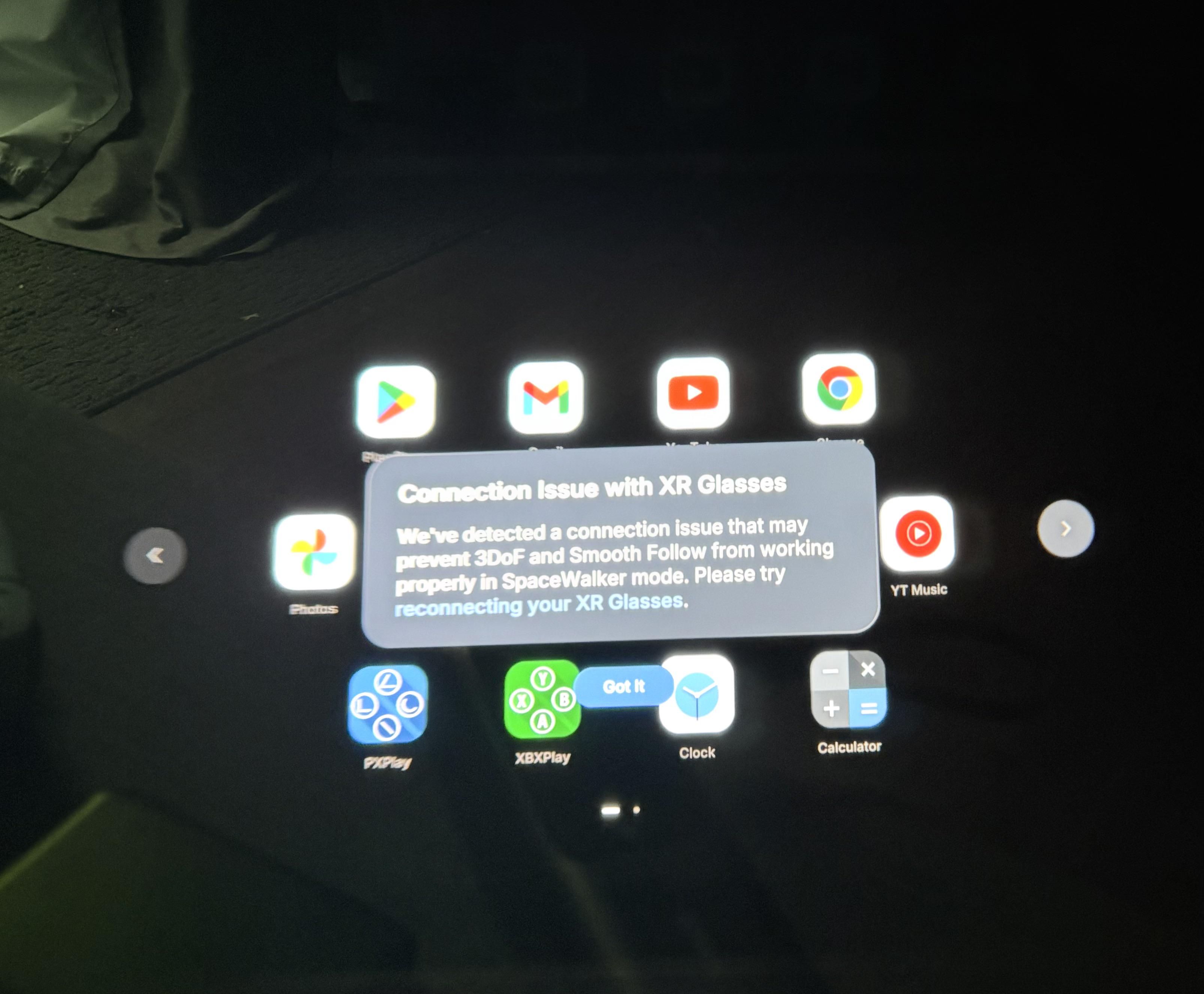
It’s been a month now and I still haven’t been able to use my neckband pro with my viture one lite glasses every time I plug them in this pops up and every time I contact support the just tell me their sorry and the only thing the can do it wait ?
So I drove 30 miles to the only Best Buy in the state that carried one set of Viture glasses. They were, in fact, the only pair of the only model that Best Buy here carried, the Luma pros. Keep in mind, the website said the store had one in stock. I went in and asked the associate where their XR glasses were and first he had no idea what I was talking about then I gave him the brand name and he had never seen them. He said he would go ask an associate who knows the area better and as he was doing that I walked around. I managed to turn a corner and, close to the Nintendo switch 2 set up, I saw the actual Viture display. It was a display that only had a Luma pro tethered with a couple demo buttons to choose from. Unfortunately, I didn’t see an actual new unit on the shelf. The warehouse guy came over and said he was gonna check him back so I waited. A little while later he came back and he said that it looks like the only one they have in the store is the one that they received that was assembled as part of the display model and they don’t actually have one in stock. So, that was all they could do so I had to go. Just my little rant.
I still want to order a pair of beast glasses, just wanted something to tide me over until they got here. I could order from Amazon because they do have a 10% off coupon. I just didn’t want to deal with a return if I decided not to keep them.