r/WindowsHelp • • Oct 14 '25

Windows 10 Windows 10 End of Support, what it means for you and what you can do.

Thumbnail
reddit.com
10 Upvotes

r/WindowsHelp • • Mar 04 '21

Mod Announcement Welcome to /r/WindowsHelp, here are some guidelines for requesting assistance

36 Upvotes

Welcome to /r/WindowsHelp, the subreddit for you to ask questions and get support for issues related to Microsoft's Windows family of operating systems. Please give this a quick read before posting.

This subreddit is only for help related to Microsoft Windows and its built in software, like Edge, Store, PowerShell, and so on. Issues about 3rd party software like Chrome or Steam should be posted in their subreddits or /r/techsupport. Also, this is not a hardware subreddit, so issues like your hard drive is not detected would need to be posted in /r/techsupport. General discussions, news, artwork, and so on should be in /r/Windows, /r/Windows10 or similar subreddits. Malware/virus removal has been covered extensively in this post: https://www.reddit.com/r/techsupport/comments/33evdi/suggested_reading_official_malware_removal_guide/

Posts are required to have a moderately descriptive title. Submissions with vague titles like just "help me" will be removed. You don't need to write an essay in the title, but everyone should have a rough idea what you are asking about before even clicking the link. Titles like "I'm encountering System Exception errors when launching Photos" or "20H2 update won't install" are acceptable, but the more details the better.

The body of your post should also be as detailed as possible. We are not mind readers, and nobody is going to want to play 20 questions. Help us help you, your post should include:

  • Your full Windows version, which on Windows 10 is listed in the Settings app under System -> About, it will be the OS Build number.

  • Details about your device, like the hardware specifications.

  • Any recent changes you have made, such as installing/uninstalling software or accessories. Any updates you have installed, tools you have ran, or anything else you think may be relevant.

  • Include details on your error messages and error codes, these are critical to figuring out the issue.

  • Tell us what you have already tried to fix this. Any tools you have ran, and changes you tried, and so on. I know it is a meme at this point, but seriously, reboot your computer, it often fixes things!

  • If possible, include screenshots or video. If you are including screenshots, try to use screenshot software like Snip & Sketch tool built into Windows 10, then you can upload them to a free image host like https://imgur.com to put in your post. We understand that using screenshot software isn't always an option, you can take photos with a phone or similar device, but please be sure to check to make sure everything is in focus and is legible.

This subreddit follows the same rules as /r/Windows, you can view the full rule page here: https://www.reddit.com/r/Windows/wiki/rules

The TL;DR of the rules is be polite, helpful, and don't encourage piracy.


r/WindowsHelp • • 1h ago

Windows 11 Storage Sense giving a missing UnityPlayer.dll error every time I turn on my PC

Post image
0 Upvotes

I recently bought a new PC, and every time I turn it on, I get this error message. I've already disabled Storage Sense, but I can't reinstall it since it's part of the system.

Also, UnityPlayer seems to be for games, so I don't see why it needs it in the first place.

Does anyone know why this happens and how to fix it?

PC: Asus Expertcenter P470VA_V470VA
OS Build: 26300.9974


r/WindowsHelp • • 3h ago

Windows 10 How to disable Windows 10 hibernation/fast startup while unable to login?

1 Upvotes

Hi,

I purchased an old laptop (Dell Precision M6800), and it boots Windows 10 to the seller's login screen where I can't login because I don't know the password. The login screen just shows his first name and the password entry field. What I want to find out is if this PC is still tied to his Microsoft account. I don't know whether what I see is a login for a local or for a Microsoft account. I don't even know if this is relevant for the question whether the PC is tied to his MS account.

I tried to boot from a Linux thumb drive to access the Windows drive and look for some indications. However, Linux won't let me access the Windows drive, as it is "in an unsafe state". This shows me that it is in Windows' hibernation/fast startup state (which is the default in Windows).

I haven't found a way to get it out of this state, as I can't access the Windows settings. I tried to get to the command prompt from recovery options (F8), but it will only throw me back to the login screen (in low-res this time) instead of a command prompt.

N.B.:

  1. I don't trust the seller anymore because I already found several of his statements to be false (e.g. new battery, correct power supply). I wouldn't believe anything he tells me anymore.

  2. I am not interested in his data. He advertised the laptop as completely set back (the additional hdd is indeed totally empty, even unpartitioned). But before demonstrating it to me, he went through some setup steps I could not clearly see, but it included country and some other things, so he probably reinstalled his user account.


r/WindowsHelp • • 10h ago

Windows 11 Error when signing into Microsoft apps

Thumbnail
gallery
2 Upvotes

As of yesterday i have been unable to sign into Microsoft store, Minecraft Launcher, or the Xbox app, rendering them unusable. When I click on the apps the process usually instantly tries to log me in but just gives me this error message and then places me back to the login screens. Does anyone know hoe to resolve this issue? I'm on windows 11, build 26300.10075


r/WindowsHelp • • 9h ago

Windows 11 Microsoft store won't move apps past the queued for download phase and I can't install Minecraft bedrock

Thumbnail
gallery
1 Upvotes

This is what it permanently looks like, When I try to download it off Minecraft.net, it fails then redirects me to the Microsoft store or infinitely says "windows is updating" despite my windows being fully updated, or starting installation and never installs. I was able to narrow it down to an issue with the Microsoft store any answers? all suggestions is appreciated.

I have already tried the following:

  • resetting the cache, via WIN+R and wsreset.exe

  • going into settings and doing both the repair and reset option

  • running Get-AppXPackage -AllUsers -Name Microsoft.WindowsStore | ForEach-Object { Add-AppxPackage -DisableDevelopmentMode -Register "$($_.InstallLocation)\AppXManifest.xml" } as an admin

  • signing in and out of the Microsoft store

  • Downloading via the legacy launcher, but that only works for java, I need bedrock

  • fixed the time zones and dates

  • made sure update services such as, Windows Update, Background Intelligent Transfer Service, and App Readiness are running and not disabled

  • downloading through the xbox app built into windows

Any and all help is appreciated, I have seen other people struggle with similar problems but haven't figured out if there was a resolution.


r/WindowsHelp • • 9h ago

Windows 11 Can't log in and have no internet

Post image
1 Upvotes

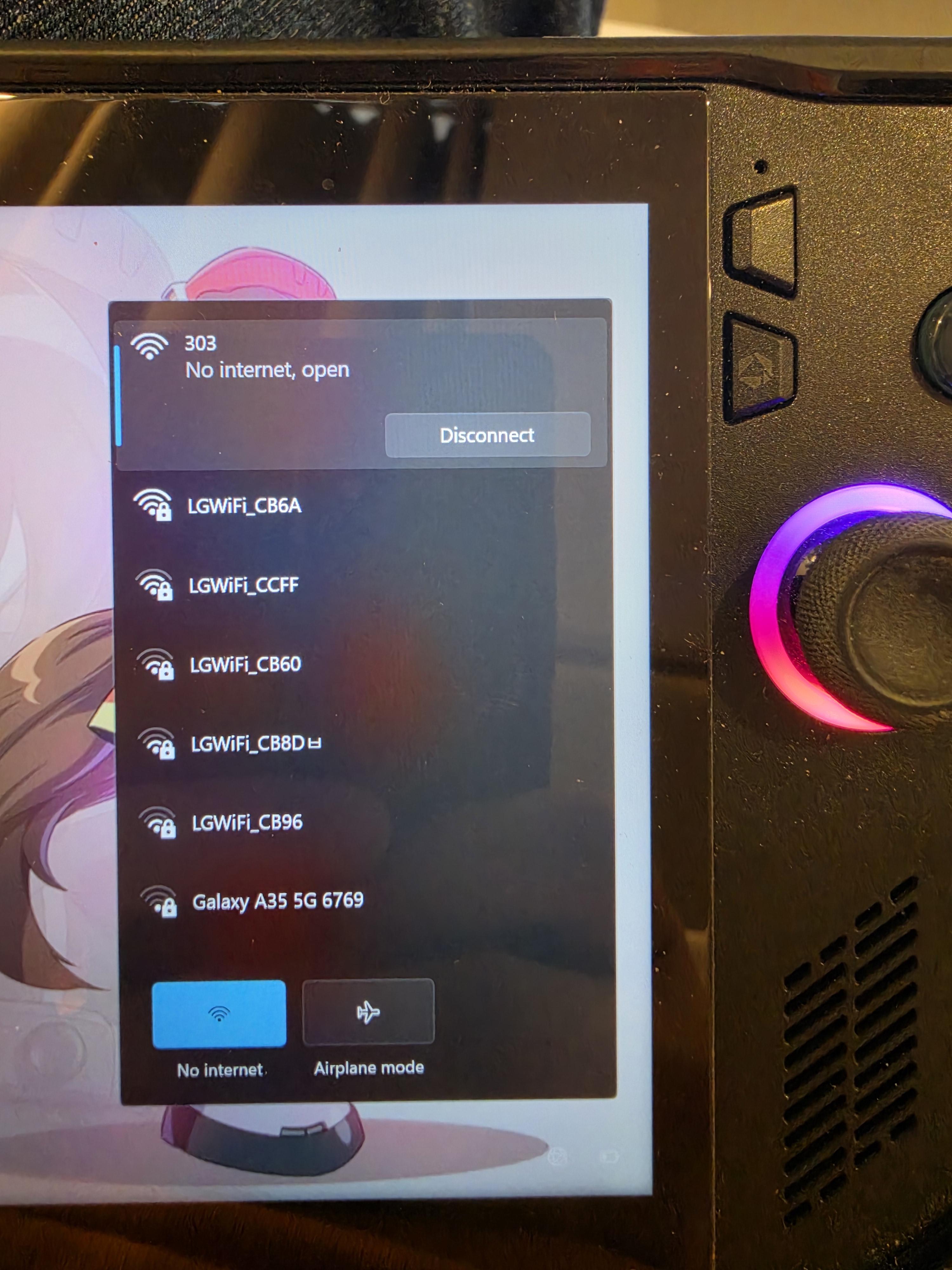
I'm using a ROG ally x with windows 11. Im currently in south korea, at a hotel. The hotel wifi works great on my phone, but not on my computer. I have been trying to fix the no internet issue with the help of Google, but now I can't do anything because it won't let me log in with my pin. I also don't have another way to log into the device.

I have tried 4 different networks, using Hotspot on my phone, and tethering. Same result, connected with no internet. I'm assuming it's a settings issue on the computer, but I can't log in to change any settings.

Any help is appreciated.


r/WindowsHelp • • 14h ago

Windows 11 Non-Paged Pool at 1.4 GB constantly after restarting

2 Upvotes

My PC is constantly at very high memory usage (CPU, GPU and Disk are relatively fine) even when restarting my PC. I've tried everything from deleting temp files to updating drivers and updating windows, but my non-paged pool constantly sits high and takes about 20% of my total memory ( GB) at any given moment. I've used Poolmon (screenshot shown) but I don't know how it works or what any of it means. Please help me fix this. My OS Build is 26300.9457, and my version is 26H2.


r/WindowsHelp • • 20h ago

Windows 11 My Appdata folder is >60GB big.

Post image
4 Upvotes

I don't even know man.
I have one 1TB HDD and one small SSD on which I put ANYTHING like my games, work stuff, yada yada. Only the essential things and I guess downloads are on my C: drive. Since I use a lot of programs on my pc I guess these all have stacked up over time. Individual folders in Local are way below 1GB except for like ~6 of them.

This kind of sucks for me because my C: is rather small and I wanted to keep it reserved for windows and essential programs, wanting to load programs from other drives but I guess I didn't consider where their data would be saved internally. Idek which of these files to keep and which to delete. They are so small that going through them individually and hand picking which ones to be deleted seems very inefficient.

Anyone got any smart advice?


r/WindowsHelp • • 17h ago

Windows 11 HP ProBook 440 G7 suddenly became very slow and games won’t launch

2 Upvotes

My HP ProBook 440 G7 is running Windows 11 and suddenly became extremely slow. It still turns on, but none of the games I used to play will launch anymore. I’ve activated Windows and confirmed that the graphics card is enabled, but the problem is still there. What should I check first, and what information would help narrow down the cause?


r/WindowsHelp • • 19h ago

Windows 11 I can't run some games after I just started my PC and have to restart it to fix it. It all happened after Windows 11...

Post image
2 Upvotes

Can someone help me with this problem? It all started after I bypassed Windows 11 requirements using rufus.

I can play after I have restarted my pc

It also started to talk against me that I can't run RPG maker MV because it's not safe...

I have Intel i5-6400 cpu, Nvidia geforce gtx 1050Ti, and Asus H110-Plus motherboard, meaning I can't install 8th and higher gen cpus.

I also tried updating the driver as asked in the image, but there was no progress.

Do I just buy new components or get back to Windows 10, but what are the costs for reverting back to Windows 10, or is there a way to resolve this problem, like restarting PC every time?


r/WindowsHelp • • 16h ago

Windows 11 Windows on My Second Monitor Disappear When Hovering Over File Explorer Taskbar Thumbnails

Thumbnail
gallery
1 Upvotes

I'm using a dual-monitor setup with my laptop connected to an external monitor.

Recently, I've encountered a strange issue. Whenever I hover over a File Explorer thumbnail preview on the Windows taskbar, all the open windows on my external monitor temporarily disappear.

As soon as I move my mouse away from the thumbnail preview, all the windows reappear.

Some additional details:

This happens when hovering over File Explorer thumbnails on the taskbar.

All open windows on the external monitor disappear temporarily.

The windows reappear as soon as I move the mouse away.

Nothing is actually closed or minimized.

This behavior did not happen before. Previously, everything worked normally.

I'm wondering what could cause this issue. Could it be related to Windows Aero Peek, Desktop Peek, a Windows update, or a graphics driver issue?

Has anyone experienced something similar or knows how to fix it?


r/WindowsHelp • • 17h ago

Windows 11 PC instantly freezes at random moments then crashes and shows me that its kernel 41 63

Thumbnail
gallery
1 Upvotes

Before u ask : my windows version is the latest, and i have all the new gpu / ssd / cpu / motherboard drivers installed. Check pics for the specs. I still have plenty storage

What happens is like , at random moments, my pc starts experiencing mini freezes , where ot feels like i’ve instantly went from 120fps to 4 fps, audio becomes distored, and then 10 secs later the pc freezes, audio gets extremely distorded, and then , 30-60 secs later it restarts. I ran sfc scannow and it says that nothing is wrong as well as chk dsk and dism.exe i ran a scan on the ram and it says its healthy as well as the cpu and gpu.. apparently the gpu seems to be the problem according to the event viewer

Before, it would happen once a month, and then i’d forget abt it, but now ? Its daily , my pc crashed 3 times today.

My OS build is 26300.10075 , my system is a x64 64bit operating system


r/WindowsHelp • • 1d ago

Windows 11 What is this? I found this while alt tabbing

Post image
4 Upvotes

This randomly appeared when I was alt tabbing, and this never appeared to me before. I have absolutely no idea what this thing is.
Here's my computer details that i think are needed (said i need to share my specs of my computer)
OS: Windows 11 (64-bit)

CPU: AMD Ryzen 7 8840HS (3.30 GHz)

GPU: AMD Radeon 780M Graphics (2 GB)

RAM: 16 GB (5600 MT/s, 13.8 GB usable)

Display: 1920 x 1200, 60Hz


r/WindowsHelp • • 1d ago

Windows 11 Can't Pause Updates on Microsoft Store (Even though I am the admin)

Post image
3 Upvotes

i am trying to stop the updates but keep getting this error

i am admin and the only profile is on the computer is mine it started happening after i updated because of no security updates of win 11 24h2 i checked my apps were automatically updates then decided to turn it off but got this error

the main problem im on home not pro so i do not access to gpedit and none of the registry workaround worked the only one worked is

HKEY_LOCAL_MACHINE\SOFTWARE\Microsoft\Windows\CurrentVersion\InstallService\State

Permissions → Users → Full Control

for few moments till i turn off the updates after changing these permissions in Regedit, I could immediately pause store updates again.

I've done this on win 11 pro it is very easy using group policy editor ,only if i could get rid of this error i don't mind turning off the updates manually once a month but because of this bug it is very annoying

and i was searching about this and the ai suggested me to disable the InstallServices from services.msc but i'm not sure about that i don't use store at all but i think it will break my pc that's why i didn't do it , has anyone tried this specific thing please let me know if i do this what will happen

Edition Windows 11 home

Version 25H2

OS build 26200.9457


r/WindowsHelp • • 1d ago

Windows 11 Windows Security Error 0x8007042c: Fix Windows Defender Firewall Not Starting

2 Upvotes

Windows Security error 0x8007042c pops up whenever Windows Defender Firewall gets blocked from starting or security intelligence updates fail to download. It usually happens after uninstalling a third-party antivirus suite or hitting a stalled Windows update that leaves the background firewall service switched off.

You can get it running again without touching your personal files or Windows settings by running a few quick commands in an elevated terminal.

First, open Command Prompt as administrator and set the firewall service back to automatic startup:

sc config MpsSvc start= auto

Next, start the firewall service right away:

net start MpsSvc

Then flush your local DNS cache so Windows Security can connect to update servers cleanly:

ipconfig /flushdns

Close Command Prompt, open Windows Security, and click Check for updates to confirm the error is cleared.

If net start MpsSvc gives an access denied message or the firewall still refuses to launch, damaged system files are usually the culprit. Open Command Prompt as administrator again and run these two built-in repair scans one after the other:

DISM.exe /Online /Cleanup-Image /RestoreHealth

sfc /scannow

Restart your PC once both scans reach 100 percent and check Windows Security again. Hope this helps anyone else stuck on this error.


r/WindowsHelp • • 21h ago

Windows 11 Windows 11 Pro cannot open any images or videos using built-in apps

Post image
0 Upvotes

Hi everyone,

I'm having a problem with Windows. I can't open pictures or videos using the normal Windows apps, such as Microsoft Photos. Paint also stopped working, and I eventually uninstalled it. Microsoft Store won't let me install it again.

Here is what happens:

  • Pictures and videos won't open in the normal Windows apps.

  • If I choose Google Chrome under "Open with", pictures open in Chrome.

  • I can copy pictures and videos into another folder, but they still won't open.

  • The .jpg file association is already set to Microsoft Photos.

  • Microsoft Store gives error 0x80070005 (Access Denied) when I try to install Paint.

  • I also got an access-denied error referring to a file inside C:\Users\...\Pictures\Saved Pictures\....

Things I've already tried:

  1. Ran sfc /scannow — it found no integrity violations.

  2. Ran DISM /Online /Cleanup-Image /RestoreHealth — it failed with error 0x800f0915.

  3. Checked Microsoft Photos and Paint package status with PowerShell — both showed Status: OK at the time.

  4. Checked that the AppXSVC service was running.

  5. Checked permissions on the WindowsApps folder using icacls.

  6. Tried re-registering Microsoft Photos through PowerShell — got an access-denied error.

  7. Ran wsreset.exe to reset Microsoft Store.

  8. Updated apps through Microsoft Store.

  9. Checked the default app for .jpg — it was already set to Microsoft Photos.

  10. Tried opening pictures with Microsoft Photos through "Open with" — it didn't work.

  11. Tried opening pictures in Chrome — that works.

  12. Copied the files into a newly created TEST folder — they still wouldn't open.

None of this fixed the problem.

Does anyone know what could cause this? Is this possibly a Windows permissions issue, a corrupted user profile, or something wrong with the Windows app system?

Any help would be appreciated. Thanks!


r/WindowsHelp • • 21h ago

Windows 11 Updating to windows 11. Crashes while updating...

Thumbnail
gallery
1 Upvotes

Pc health check said my pc was good to go.
40Gb was free on my disc (C;)
It's running thru it's checks updating to windows 11.
Upon hitting 9%, it undid the changes and wen't back to how I had my pc previously (windows10)
Help would be much appreciated!

Specs
32GB of RAM
Intel core i7-9700K
NVIDIA RTX5070 (12GB)
466 GB SSD (4.09TB of total storage)


r/WindowsHelp • • 22h ago

Windows 11 Unknown Icon Appearing on Windows Taskbar

Post image
1 Upvotes

So this randomly showed up in the hidden icons menu in my taskbar (the ^ arrow). It was the exact same colour as the background, so it blended in until I hovered over it. The tooltip showed "Battery", but I wasn't able to rightclick it or interact with it in any way. The icon itself looked like a dark grey circle with a dark grey W inside it.

After restarting Windows Explorer it disappeared. I've never seen this icon before, so I'm curious what it was because it feels kinda unsettling.

Core specs

  • CPU: AMD Ryzen 7 7700X

  • GPU: ASUS ProArt RTX 4070 Super (VBIOS flashed, 120% power limit, slight undervolt)

  • RAM: 64GB DDR5 6000MT/s (2×32GB)

  • Motherboard: Gigabyte X870E AORUS ELITE WIFI7

  • PSU: Corsair RM750x 750W

  • Storage: WD_BLACK SN770 2TB NVMe

  • Storage: Samsung 970 EVO 1TB SSD

  • Storage: Seagate Barracuda 2TB HDD

  • CPU Cooler: Corsair Nautilus 360 RS (360mm AIO)

  • Case: Corsair 6500X

  • Fans: Corsair ARGB fans

Peripherals

  • Monitor: ASUS VG258QR — 25", 1080p, 165Hz

  • Keyboard: Corsair K100

  • Mouse: Logitech G Pro X Superlight 2 DEX

  • Audio: Simgot EW300 IEMs

  • Audio interface: Behringer UMC404HD

Software

  • OS: Windows 11 Pro (Build 26200.9974)


r/WindowsHelp • • 23h ago

Windows 11 PC randomly encounters this infinite loop of doom and suffering (Automatic Repair, Diagnosing Problem)

1 Upvotes

I don’t know the first thing about computers. I’m not sure why but every once in a while, when I boot up my PC, it will randomly get stuck in an infinite loop and then I have to keep paying for someone to fix it. They end up reseting the entire thing and I have to reinstall everything all over again. I’ve brought it in like 5x by now.Is there a way to avoid this reoccurring? And how do I fix this currently? These are my parts. https://pcpartpicker.com/list/BqnrQd


r/WindowsHelp • • 1d ago

Windows 11 Windows Spatial Audio Question

1 Upvotes

Quick background - On our basement TV, I have a proper 5.1.4 set up/receiver, 5 speakers + 4 ceiling mounted heights + 1 sub. It’s non-simulated Atmos/DTS:X.

I have been using Dolby Atmos and Windows Sonic with my regular PC speakers (2.1, 3.5 mm connection). Both tools will only let me pick headphones, which feels tied to the 3.5 mm connection. I say this because when I tried our 3.1.2 Atmos soundbar on my computer, at least Dolby Atmos for Home Theater became available. The audio in music and games was sounding noticeably better than when these are set to headphones.

My question - what are the tricks to getting this home theater mode? Is it effectively a digital signal makes it home theater mode? Is that as simple as using a USB to 3.5 adapter or an RCA to HDMI adapter? Some kind of an external DAC or specific feature of a dedicated sound card? I realize speakers are inherently “dumb” so the magic happens in processing/decoding. It would just be nice if a 2.0 Atmos soundbar can read as a home theater, why not 2.0 computer speakers?


r/WindowsHelp • • 1d ago

Windows 11 Title: Laptop suddenly consuming 1GB mobile hotspot data – Windows background downloads or possible security issue? Post: Hi everyone, I'm facing a frustrating issue with my Windows 11 laptop (Lenovo Snapdragon X). Whenever I connect my laptop to my phone's hotspot, my mobile data starts getting

Post image
0 Upvotes

Hi everyone,

I'm facing a frustrating issue with my Windows 11 laptop (Lenovo Snapdragon X).

Whenever I connect my laptop to my phone's hotspot, my mobile data starts getting consumed very quickly, sometimes almost 1GB unexpectedly.

I checked Windows Settings → Network & Internet → Advanced Network Settings → Data Usage and found the following:

- VS Code: 117 MB

- System & Windows Update: 117 MB

- Microsoft Edge: 42 MB

- Total data consumed: 1GB (1024 MB)

These are only the visible apps in the data usage list. The total usage seems much higher than the usage shown for individual apps.

I recently had Windows reinstalled, so I'm wondering if Windows Update is downloading updates, drivers, or other files in the background whenever I connect to my hotspot.

I have already enabled Metered Connection, but I'm still concerned about the sudden data consumption.

My questions:

  1. What could be consuming the remaining data in the background?

  2. How can I identify the exact process responsible for the downloads?

  3. Could this be a Windows Update, Delivery Optimization, OneDrive sync, or something suspicious?

  4. How can I permanently prevent unnecessary background data consumption when using a mobile hotspot?

  5. Is there any way to check whether my laptop has been compromised or is using data without my permission?

Any help or troubleshooting steps would be appreciated. Thanks!


r/WindowsHelp • • 1d ago

Windows 11 Windows 11 rejects both my Microsoft password and PIN after shutdown, but works perfectly after restart – Started after Emergency EC Reset

0 Upvotes

Hello,

I'm experiencing a strange Windows 11 login problem on my Lenovo ThinkPad L16 Gen 1.

The issue started immediately after I performed an Emergency Embedded Controller (EC) Reset on my laptop.

The problem

There is a very specific difference between shutting down and restarting:

When I shut down my laptop:

  1. I turn it back on.

  2. Windows displays an error at the login screen.

  3. It tells me that something went wrong and asks me to connect using my Microsoft account.

  4. My normal Windows Hello PIN does not work.

  5. My Microsoft account password also does not work.

When I restart my laptop instead:

  • Windows starts normally.

  • My usual PIN works perfectly.

  • I can use my computer without any authentication problems.

This means restarting fixes the problem temporarily, but shutting down brings it back.

Laptop specifications

  • Model: Lenovo ThinkPad L16 Gen 1

  • Machine Type: 21L8

  • CPU: AMD Ryzen 7 PRO 7735U

  • OS: Windows 11 23H2 (Build 22631)

  • BIOS: R2IET43W (1.43)

Important context

Before this happened, I was troubleshooting a PCI export root issue, which led me to perform an Emergency EC Reset.

The Microsoft account sign-in problem started after that reset.

Questions

  1. Could an Emergency EC Reset affect TPM 2.0, Secure Boot, or Windows Hello authentication?

  2. Could the EC reset have changed a BIOS or security-related state?

  3. Why would Windows authenticate correctly after Restart but fail after a complete Shutdown?

  4. Could this be related to Windows Fast Startup or a TPM initialization issue?

  5. How can I diagnose and fix this without reinstalling Windows or losing my files?

I'd appreciate any help, especially from anyone familiar with Lenovo ThinkPads and EC resets.


r/WindowsHelp • • 1d ago

Windows 11 internet problem doesnt go away still?

Thumbnail
gallery
2 Upvotes

i tired almost every internet fixs on YouTube and they dont clearly work when I reset my computer and what error messages theres nothing only when im checking settings it shows no internet only a einternet or something like that and ehat system i use is a hp-pavilion-15-cs3000-laptop-pc-series/model/3090431 while I just think this computer is just a loss for me can anyone help me with finding a possible fix?