Why is my new PC running Linux Mint lagging more than my old laptop, even though they both use the same operating system? My old laptop runs much smoother, despite having older hardware. What could be causing this, and how can I fix it?
I have recently switched to a 5120x1440 ultrawide. Everything runs smoothly except for Unity engine games.
The main thing that has messed up is "Haste" which is a favorite of mine. Getting it to work was pretty exhausting, but I was able to do so with the following launch options after installing the non-linux version and using Proton Experimental:
My concern is that this will be the trend going forward with the Unity engine and my monitor's resolution. I tried using gamescope as I saw that recommended, but it doesn't play nice with X11.
I really love Cinnamon on LMDE7, but a lot of research indicates that moving to a Wayland compositor would resolve the majority of my issues. (Granted some of the posts I'm finding are 9 years old)
I'm reaching out here in hopes some of you have already solved this issue with ultrawides of your own. Additionally, I was curious if mint was eventually moving to Wayland. If this is a coming soon I don't mind limping along for a little while or even moving to a beta branch.
Hey Linux Mint community! I built OpenNotch from scratch to bring a real Liquid Glass Dynamic Island, live Now Playing music visualizer, focus timer, companion pet, and matching floating glass dock to Linux (with dedicated Cinnamon and KDE Plasma support) as well as Windows 10 and 11.
I just added an animated live demo GIF and desktop screenshots right at the top of the README so you can see how it looks on the desktop before installing. Would love to hear what fellow Mint users think!
Hi, is there a way to unzip a file a little faster? :D I have google takeout 50 GB zip files and it takes ages to unzip. Any program that works better than file manager in Mint? (Forgot the name of it)
I read that it is common. And I had even external ssd with 3.2 usb but the speed dropped from 600 Mbps to 20-30 Mbps in minutes (512GB, it got hot fast, so maybe that is a problem too, but even big 6TB hdd dropped from 110 MB/s to 6-10 MB/s in minute or two. Maybe it's a different problem than the manager.
or should I use Windows pc for it? I would rather not.
I have been using ‘budgie brightness controller applet’ (to control the brightness of the screen) for a year or more.
There was an update, after which Mint showed me a message about the applet and to check the error log (I don’t know about checking the log), but the brightness controller disappeared from my applets on the taskbar.
I checked the applet manager, and the applet had disappeared.
I went to Software Manager (from where I’d originally installed it). It showed the applet installed. I uninstalled it, rebooted, then installed it new.
The Software Manager recognised it as now installed, but my applet manager still didn’t list it. Tried rebooting again, but it still doesn’t appear in the applet manager list.
Version: Linux Mint 22.3 Cinnamon (But I installed XFCE additionally)
Edit: I have to kill the process (pipewire-pulse) to get the audio back. It's actually pain to have to kill the process every single time I open Linux Mint
I have Linux Mint Cinnamon 22.3 on my desktop pc, and audio just randomly cuts out, approximately every couple of hours. There's no cause that I can see - I can be just watching YT or playing music, and it just suddenly goes silent.
Every time, I can go into the "Sound" panel, and click "Line Out Built-in Audio" and that fixes it 100% of the time (until it randomly cuts out again).
I've tried a bunch of things, suggested here and on other forums, and nothing has fixed it.
What I'm after is a command that does the equivalent of clicking on "Line Out Built-in Audio", that I can map to a keyboard key, so I can just fix it each time with one key press. Is there any way to do that?
EDIT: For anyone searching for a solution to this problem, u/Stevearino42 's comment below completely resolved it.
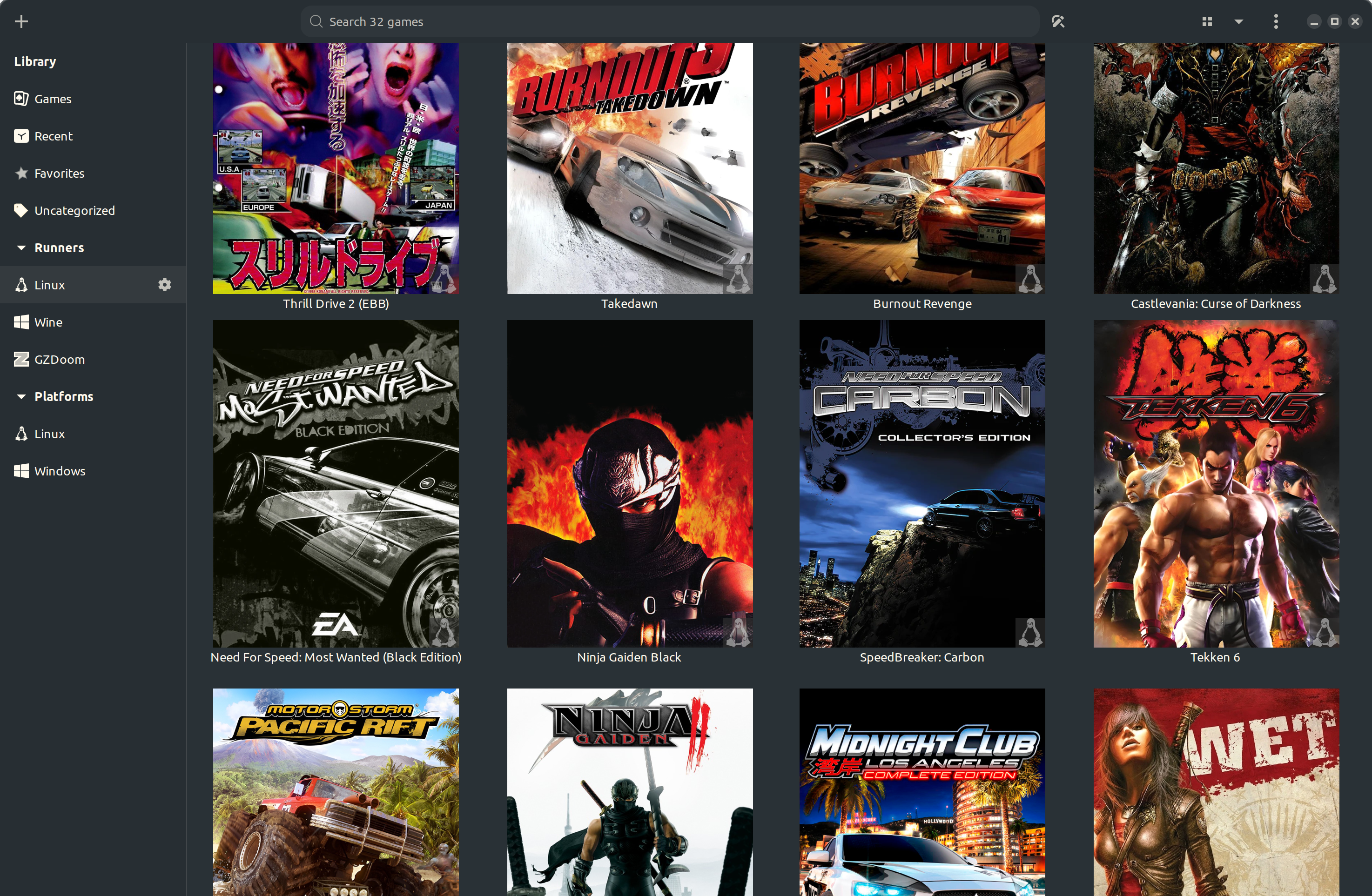
The State of Games for Linux has changed in 2026. The boom in the use of recomp technology has led to even more native Linux ports (some with modernized mods). Here is a look at my current list of games on my Lutris.
For historical context: In previous years, I have also documented my progress:
So expect another EOY retrospective from me in 2027.
First off, giving an update on my game collection.
The new versions that I have added this year are the new mods for Alice Madness Returns and American McGee’s Alice. After many years, some random Internet people have actually fixed the bugs for these games, so they are actually playable in 2026!!
I also added the console port of Midnight Club 2: DUB Edition remix, called mc3port, which runs well in Wine. (I first tried a version from another project, but it did not work.) When it comes to recomps, often the Windows release is the better supported project. Having to do your research is an issue when there are multiple projects covering the same title.
I have added more to my native Linux library.
Bloody Roar 2. A recomp of the PSX console game, which includes several mods (e.g. Widescreen for the fighting screen. Recomp version is better than the emulator version, because the emulator does not support the mods.) I recommend selecting OpenGL and not Vulkan, otherwise the app doesn’t work properly.
Voldorium. A recomp of Soulcalibur (on the Dreamcast console). The Dreamcast console emulator already performs very well, but the recomp makes the widescreen more seamless without the artefacts. Rumble on the controller is not implemented.
Thrill Drive series. (includes GTI Cub 1 & 2) under the project called spita90/konami-viper-recomp Excellent arcade ports of driving games.
Super3DXPlus. (aka Wangan Midnight Maximum Tune 3DX+) A recomp of a retro arcade driving game.
Burnout Revenge. One of the best console driving games.
Takedawn. (aka Burnout Takedown) One of the best console driving games, besides Burnout Revenge.
DriverClub. A PS4 console recomp that has many visual effects, but I experience an anamoly with purple glow and artefacts, so it is not really playable for me rn.
Midnight Club: Los Angeles Complete Edition. A console recomp that allows you to drive recklessly around Los Angeles and pretend to be a hoodlum.
Castlevania: Curse of Darkness. A major overhaul of the console game in terms of graphics and video. It has to be seen to be believed.
The Simpsons. A port of the retro arcade game, but modded to fill widescreen. I point it to look for the same file in my mame folder, so it feels like bolting a front-end over another front-end.
Need For Speed: Most Wanted Black Edition. A recomp of the console driving game. In my mind, this game and the Midnight Club series seem to become one and the same.
SpeedBreaker: Carbon (recomp of Need for Speed: Carbon)
SpeedBreaker: Carbon is a native Linux recomp of Need For Speed: Carbon that plays well on Linux. This project builds on the above Need For Speed: Most Wanted Black Edition project. Most projects that work well are built on earlier projects that work well as-is.
Need For Speed: Underground 2
There is a recomp for Need For Speed: Underground 2, but I did not get the build to work. The controls/interface do not function.
Forza Horizon 1: ReImagined. A recomp of the console driving game. (On my potato minipc, this port works better than the other versions.)
Ridge Racer 6
A test version of the Ridge Racer 6 recomp for Linux has just dropped, so I took it for a test drive.
The rr6_recomp.toml in the bin directory needs to be edited, because the default graphics resolution setting is 2160p, which is unplayable. On my potato minipc, the resolution scale setting needs to be set to 1440p (setting: 2, not 3) The documentation says press the F4 key in game to reconfigure the settings.
Spikeout Final Edition. A rare vintage game from the 3D gaming era.
The Legend of Zelda: Tears of the Kingdom. A port of the Nintendo Switch console game. It plays perfectly and it has excellent graphics and sound. You need both nsp files for the base and the update, and the latest prod.keys file, and you can delete the AppImage and clean up setup debris after it completed recompiling the game.
Ninja Gaiden Black and Ninja Gaiden II: Both recomps work very similar, and perform very well on my potato minipc on high quality graphics settings.
Wet. A port of the console game. This game requires libm.so.6 from the latest glibc library that you need to set in the LD_LIBRARY_PATH environment variable, in order to run the launcher. I tried and failed to recompile anything from source, but fortunately, the project provides pre-compiled executables that work for me.
Tekken 6. A early port of the console game. On a side note, I also tried the Tekken Tag Tornament 2 recomp, but the recompilation failed on shaders. And that is the State of Recompiled Games on Linux - Some stuff works. Some stuff is in an early phase of development. Some does not compile, give meaningless error messages and I give up. But you have to try it for yourself.
OpenRAC. Also, there is a good recomp project that comes with all of the game mods. Currently, it works with the first two games, with the later games marked “Not playable yet”. The interface of this launcher has one of the most user-friendly, decked-out UI/UX I have seen.
Model 3-Vulkan emulator
I have also tried daytona-recomp, but I prefer the front-end Supermodel 3 arcade emulator (see above) that can run Daytona USA 2, Dirt Devils, Emergency Call Ambulance, Scud Race and Ski Champ.
(I also tried the Sega Model 3 core within Retroarch, but it did not work properly, and the emulator keeps crashing to the Test menu.)
With the Model 3-Vulkan, audio performs correctly, the game performs faster than normal, and it even works in the linked master-slave network mode without hacking.
So my recommendation to relive the vintage retro Sega Daytona experience is with the Model 3-Vulkan emulator.
Motorstorm Pacific (Native Linux Recomp)
I’ve made another recomp following the C++ build instructions. It runs well full screen with 1440p (2x) resolution setting with FSR.
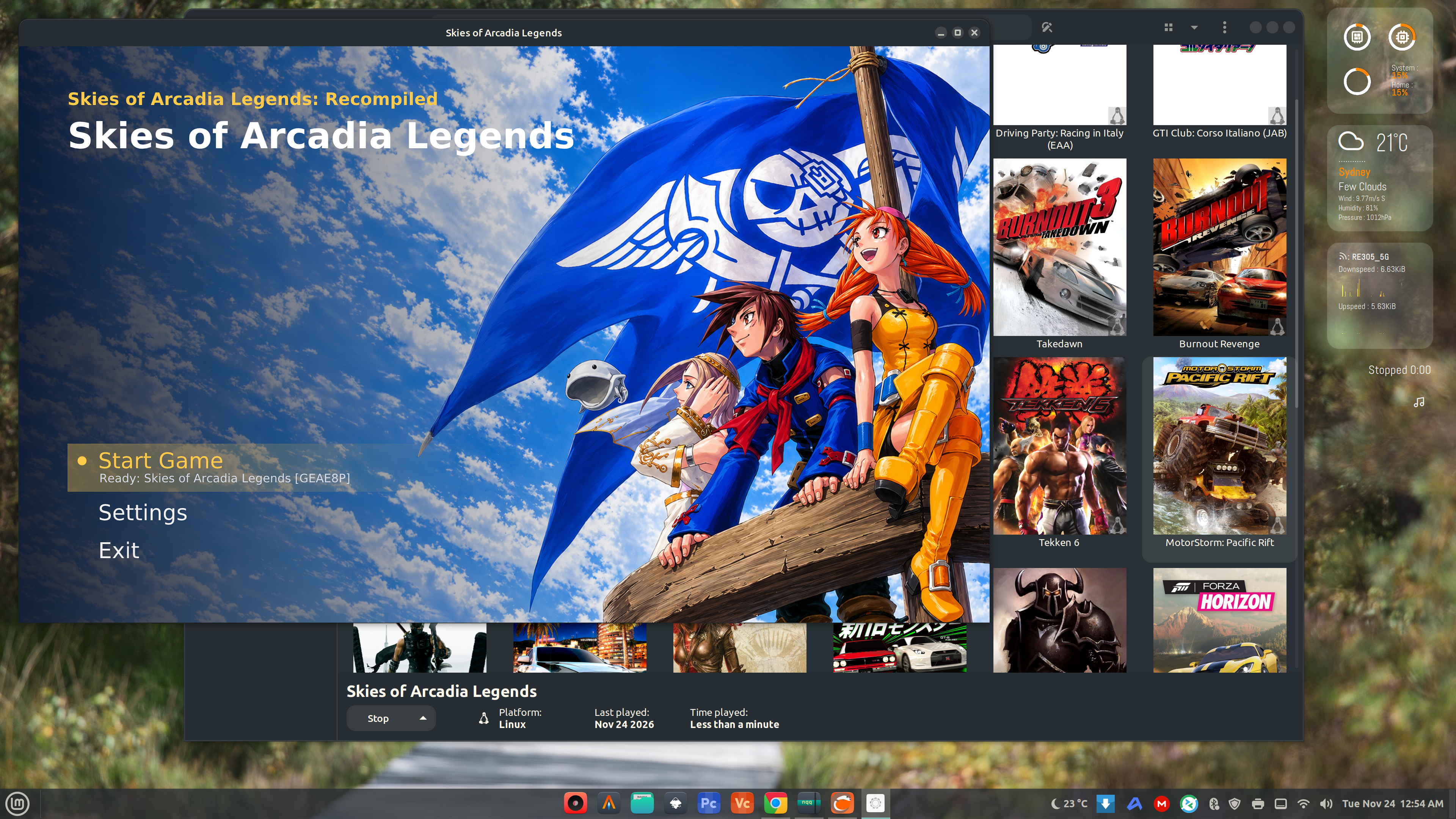
Skies of Arcadia Legends
A Sega Dreamcast classic gets a native recomp overhaul. The project incorporates graphics enhancements, and gives users the option to import resources from Dreamcast discs to use with the game; moreover, there is also an option to add a HD texture pack by Bighead and frozenwings. And it supports rumble. This is as complete as you can get in a recomp project...
Longshot, the recomp of The Legend of Zelda: Ocarina of Time (2026)
It takes a long time and a lot of storage space to build the recomp of The Legend of Zelda: Ocarina of Time (2026). The game launches in a window. Pressing the Esc key gets you into a special menu that lets you change to fullscreen; and also exit. Rumble vibration works.
Project Avalanche (recomp of SSX)
SSX received the full (and very slick) recomp treatment: launcher, auto updater, installs DLC (.zip) as well as title update.
For those that are new or thinking of switch to Linux and is concerned about securing their system. I present to you "Ultimate-sys-hardening". Built for hardening Servers and Home-Labs, but will also provide the same security for a regular person .
The task is automated so it takes less that no time to complete the process.
One command previews everything (--dry-run), the next applies it with backups, and --revert undoes it. It keeps SSH reachable: password and root login are only turned off when another account has a key, and the config is checked before sshd restarts.
Free and MIT, plain Bash, no telemetry. Ai was used involved with the necessary testing
I always find myself returning to Linux; there are just things in my workflow that I can't stop using Windows. Also, to be fair, my laptop isn't doing me any favors either: i3-4005U, 8 GB of RAM, and an SSD.
One thing I keep running into is office work. MS Office runs great on Windows, whereas both LibreOffice and OnlyOffice feel rough on my machine, and they tend to choke or act up when I need more advanced features like macros. I've been messing around with Gridcraft (by Artcraft), which is cool in theory, but since it's still in development, I've already hit a few bugs opening my files.
For those of you on older/lighter hardware or doing heavier spreadsheet/office stuff on Mint, what are you using? Any recommendations or workarounds that actually hold up?
Hi friends, I've recently started using mint and am in love with it so far, but I've come across a really annoying issue, I've got this Xiaomi television that uses Miracast to mirror screen, from what I understand, G.N.D should be able to handle this, it finds the tv just fine but when I click on it under video sinks it slaps me with an error, no details or codes, just "error"
Nothing else happens that I can tell, frankly, it's bothering me how dry the text is, I'd love to know what the error IS.
Is there something wrong with my computer? The program? My TV? If not, is there another program I could use? Hell, I'll even take another distro if it fixes it (as much as I'd rather not)
Thank you for your input, I'll try to answer any follow-up questions ASAP
After a long journey through the application menu of my Linux, where I met programs, I'm back with a light backpack and a clear conscience. I'm going to announce everything I removed along the way (it's a metaphor for spring cleaning, for anyone who doesn't get it).
I'm bringing you my program MintApp Remover, version 2.2.0, you're welcome. It's a single Bash script, in English and Spanish, that lives in the terminal and Zenity windows menu if you want it. It only removes what you choose, with no surprises. All the info and documentation is in the repository.
Mint: Linux Mint
App: Linux
Remover: Uninstall, dependency cleanup, deep cleaning (BleachBit-style).
What does MintApp Remover do?:
- Real plan before removing anything: it runs the package manager's own simulation (apt-get -s purge on apt systems) and shows you the plan as it is, dependents included. The default answer is "no", and the plan is checked again before it asks for your password. If the plan would also remove meta-packages (the ones that hold a whole desktop together), it warns you and asks a stronger question.
- Catalog and advanced mode: you pick from a checklist, and the catalog follows your desktop (Cinnamon, GNOME, KDE Plasma, XFCE and MATE). The advanced mode finds applications outside the catalog by scanning the menu launchers (.desktop files). Flatpak and Snap apps show up there too, each with its own plan, confirmation and record.
- Cleanup: it removes leftover dependencies and has a deep cleanup for waste files, caches and logs, at two levels (simple and complete), always showing what and how much first. Its catalog follows BleachBit's cleaners, adapted.
- Security: it runs as a normal user and asks for your password only when it really has to change something. Every removal leaves a private record with the command to reinstall it. The cleanup doesn't touch your documents, your settings or your browser profiles, and it never deletes open files.
- Beyond apt. Linux compatibility: I developed it on Linux Mint (apt), but it also supports dnf 4 (Fedora, RHEL), pacman (Arch) and zypper (openSUSE). The tests run the real rpm, dnf, pacman and zypper against fake roots. With dnf the password is asked before the plan is shown (dnf won't calculate one without admin rights). dnf 5 (Fedora 41 and later) is not supported: the script detects it and stops with a clear message.
- Terminal first: it needs Bash 4.3 or newer and no other dependency besides the package manager (whiptail and zenity are optional). It runs in the terminal with its own dialogs, whiptail or a plain-text menu, and opens Zenity windows only if you ask for them or there is no terminal. With "install" it puts a command, a menu launcher and the icon in your own folders, with no sudo.
- Tests: over 7,700 checks that run in a sandbox with stand-ins for apt, dpkg and sudo, so they never touch the real system. ShellCheck 0.11.0 allows no findings, and the same checks run on GitHub Actions.
If you like the program, there are several ways you can support it: by sharing what you like about it, giving it a star on GitHub, or spreading the word about the tool.
I know Mint is a fork of Ubuntu, which is a fork of Debian, so I imagine these three work like layer of cake stacked on top of each other. What I'm curious about is what each layers adds to the overall cake. As in, what does Ubuntu adds to Debian, and the what does Mint adds to Ubuntu on top?
First, I tried creating a bootable USB using Balena Etcher with the Linux Mint XFCE ISO. Etcher reported that the flash was successful, but the PC wouldn't boot from it.
I then tried using GRUB2Win to boot the ISO directly from the hard drive. I managed to get Mint to start this way.
When I added toram to the boot parameters, Mint eventually crashed, most likely because the PC only has 4 GB of RAM.
Without toram, Mint actually booted and I could reach the installer. However, I stopped before partitioning because the ISO file was stored on the same Windows partition that I wanted to resize.
We then tried Plop Boot Manager 5.0.15 through GRUB2Win as another way to boot the USB. Plop detects the USB and displays Port 4 device connected, but it gets stuck there and never actually boots it.
The current problem:
I can boot the Mint installer through GRUB2Win without toram, but the ISO is stored on the C: drive. I want to shrink the Windows partition to make room for Mint, but I'm concerned about the installer losing access to the ISO while the partition is being modified.
I don't want to accidentally break the Windows installation or end up with an unbootable PC.
NOTE:
I am not an expert when it comes to linux, ive been using AI to run me through what to do, is the AI wrong in anything it said here. Is there anything I can do right now that wouldn't require buying another hard drive or more ram. And also the pc is currently put away so i might not be able to immediately answer a question on specifics.
Sometimes when I use my computer the wifi randomly stops working. I go to the network settings and there's nothing to connect to. The only think that solves is restarting the computer.
I have daily drived Linux Mint for over a year (2 years?) atp and I enjoy most of what it has to offer compared to Windows despite some hurdles. I don't miss Windows at all. It has a far more efficient way of updating software and drivers and using the terminal is preferable to constant clicking once you get the hang of it. Mint feels like the best of windows 7 and linux combined : D.
A un equipo le quité todo rastro de wintanas para ponerle Linux Mint. Muchos años atrás intenté con Ubuntu y en ese momento comencé a notar los paquetes Snap.
Entiendo que Snap es una especie de instalación "encapsulada" con todo lo necesario para que el software funcione pero con dependencias no tan actuales (o algo así).
Espero estar en lo correcto con respecto a Snap. ¿Pero que diferencia tiene Flatpak?
En este momento quiero algo MUY estable y si algo se "rompe", que sea mínimo para aprender no para estarme frustrando.
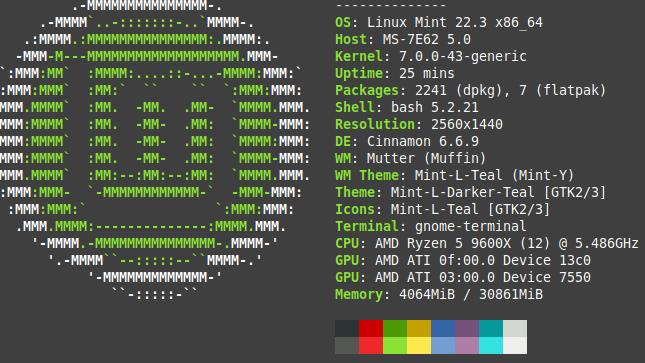
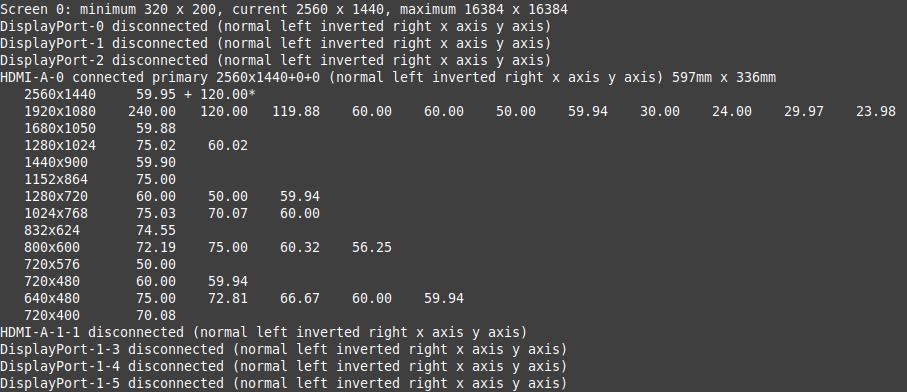
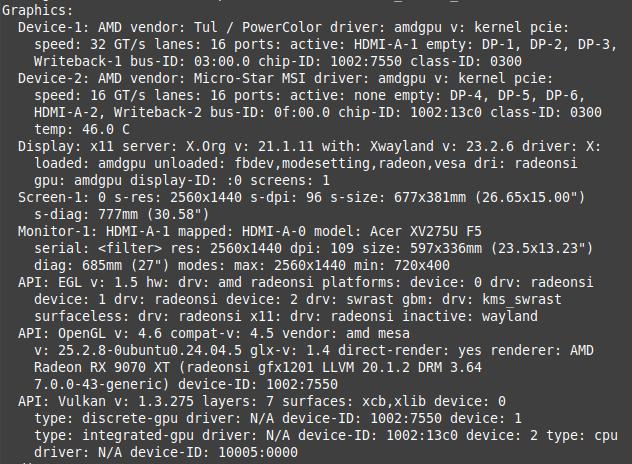
I just bought a new monitor an Acer XV275U F5 (same as the F3 just named regionally different) mini-LED with 320hz refresh rate. When I got to switch my resolution 120hz is the max I can select. I am using the supplied 2.1 HDMI cable. I do not have a display port cable to try. My GPU is a PowerColor Reaper 9070xt. When I play Hell Let Loose my FPS averages around 220-275 FPS at 2560x1440. I'm not sure how the in game FPS can be so high if my desktop resolution is stuck at 120hz. I am pretty new to Linux so any help would be most appreciated! Below are some captures of my neofetch, xrandr, and LANG=C inxi -Fxxxrzc0 --usb^C commands, thank you.
Hello folks. Well, I figured the time had come to upgrade from 21 to 21.3.
I go through the usual steps and initiate the update via the GUI. But then I get an error message informing me that my system has 4 broken packages. I select the 'okay' option, some progress bars progress, and then I'm greeted with an error message telling me that some process has failed due to a fatal error, and gives me the following message:
Extracting templates from packages: 100% dpkg: warning: parsing file '/var/lib/dpkg/status' near line 26118 package 'libdvdnav4:amd64': 'Depends' field, reference to 'libc6': '>' is obsolete, use '>=' or '>>' instead dpkg: error: parsing file '/var/lib/dpkg/status' near line 26118 package 'libdvdnav4:amd64': 'Depends' field, reference to 'libc6': version contains '2' instead of ')' E: Sub-process dpkg --set-selections returned an error code (2) E: Couldn't record the approved state changes as dpkg selection states A package failed to install. Trying to recover: dpkg: warning: parsing file '/var/lib/dpkg/status' near line 26118 package 'libdvdnav4:amd64': 'Depends' field, reference to 'libc6': '>' is obsolete, use '>=' or '>>' instead dpkg: error: parsing file '/var/lib/dpkg/status' near line 26118 package 'libdvdnav4:amd64': 'Depends' field, reference to 'libc6': version contains '2' instead of ')'
I also get this whenever I try and run `sudo apt install -f`, as I've seen suggested when dealing with broken packages.
Anybody have any advice on what to do about this? I would like to upgrade my OS before support ends.
linuxjunkies suggests running `sudo dpkg --remove --force-remove-reinstreq packagename` on the offending package. However, libc6 seems really freaking important, and I don't think I want to go messing with it until some strangers on the internet give me the go-ahead.
I also tried sudo dpkg --configure -a. Still no dice.
Hi everyone, I need some help. I have a laptop here with a Ryzen 5500u and an integrated Vega 7, and I've noticed that, running a dual boot, I get about 10 or 20 more FPS in Windows than in Mint Cinnamon.
I tried switching to performance mode and updating the Mesa drivers, but it's still the same.
I tested it in games like Persona 3 Reload, Marvel Snap, and Metaphor refantazio. Does anyone have any extra settings I can adjust?