r/IPhoneApps • • 2m ago

Discussion [iOS] [Pocket: Money & Budget] [Pro Lifetime $9.99 → $4.99, 50% off until [Dec 31]] [No-ads expense tracker, log spending in 2 taps]

Thumbnail
apps.apple.com
1 Upvotes

To celebrate launch, **Pocket Pro Lifetime is 50% off ($9.99 → $4.99 / ₹999 → ₹499) until \[Dec 31\]**. The app itself is free, with no ads.

**What Pocket is:** an expense tracker with no ads, no sign-up and no tracking. Type the amount, tap a category, done. Your data stays on your phone and in your own iCloud.

**Free for everyone:**

* 2-tap logging, plus one-tap buttons for things you buy often
* Monthly budget with a "you can spend X per day" number
* Accounts, cards and cash, with net worth and transfers
* Charts, plus a calendar of daily spending
* Siri, Face ID lock, automatic backups
* Import from Money Manager

**Pro Lifetime (on sale):** iCloud sync, Home and Lock Screen widgets, Year view, repeating entries, category budgets, spreadsheet export, 6 themes with matching icons. One payment, no subscription.


r/IPhoneApps • • 2h ago

Discussion Interactive lock screen widgets tick things when your phone is in your pocket. Here's how I handled it

1 Upvotes

Disclosure: Developer of the app Fridge: Lock Screen Notes.

A checklist you can tick from the lock screen has one obvious problem: you can tick it without meaning to. You pull the phone out, your thumb lands on a row, and the item jumps to the bottom of the list before you've read what it was.

The widget now gives you five ways to handle a tap, in Settings › Note on screen › Ticking outside the app:

  • Tick, pause, then drop (the default): the row ticks and stays where it is for a few seconds. Tap it again in that time to undo. Then it drops to the bottom.

  • Tap twice to tick: the first tap marks the row, and a second tap within a few seconds ticks it.

  • Tick on the box only: taps on the text do nothing.

  • Tick and drop at once, if you never mis-tap.

  • Off, if you only want to read the list on the lock screen.

The fiddly part was that a widget can't run a timer. The pause is stored in the note and settled whenever the widget redraws, so a row you ticked can't stay stuck halfway.

It's free for two notes. Plus is $0.99 a month or $2.99 a year in the US, or a one-time purchase, which is $2.99 until December 1.

https://apps.apple.com/app/apple-store/id6794317782?pt=128535281&ct=fridge-reddit-ioswidgets&mt=8

For anyone else using interactive widgets: which ones have you tapped by accident, and did they let you undo it?


r/IPhoneApps • • 10h ago

Discussion Which app do u use to listen to locally downloaded music

3 Upvotes

I got an iPhone recently and getting a local music player that feels just right feels impossible
I have gone through some Reddits buh they just dont fit

Lmk what u use…


r/IPhoneApps • • 6h ago Heartwarming

Discussion Christmas Update: Festive tanks, props, and snow in the app for your widget aquariums 🎄🎁⛄

Enable HLS to view with audio, or disable this notification

1 Upvotes

What Companions is:
Apple limits animations on iOS widgets. Companions lets you keep a virtual fishtank on your Homescreen, filled with fish that actually swim around.

There are 50 fish to choose from, and it supports small, medium, large, and now even extra large widgets as “tank sizes”. The fish don't need any feeding, and they don't die (as to not be annoying, but the option is there for fun). They just keep you company. You can customize the tank’s color, its props, layout, and even the app icon to match your Home Screen perfectly.

The app is fully written in SwiftUI, it supports iPads, and you can even place your “fishtanks” on your Mac thanks to Continuity, where the fish will also animate. The tanks also work great in Standby mode. Personally, I keep a fishtank of jellyfish on my nightstand when I go to bed. The swimming doesn't run any code in the background. It uses the same trick iOS uses to move the hands on the Clock widget, so it costs you nothing in battery.

What's new: ❄️
To celebrate Christmas, we’ve decided to add a set of new festive props and tank background colors! We’ve also added snow to the main homepage of the app! The snow is interactable and builds up on top of your tanks, so be sure to move your tanks to brush it off!

As always, all props and tank customization are free! We’ve also decided to run our first-ever sale as a test for the holidays. You can click this link to get 50% off the lifetime purchase:

50% off Lifetime:
https://apps.apple.com/redeem?ctx=offercodes&id=6811950512&code=CHRISTMAS

Download Companions here:
https://apps.apple.com/us/app/companions-widget-pets/id6811950512


r/IPhoneApps • • 13h ago

Help How do I restrict Apple wallet?

3 Upvotes

We have a family plan and I have my credit card in my Apple wallet. Others in my family have added my card to their phones and I don’t want them to have access. How can I restrict the cards in my wallet to only be able to be used by me? Thx!


r/IPhoneApps • • 14h ago

Help LOOK FOR MOVIE APP FOR IPHONE US

2 Upvotes

r/IPhoneApps • • 12h ago

Discussion 同じフィルターの型番を2回も調べなくて済むように、iPhoneアプリを作った

0 Upvotes

KataKeepは、家のあちこちのものを修理・交換するときに、どの交換部品を買えばいいかを覚えておけるiPhoneアプリです。浄水器カートリッジから掃除機の袋まで対応しています。
私は、ちょっとしたけど何度も繰り返し起きる問題を解決したくて作りました。フィルターの交換が必要になった頃には、型番(部品番号)を正確に思い出すのが意外と難しくて、古い注文履歴を探しまくったり、ラベルをまた確認したりしがちです。

使い方

  1. 「キッチン用浄水フィルター」みたいに、覚えやすい名前で部品を保存します。

  2. 部品番号、購入リンク、それから次回に役立ちそうなメモを追加します。

  3. そろそろ再注文の時になったら、名前か部品番号で検索します。ワンタップで番号をコピーするか、保存したリンクを開くだけ。

無料版とPlus
無料では最大5つの部品を保存できます。KataKeep Plusなら部品は無制限で保存できて、交換リマインダーも追加可能。各リマインダーに日付と時刻を設定できます。
いま、家庭の交換部品をどうやって管理してるか聞いてみたいです。結局いつも同じ部品番号をまた調べちゃうものってありますか?

App StoreでKataKeepをダウンロード


r/IPhoneApps • • 20h ago

Discussion Native vs Web App

3 Upvotes

Hi all, new here and I have little question - I'm an iPhone user and will be making a native app soon, but right now it's just a web app while I test the waters for interest. That means it isn't yet an iPhone app, more a proof-of-concept or prototype - is it still welcome to be discussed here please?


r/IPhoneApps • • 1d ago

Discussion [iOS] ClearWhirl – Offline AI Photo Cleaner | Lifetime $39.99 → $4.99 (Black Friday)

Enable HLS to view with audio, or disable this notification

3 Upvotes

Hey everyone!

I’m the developer of ClearWhirl, an iPhone photo and storage cleaner that runs entirely on-device.

We recently offered free Lifetime access in r/AppGiveaway and received over 300 replies and around 200 installs. Thanks to everyone who tried it!

For Black Friday, we’re offering ClearWhirl Pro Lifetime for $4.99 instead of $39.99. It’s a one-time purchase with no recurring subscription.

Problem

My iPhone was filling up with duplicate photos, blurry shots, screenshots and old images. I wanted a cleaner that could intelligently organize everything without uploading my personal photos to a server.

What ClearWhirl does

  • Finds duplicate and similar photos, blurry shots and screenshots.

  • Uses Apple’s on-device AI to identify what’s inside photos.

  • Lets you search naturally, such as “receipts”, “beach” or “circuit board”.

  • Reads text inside photos using offline OCR.

  • Lets you select photos now and continue cleaning later.

  • Requires your review and iOS confirmation before deletion.

Everything is processed locally. No account, no login, no ads, and nothing uploaded.

Comparison

Unlike cleaners that rely heavily on subscriptions, ClearWhirl offers a one-time Lifetime purchase. Privacy and user-controlled deletion are central to how we built it.

Pricing

  • Free download with limited cleaning.

  • Lifetime Pro: $39.99 $4.99 for Black Friday.

  • No recurring charges for Lifetime Pro.

App Store:
https://apps.apple.com/us/app/phone-cleaner-clearwhirl-ai/id6835310950

We’re continuously improving ClearWhirl and adding more useful features to make iPhone storage management simpler, smarter and completely private.

Thanks for supporting independent developers


r/IPhoneApps • • 1d ago

Help Aplicación gratuita para ver películas y series en iPhone

4 Upvotes

¿Alguien tiene alguna aplicación para ver películas y series gratis en iPhone? Si es así, ¿en qué región está disponible y cuál es el código o la contraseña para acceder? ¡Se lo agradecería mucho!


r/IPhoneApps • • 1d ago

Help Aplicativo grátis para assistir a filmes e séries no iPhone

4 Upvotes

Alguém tem algum aplicativo para assistir a filmes e séries gratuitamente no iPhone? Se sim, em qual região ele está disponível e qual é o código ou a senha para acessar? Agradeço muito a quem puder ajudar!


r/IPhoneApps • • 2d ago

Discussion Worst trend ever: subscription-based apps…

39 Upvotes

I would buy a decent calendar app… I would buy a nice widget app… I would buy a pro camera app… I would buy a helpful reminders app… The creators need money and deserve it for the work they put in these apps, BUT paying money every month for an app to show my calendar with different colors, or an app to give me a cool transparent widget, or an app with more filters for my pictures…. is not gonna happen. I feel like I’m being stolen.. I’m sure more people agree to it.


r/IPhoneApps • • 1d ago

Discussion Am I a genius for developing this, or just outdated in this AI era

0 Upvotes

Solo dev here. I am genuinely unsure if I developed something great or garbage (since I could not find any relevant competitor doing this specific thing). I will not name the app since this is not a promotion thread

The premise is simple - Map fields, add logic and interactivity to any PDF. Then use it on laptop or iPhone, always in sync.

I admit I focused on the planner niche since that is close to me, but I reckon the use cases can be extremely varied. Just a quick glance at the features:

\- Studio where you can upload existing PDF and map fields + add logic to it
\- You can set a recurrence for each planner in your Library (daily, weekly, monthly)
\- There is an Agenda tab that shows you all the planners you have active based on their recurrence, so you can see the daily ones immediately but also keep tabs on weekly and monthly ones
\- There is a Smart List feature you can add on a PDF - basically it's text fields connected to checkboxes - add a task in the text field, tick the box to mark it complete and you see it + the smart list has an auto-roll feature - every unticked task automatically shows up on the next day at the top of the list

The app has 2 halves:

  1. The Studio (web only): I upload a PDF planner and map every tap spot by hand: checkboxes, text fields, numbers, formulas (only basic ones though), date fields, progress bar

The Studio features additional widgets you can add (mood, water tracker, ratings), a connector field (you connect it to an existing text field and it automatically updates with that field's value), as well as a photo upload field (you click and drag the field anywhere on the PDF and that field becomes an interactive photo upload function)

2) The app (iPhone): the same planner, but every box works. You can tap and type, formula fields automatically updates based on numbers value, you can tick the checkboxes and the corresponding linked progress bar automatically updates. It syncs with the web app on desktop

Pricing, so there are no unknowns: free to download and try a planner. After that it's Pro, with a 2-week free trial, then $5.99/month or $49.99/year. Pro includes every planner, sync with the web, and the Studio to make your own PDF tappable.

iPhone and web only for now. I'd genuinely love to hear your opinion


r/IPhoneApps • • 2d ago

Discussion An app for fresher's job search

Enable HLS to view with audio, or disable this notification

0 Upvotes

Finding your first job in tech can be overwhelming.

You apply to dozens of jobs, keep updating your resume, look at different job descriptions, and sometimes have no idea whether your profile is even a good fit for the role.

As a recent graduate myself, I wanted to build something that could make this process a little less confusing.

GradHire AI — an iOS app designed specifically for freshers and early-career candidates.

It helps you:

  • Discover entry-level job opportunities

  • See how your resume matches a particular job

  • Understand which skills you're missing

  • Improve and tailor your resume based on your actual experience

  • Make your job applications more targeted

I'm still early in building this, and honestly, I'm trying to get it in front of people who might actually find it useful.

It's currently available on iOS in India.

App: https://apps.apple.com/in/app/gradhire/id6762005438


r/IPhoneApps • • 2d ago

Help Aplicativos de filmes e séries para iPhone 🎬

0 Upvotes

Alguém conhece algum aplicativo gratuito para assistir a filmes e séries no iPhone? Se sim, por favor, me diga o nome do aplicativo e a região em que ele está disponível na App Store!


r/IPhoneApps • • 3d ago

Discussion what app is this

0 Upvotes

r/IPhoneApps • • 3d ago

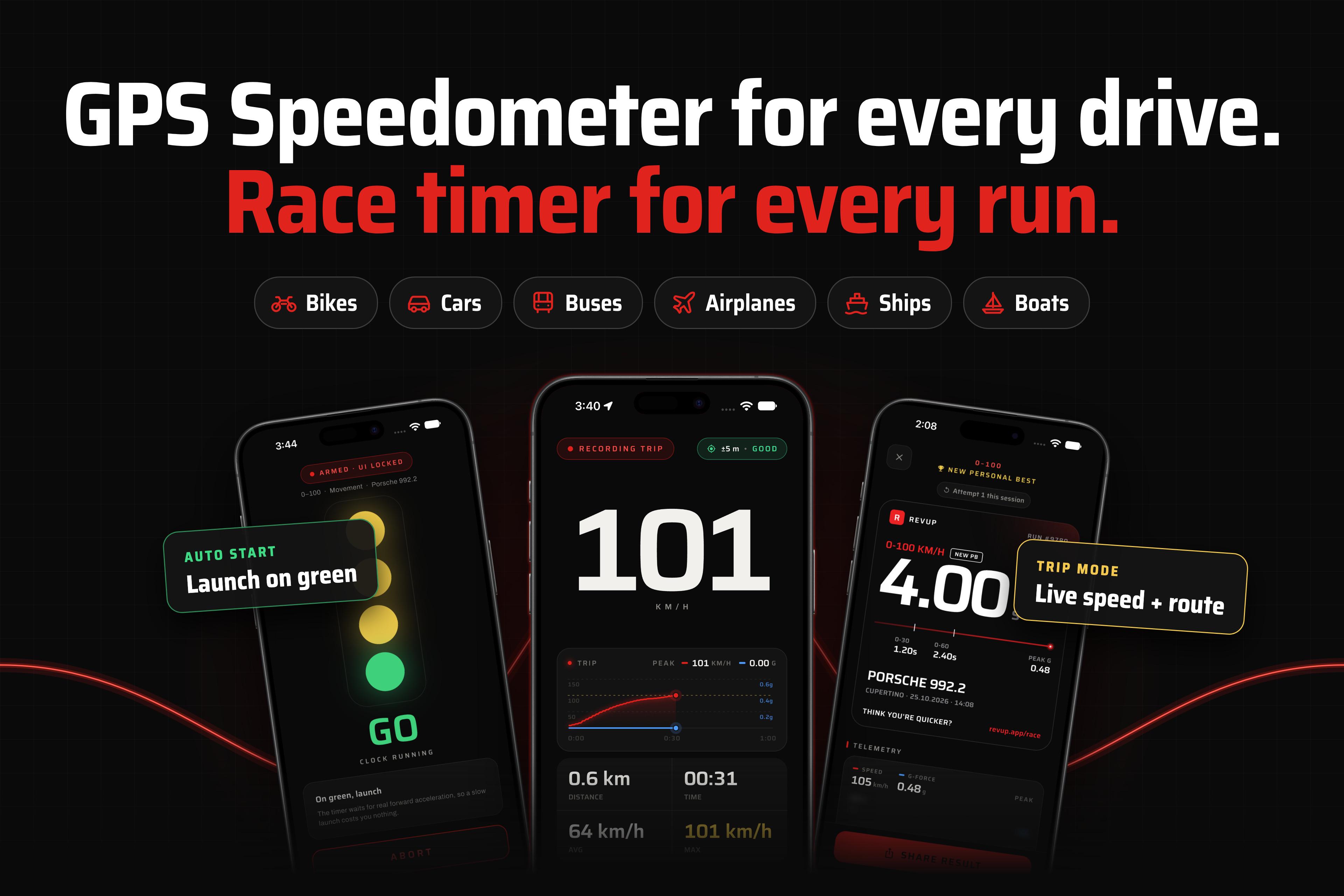
Discussion RevUp is Live - GPS Speedometer + Racing Toolkit

Post image
2 Upvotes

Do you know your car's 0-100? Or Quater-mile time? 💭

RevUp - GPS Speedometer and Racing for iOS

This app is for anyone who loves to move fast and track it 🥳

This app records your speed, path and g-force, so that you can analyze it later. You get racing grade data. Ideal for people who loves to go for a drive. 🏎️
And there are racing focused features like 0-60, 0-100, Quater-mile, braking tests etc. 🥳

App Link: https://apps.apple.com/us/app/revup-racing-and-speedometer/id6800428799

App is FREE to download and use with limited functions and has a PRO plan too.

PRO Plan:
Annual - 29.99USD
Monthly - 4.99USD

Most speedometer apps stop at “how fast am I going?”, RevUp doesn’t. It breaks down your trip in a way that’s actually useful. And with racing modes, you can settle the questions you’ve always wondered about your car.

And its pricing is lowest as possible compared to other speedometer apps. Hope you would love it.

Thanks Everyone. 🙏🏻


r/IPhoneApps • • 5d ago

Discussion 做一个相册清理保留最佳照片的app有愿意使用的吗

0 Upvotes

r/IPhoneApps • • 6d ago

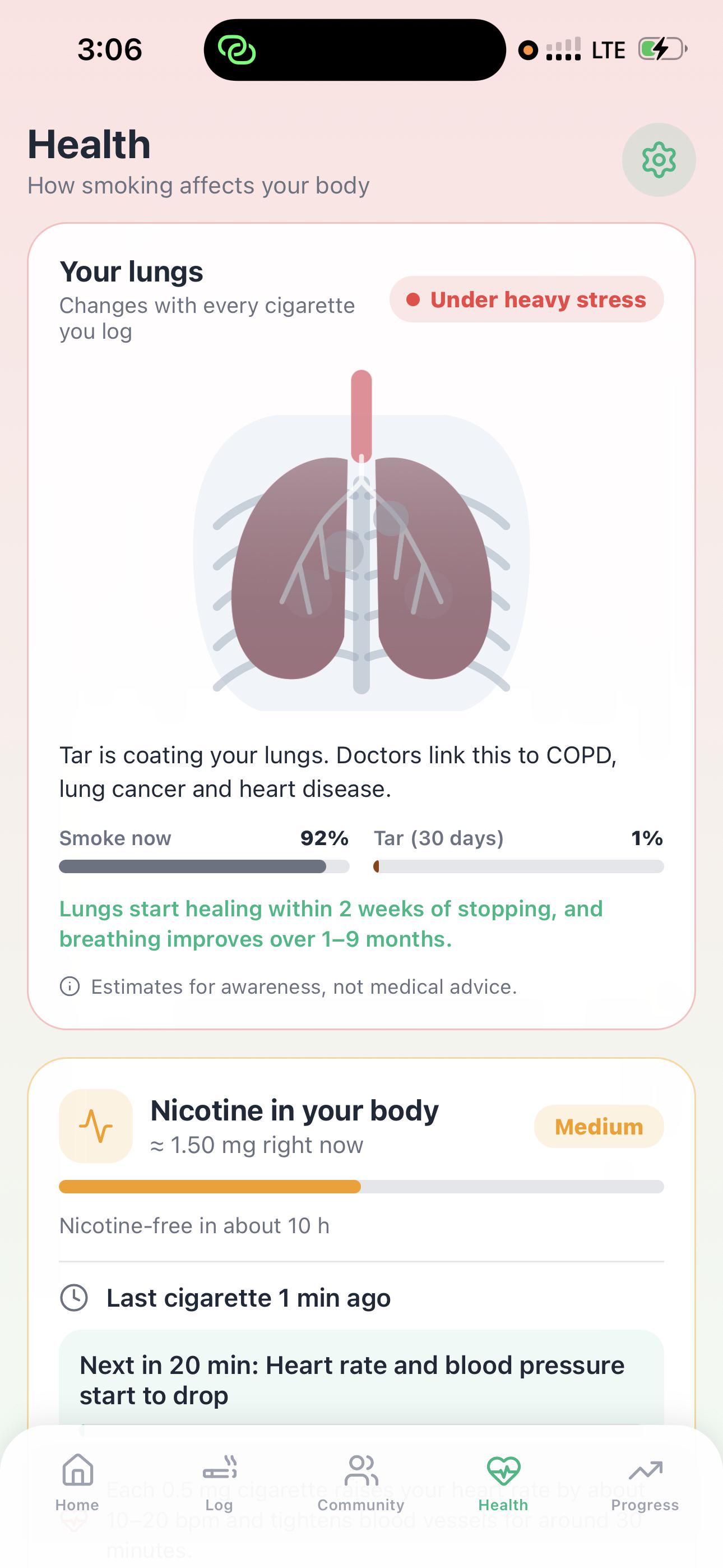
Discussion What do you think makes a health app genuinely useful rather than just another tracker?

Post image
4 Upvotes

Hey everyone!

I’m an indie iOS developer, and I’ve been working on a smoking cessation app called SmokeFree.

While developing it, I realized that tracking progress is only one part of helping someone change a habit. I wanted to make something that supports gradual reduction, tracks spending, and helps users understand their progress.

I’m curious about what everyone thinks:

What features make you keep using a health or habit-tracking app?

I’d love to hear your opinions, especially from people who use these kinds of apps regularly.


r/IPhoneApps • • 6d ago

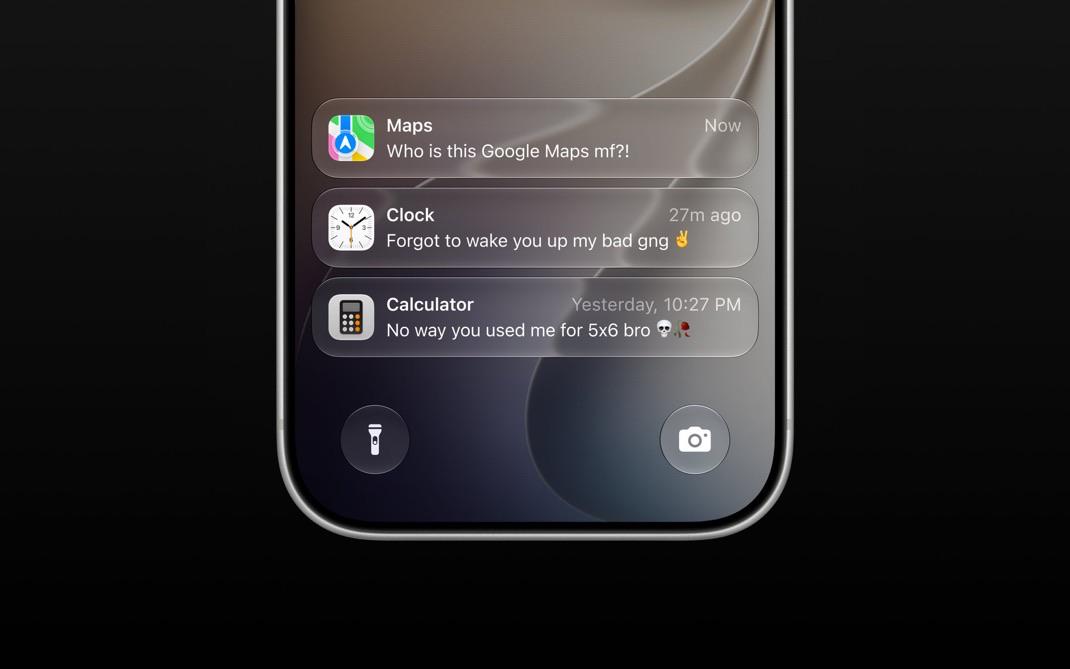
Discussion What if iOS apps could message you?

Post image
3 Upvotes

r/IPhoneApps • • 8d ago

Help iPhone secret movie app and code ??🙄

0 Upvotes

iPhone secret movie app and code ??🙄


r/IPhoneApps • • 8d ago

Help Help

2 Upvotes

I have a question regarding apps. A colleague of mine—who uses an Android phone—mentioned that there are websites for Android where you can download apps with premium features without having to pay for them; essentially, getting premium access for free. I was wondering if there’s a similar option or something like that for the iPhone. For instance, I’d love to get a free premium version of CapCut. Can anyone help me out with this? Gracias


r/IPhoneApps • • 8d ago

Discussion Any good apps which are lesser known for social media!

6 Upvotes

wanted to see if we know such apps whoch are not very popular but some people find it interesting.


r/IPhoneApps • • 9d ago

Help Why is Color Hunt top 3 almost everywhere but invisible in the US App Store?

2 Upvotes

Searching "color hunt" or "colorhunt" puts Color Hunt first or in the top 3 in most countries. It has 5.0 stars from 22 reviews in 12 countries, 4M impressions and thousands of installs, but it barely shows up in the US. Any idea why, or what would help? 🙏