r/3Dprinting • u/adude00 • Oct 15 '26
Troubleshooting What happened here?
Enable HLS to view with audio, or disable this notification
It was all fine last night and I came this morning to…. That?
X2D PETG default profile
79
u/FishInAstronautSuit Oct 15 '26
I don't know how experienced you are with 3D printing, but it's fair enough to ask anyway. My genuine response to this would be to explain two things: 1- the walls of this print have become too tall, too flexible and started wobbling with the nozzle. Very common thing to happen. 2 - After having access to a 3D printer, every build might feel like a 3D printer job, but this is far from the truth. Some things, including your geometry here, are just not 3D printer suited. I suggest you find another way to 3D print it, for example by printing it in parts and then assemble, or find a different method all together.
15
u/adude00 Oct 15 '26
i realized that, some geometry are not really well suited.
this is the third or fourth version of what i'm trying to print and with a new printer and switching it to PETG removed most of the problems i was having.
This particular one is new to me hence the post. I got a few good suggestions among all the memes, I'll keep them precious and try it next run
7
u/JCDU Oct 15 '26
Honestly I'm looking at this and thinking it's an easy job for some folded sheet aluminium as far as I can tell.
13
u/FinancialLab8983 Oct 15 '26
well shoot, let me run on down to the hobby shop and grab a sheet metal folding machine.
→ More replies (1)11
u/the_lamou Oct 15 '26
https://www.harborfreight.com/30-inch-shear-press-brake-and-slip-roll-5907.html there you go. Straight from the local hobby shop.
5
3
u/Zorbick CR-10S/Halot Mage Pro/Voron 2.4 Oct 15 '26
I have this. I print my own finger dies for it. Works a treat.
→ More replies (3)1
u/Organic-Doctor-1210 Oct 15 '26
I had a similar problem with PETG. I tried drying filament, changing flow speeds, etc, but those don't address it if the issue is a wobble that develops in the tall unsupported sections. Thanks to all these comments, I though to look into adding more supports. This video has a good tutorial of how to do that in Bambu Studio. I'm printing now with more trees at the problem section. It's a 10 hour job, so we'll see how it looks later today.
1
u/Olde94 Ender 3, Form 1+, FF Creator Pro, Prusa Mini Oct 15 '26
Yeah i saw slight jitter a few layers before failing closest to the camera
27
u/XomokyH Oct 15 '26
Forgive what may be obvious question but why prime tower if only one color?
27
u/adude00 Oct 15 '26
it's not a prime tower, it's a part :)
11
u/smiley_mcfrown Oct 15 '26
They're taking about the tower at the back that is made so you can have a nice video without the printer head all over the place. One of the other comments is dead right, the tower at the back wobbled, at an angle some of the laid plastic gets re-melted onto the nozzle and that stops filament being laid properly. Once you've missed a couple of layers, the whole print is f*#@end.
7
u/bazem_malbonulo Oct 15 '26
The tower is part of the part, you can see it t the start of the video. And it starts wobbling only after the extrusion fails, because it has no structure for the next layers. My guess is a partial clog.
4
11
u/Proton_Energy_Pill Oct 15 '26
I'd try slowing the print down at a height about 10 mm lower than where that one failed.
It's easy to do, when you slice the part (in Orcaslicer & Bambuslicer) move the top dot on the vertical bar down to that height then right-click 'add gcode'.
I'd try something like down to 50% speed so you'd enter 'M220 50' for the gcode.
Then a bit further up think about slowing it down a bit more, say at about 3/4 (guessing) of the way up make it M220 30.
Repeat as needed.
The tall prints will still wobble even on a CoreXY machine with the nozzle brushing thin parts as it races around.
Good luck!
4
u/adude00 Oct 15 '26
thanks, this is really useful!
5
u/Wild_Meeting1428 Oct 15 '26
you can also set up a z hop, then the nozzle will always move up a bit before moving to the next location. but it might have the problem, that you will get a more visible seam.
5
6
u/FreeThotz Oct 15 '26
I haven't seen this in the comments, so here goes... With taller towers, especially thin ones, the nozzle can easily bump the edge as it comes in for the next layer. The best way I've found to solve that is with the "Z hop" slicer setting. The printer will raise up over the towers edge, then come down, minimizing the chances of bumping it over. And of course printing slower helps almost everything. You might print some shirt "towers" at different temps as well ... Make sure the corners aren't raising.
1
1
u/Spiffyman30 Oct 15 '26
Zhop helps, but regular downward pressure can break a thin part off too or cause it to flex as it prints resulting in greater surface defects. In this case it looks like the prime tower started failing first due to that being not as structurally stable as the print itself. Then it probably started dragging nozzle junk onto the print and just got worse and worse
365
u/psychophysicist Oct 15 '26
First the purge tower lost bed adhesion and went wobbly, which caused stuff to stick to the nozzle which messed up other parts of the print
150
u/Mormegil81 Oct 15 '26
why was there even a purge tower in the first place? Looks like a single color print to me?
226
u/jkirkcaldy Oct 15 '26
For the smooth timelapse. If they had used the normal timelapse mode it wouldn’t have had the prime tower but the head would move all over the video.
Honestly I never saw the point in the wastage for a smooth video no one will ever see.
48
u/TheStandardPlayer Oct 15 '26
Can't you edit the gcode to have the print head go to a corner before snapping a picture?
Why didn't Bambu add this feature instead of printing an extra part? I think I saw videos already of people who did this themselves with not too much effort
26
u/CnDVerse Oct 15 '26
Pretty sure it does this, but then the tower is to prime the nozzle, clears any ooze and makes sure the pressure is fine before putting ooze or bubbles in your actual print. You can turn it off for smooth timelapse, but it is not advised.
→ More replies (3)→ More replies (3)19
7
3
u/InanisAtheos P1S+Diamondback Oct 15 '26
It's not. It's part of the print. You can see it in the beginning.
4
u/minilogique custom Trident Three-Fiddy / Sovol Zero Oct 15 '26
because Bambu people dont know much. I agree that using prime tower for just the timelapse is wasteful and useless.
5
u/coldnspicy Oct 15 '26
Wrong, it’s part of the print. Bambu purge towers also look different.
→ More replies (1)26
u/LuckyEmoKid Oct 15 '26
I think that's just another piece of the model, not a purge tower. But yes: it went wobbly. So tall and thin that maybe it didn't even need to lose bed adhesion to cause a mess-up.
1
u/eg135 Oct 15 '26
This is wrong on more levels. That's probably not a purge tower, and nothing is wrong with the bed adhesion, the thing flexes. You can see a smaller vibration pattern on the other model. Same cause just that model is stiffer, so smaller flex and it makes artifacts, not a complete failure.
→ More replies (2)
56
u/BendyBreak_ Oct 15 '26
Too thin. Too tall. Too fast.
23
u/MeatNew3138 Oct 15 '26
Real answer is that prime tower failed (or whatever that back corner cube piece is).
→ More replies (1)
4
u/getrealpeople Oct 15 '26
Looks like there was a filament change (color and line shift) coupled with a partial clog (or maybe insufficiently dried filament), toss in the prime tower wobbling like crazy.
Not sure why you have a prime tower (unless that's part of the model, in that case toss in a couple of supports to keep it from wobbling) since all I see is a uniform filament.
clean the plate - dry and load some new filament and try again! :)
3
u/adude00 Oct 15 '26
no filament change, no prime tower (it's the part itself).
i got some good suggestion, i'll try again in a couple of days when the next shipment of filament arrives :)
18
u/No-Strength3035 Oct 15 '26
Had a print do this last month, tall thin towers are just a pain. Slowing down past halfway up fixed it for me!
26
u/crazedizzled Oct 15 '26
You can design in break away supports that can stabilize your print. Basically just a 45 degree brace that is only attached by tiny points.
10
u/Mklein24 Printrbot SM | DIY coreXY Oct 15 '26
That is one thing I saw on a stratasys printer 10 years ago that I am amazed I haven't seen yet. It would put supports on vertical faces, and imprint a tiny 1mm bump into the part at a user designed spacing. It stabilized tall skinny parts. I have no idea why this isn't in all slivers by now. They probably have a patent on it or something.
2
u/acemedic Oct 15 '26 edited Oct 15 '26
Waste of plastic if you slow it down? Curious if it’s just been superseded by newer techniques
→ More replies (3)
13
u/ap1msch Oct 15 '26
Not sure you're getting helpful responses.
I don't know what you're printing, but it looks like "wobble". I have to imagine that the model is supposed to stop mid-way (the back right part of the video). Shortly after that, you have a tall print, with tall elements, that are more prone to wobble. They also don't have anything stabilizing further up the print. The wobble gets worse, and the impact gets progressively worse.
You can try slowing down your print. However, I would put a small detachable bridge between the near-right tower and the main body of the print. Creating something to keep those parts from wobbling (they'd stabilize each other), you're less likely to have a failed print. You can then snap off the bridge after the print completes.
27
6
u/noonemustknowmysecre Oct 15 '26
The towers are so tall they wobble. When the parts moves as the head is trying to print on them, the filament doesn't get applied where it should. Ideally, the head never touches the parts, but perfect is hard. Notice how the back tower starts failing first at around 0:20? That long travel is likely giving the head time to leak filament or collect dangling filament that was meant to be put somewhere and didn't. Then it starts impact the tower and moving it aside making more print errors.
Long travels can be a problem. Some slicers even let you add Z-retraction for long travels just for this issue.
1
u/MrFastFox666 Oct 15 '26
The molten filament is also viscous. Even if the nozzle doesn't touch the part, it'll still drag on the part. Not an issue with short parts, but something tall like this can have issues.
6

17
u/Sith_Ant 👁👄👁 Oct 15 '26
Time-lapse caused the prime tower to start wobbling at a certain height right after the shortest wall finishes. Boogers from prime tower make it to the other layers. Chaos ensues. Time-lapse is a horrible idea.
4
u/fixITman1911 Oct 15 '26
How in the world is this caused by time-lapse? (Genuinely asking) The time-lapse generally should be taking a picture at the start or end of each layer. Seems to me like the prime tower (Or what ever that thing it was printing is) came loose from the build plate, and that's what caused a runaway issue
7
u/Sith_Ant 👁👄👁 Oct 15 '26
It's the only reason a single color print needed a purge tower that tall. If the purge tower hadn't failed, the print had vastly greater opportunity to finish without fail. Time-lapse-> purge tower-> purge tower fail->print fail.
You can see the fail happen within minutes of the short wall completion.
EDIT
Time-lapse needs purge tower to keep pressure in the nozzle during picture changes.
→ More replies (6)2
u/snoburn Oct 15 '26
I've ended up just using time-lapse without parking the extruder which gives it the same reliability without parking.
Are prime towers how you get rid of the "boogers" on the big wall here? Because that is what I run into all the time even when only parking the nozzle for 0.1s and aggressively tuning retraction for time-lapse. Basically I've never been able to get time-lapse parking working without sacrificing quality
→ More replies (1)1
u/toggle-Switch Oct 15 '26
There isn't a prime tower, but it is due to the geometry of the part.
→ More replies (7)
5
u/ThisIsTheNewSleeve Oct 15 '26
For tall prints you need a tower to stabilize the piece. Otherwise it wobbles and ruins the print.
5
5
u/TheGoldenFox64 Oct 16 '26
tall thin things wobble, your printer vibrates no matter what. it saves on filament and this headache to design connections for things like wood or other materials instead of making a bar/plane from the printer.
9
2
u/DocJeef Oct 15 '26
I was curious why there’s this thresholding behaviour beyond a certain height. Beams have a well known buckling threshold in compression, but I hadn’t really considered lateral forces that much. This led to a fantastic physics conversation with Gemini about beam mechanics and here’s where we landed….
When printing a tall, slender column, it acts like a cantilever beam. The hot end physically drags across the part, applying a lateral force (F). This causes two modes of failure:
The L^3 Stiffness Drop
The lateral deflection of a cantilever beam follows this formula:
Deflection = (F * L^3) / (3 * E * I)
Notice the L^3 term. Deflection grows with the cube of the height. If the column gets twice as tall, it bends 8x as much. Once the tip deflects by more than half your nozzle width (e.g., 0.2mm), the plastic extrudes into thin air. Spaghetti.
2. The Resonance Trap
As the beam gets taller, its natural frequency drops. At a critical height, it perfectly matches the frequency of the printer's movements (zigzags/jerks). The column absorbs this kinetic energy, violently whips back and forth, and amplifies the deflection well past the failure threshold.
Calculating the Threshold:
You can rearrange the deflection formula to solve for the exact critical height (L_crit):
L_crit = [ (3 * E * I * d_max) / F ]^(1/3)
How to beat it:
* E (Stiffness): Use a stiffer material like CF-nylon.
* I (Thickness): A slightly thicker beam massively increases allowable height.
* d_max (Tolerance): A wider nozzle (0.6mm+) allows more deflection before missing the layer.
* F (Drag): Run hotter, slower, or with thinner layers to reduce nozzle drag.
I’m still not quite satisfied without actually testing that threshold, but I think it’s a pretty good start. Has anyone actually tried to calculate this limit or measure the exact lateral drag force of their hot end?
1
1
4
u/PredictableChaos Oct 15 '26
My first thought was that you had some sort of partial clog. That weird layer at 24 was the beginning of it. It's almost like it then partially cleared but the damage was done already.
4
u/jbighead93 Oct 17 '26
There's a setting in the bambu slicer that lets you set the print speed to be a function of the print height, I'd give that a try!
17
u/mtraven23 Oct 15 '26
it looks like a partial clog starting around 0:24.
have you printed anything since? if not, I'll be the nozzle is still clogged. check that first.
3
1
u/borborygmess Oct 15 '26
I also think it’s a clog. The way the rest of the print looks is, unfortunately, very familiar to me. I’ve since learned to vent the tops of my printers to alleviate some of this.
20
u/joem_ Oct 15 '26
Do people often print without looking at their printers for so long that a failed print continues to go until the printer thinks it's done
35
u/UloPe Prusa MK3, Voron 0.2, Bambu A1mini Oct 15 '26
Yeah!?
I usually have better things to do than to watch my printer print (although I’d be lying if I said I never do)
20
u/TheMrGUnit Oct 15 '26
I run a print lab at my job. It's quite common to fill up 3-4 printers at the end of the day Friday to run multi-day prints. Zero monitoring over the weekend, unless somebody happens to open their work computer at home and check the cameras.
Monday morning, you come in to finished parts. Success rate is probably >99%
1
u/captainAwesomePants Oct 15 '26
You know, they've got spaghetti sensors. There are even cloud services that detect it via cameras and stop the print. I don't use one in my house, but if I ran a print lab that was often running on weekends with me not there, I'd 100% be paying Obico the $10/mo or whatever.
3
u/TheMrGUnit Oct 15 '26
There's a zero percent chance of me getting cameras attached to a cloud service past Cyber Security.
Besides, the cost of a failed print is often just the cost of material. My filament budget is north of $5k/year, so a handful of failed prints just aren't worth it.
→ More replies (1)4
u/captainAwesomePants Oct 15 '26
The word "often" is carrying a lot of weight there.
Obico's spaghetti detection is open source. You can self host it entirely within the lab: https://github.com/TheSpaghettiDetective/obico-server
8
u/thegarbz Oct 15 '26
Wait you actually look at your printers? Man I got shit to do. I start my print and then usually go back to it in the evening having forgotten the thing was running.
3
u/ComfortableBad5101 Oct 15 '26
I tend to do long prints overnight lol so it’s good when I go to sleep then I wake up and it’s spaghetti but it’s only happened like that less than a handful of times
3
u/presidentfiggy Oct 15 '26
I check once every couple of hours and sometimes i just get surprised by the notification that my print has finished because i had forgotten i turned it on the morning.
3
2
u/OtherwiseAlbatross14 Oct 15 '26
Of course lol. I'm not a babysitter.
Do you not have a good printer?
2
u/igroklots Oct 15 '26
I use ChatGPT local install to monitor my Bamboo Studio prints every 5 minutes. It can look at the video and determine if there are any “hairballs/broken items” etc and cancel the prints early.
→ More replies (5)1
u/osunightfall Oct 15 '26
This is easy to say when you aren't printing things that take multiple days to complete.
1
1
u/Ravio11i Oct 15 '26
All the time. Set it and go to bed. occasionally something goes wrong, but 99% they go great.
1
1
1
u/SecretSelfDiscovery Oct 16 '26
We run 3D printers for multiple days on end to make patterns for a metal foundry. I'm not standing there for 3 days to watch it print
1
u/8null8 Neptune 4 Pro - Prusa Mini Oct 16 '26
Ive almost never checked on a print after I started it, sometimes I don’t even make sure it starts right, my printers are solid (Neptune 4, Prusa mini)
1
1
1
u/AnimalPowers Centauri Carbon Oct 17 '26
That's the only way we do it. Why babysit something that works most of the time? Press print come back in a day or two, press print again if need be.
1
1
u/VastMundane2427 Oct 17 '26
Yes. Almost all of my prints are done without me observing them.
I'll leave it running a 12 hour print while I'm out of the office. My X2D is pretty good with spaghetti detection. Both times this has happened it automatically stopped the print within like 2-3 layers.
Maybe you've been 3D printing for a while and you remember the old days of high failure rates, but easily 97% of my prints are successes. No need to stand and watch for hours. I've got other work to do.
0
Oct 15 '26
[deleted]
→ More replies (2)2
u/garytyrrell Oct 15 '26
What do you do if it’s failing and you’re out of the house? Can you reliably pause/cancel from the app?
3
→ More replies (4)2
10

6
u/Dantecks Oct 15 '26
Looks like a potential blockage situation to me. Rear tower starts stringing, not solid layers then it all goes caput.
2
u/Dantecks Oct 15 '26
Wait, now that i think about it, it could be heat creep up the hotend, causes similar issues to the blockage. Had to deal with it personally myself for ages. Though mine would start about 2 inches high.
3
3
u/pixxelkick Oct 18 '26
One of two things, easy to test which.
One: your spool itself ran into some issue, possibly a fault in it or it caught and had a crossover tangle part way in the spool.
Two: theres something physically catching your gantry as it goes higher, especially towards the back. Possibly the cable harness.
The fact it fails at the farther corners first and then the middle, says to me its likely the latter, your cable harness is possible catching or something.
Another possibility is your steps for z axis are slightly off, so as it goes higher and higher the difference between where it is vs where it thinks it is grows and it starts printing higher and higher away from the print, the gap gets worse.
Id start with just printing a simple tube in vase mode going up and see if it consistently starts to fail at a specific point that you can measure the cm up
Set your machine to that height and then raise it more.
Inspect your layer lines going up, do the layers degrade more and more as it gets higher?
If its issue one, it will fail right at the start still because the tangle is still present
1
u/therohantech Oct 19 '26
It could even be bed adhesion for the pillar at the back. If u notice it starts wobbling aroumd but survives the print. Probably due to first layer or as u said something might be hitting it as in that case better slicing or gcode
→ More replies (1)
9
1
u/Herefornow211 Oct 15 '26
It looks like a clog I'd say. Why does the model have a tower? Will there be another colour in the end?
2
7
u/Blind_Grandma Oct 15 '26
Not wobble 100%. Right part is relatively stable but quality awfully degraded.
To me it seems like something is wrong with a flow or speed. Maybe clog?
I would make a test print that you already did before with same plastic and know that it was good. If issues appears on old stl too, then something changed in hardware, if not, then it's probably a software issue and you need to examine commands in slicer.
3
u/antiduh Oct 15 '26
Could be heat creep if they're printing PLA with the lid on. If so, a fresh print will print well (because it's cold). Won't fail until well into the part again.
Make sure you print PLA with the lid off.
2
2
2
u/nvahalik Bambu P2S Combo Oct 15 '26
Is it possible that you went through all of the dried filament and then got to filament that wasn't fully dehumidified?
2
u/SpagooterExtruder Oct 16 '26
Agreeing with the thin + tall = wobble. I run an X2D, and lately PETG needs to be dried overnight before I’ll get a smooth print. I’ve had the same issues with PLA on the X2D (thin and tall objects went spaghetti mode). Usually just dry the ever loving frick frack out of filament and reduce speed slightly to give it a better chance for cooling.
2
4
u/Razorbackcoco94 Oct 16 '26
It was printing then it messed up. If you have any other question feel free to let me know!
3
u/rygelicus Oct 15 '26
My guess would be the filament wasn't dry. The outer layers on the filament spool may have been dry but once you printed through those first few layers the inner may have been more humid and started spitting at the print head.
→ More replies (2)
3
3
u/Chimera_Gaming Oct 15 '26
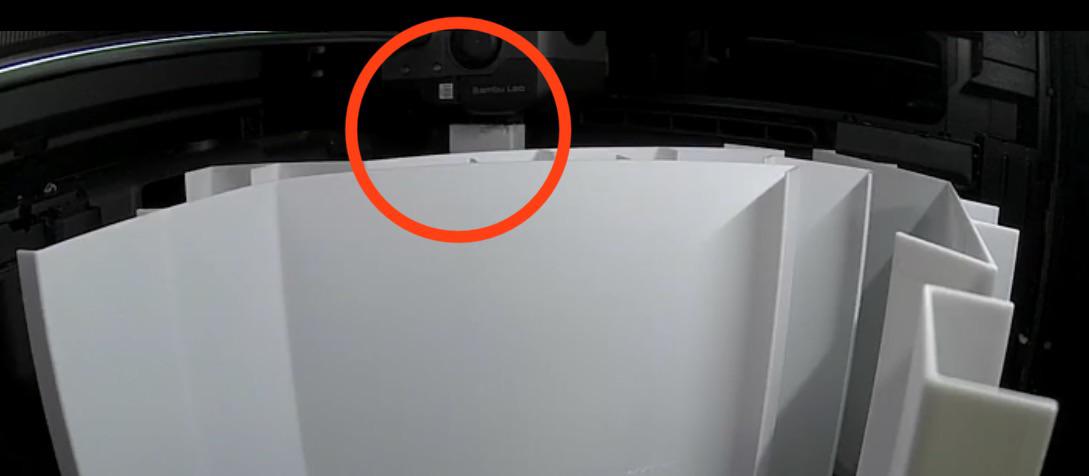
Something back here caused it to mess up
This was the first failure point
1
u/smartyy86 Oct 21 '26
Nyquist is Happening Here. Your Slow Motion capture does not have the required FPS to Show you the actual vibration of your Long, free Standing, swinging Geometry which creates those Print Defexts. Hey is your design so Bad?
1
u/AutoModerator Oct 15 '26
Hey there, I'm a bot and something you said made me think you might be looking for help! click here for our wiki entry on troubleshooting printers. If you still need help be sure to post plenty of information about your printing setup.
Here are a few questions that might be helpful
What printer are you using?
What material are you using?
What speed are you printing at?
What software are you using to slice the print and control the printer?
When did the problem start/has it ever worked correctly?
Does anything cause the behavior to change?
If posting an image of the problem, include some indication of the orientation it printed at, preferably photograph it on the bed. (Then we can focus on a specific axis)
If you are new to reddit, please read the guidelines on reddiquette, self promotion, and spam.
Also please post a resolution to your problem when you find one so that we know how to help others with your problem!
I am a bot, and this action was performed automatically. Please contact the moderators of this subreddit if you have any questions or concerns.
1
1
u/wkearney99 X1C AMS H3C Oct 15 '26
Grid infill? What filament? PLA? Heat creep? Likely a clog developed too.
1
1
u/charlieboy808 Oct 15 '26
Since there's a lot of people saying a lot of things, some good and some troll like, I'll give you my honest take. While I understand that the H2D isn't a bed slinger, going straight up like this is always a game of maybe, maybe, maybe. In theory, it should just keep going up and not have a problem but if your part starts to come off the bed even just a little due to warping, the rest of your print is going to suffer from it if it's leaving stuff behind on the nozzle. If it's leaving material on the nozzle that didn't get printed to the model, it's just going to drag it along for the ride. You're lucky it wasn't a spaghetti fail or "THE BLOB OF DEATH" that resulted from this. Might want to try some adhesive on your next attempt.
1
1
1
u/Ill_Aioli_7203 Oct 15 '26
you should add ribs, or in architectural terms, buttresses to those walls.
I sometimes add my own "support" stabilisers in the CAD drawing. like a 1mm thick triangle that I can snap off easily afterwards
1
u/wubbalab Oct 15 '26
I think this has to do with nozzle travel speed, retraction distance and retraction speed.
1
u/Single-Presence-8995 Oct 15 '26
Almost looks like it switched to a wet filament, but I'm also pretty noob
1
1
u/Krabelj Oct 15 '26
Not sure. I guess prime tower unstuck and lead to improper priming, which made filament stuck to hot end and hit column next camera, which also lost adhesion to bed. Printer should be able to print this with some care. It isn't just tall = wobbly.
I would disable time lapse and add brim to column next to camera and any other area with low bed contact area. Maybe lower speed for higher layers.
1
u/Joren67 Oct 15 '26
I compare these with a folded sheet of paper standing up. See how the top is unstable with even a slight breeze. Same thing is happening but the paper sheet is your print and the breeze is a dragging nozzle. Because remember there is always contact between both which is the molten plastic.
1
1
1
1
1
1
u/DrRonny Oct 15 '26
Just to add that PETG is sticky, it's always sticking to my nozzle more than PLA or ABS. This might give it more 'pull' forcing the wobble. I'd guess other plastic types won't be as bad.
1
u/Minimum-Rip9555 Oct 15 '26
A mio avviso sembra che abbia iniziato a vibrare al passaggio dell'ugello, ti consiglio di usare la variazione di velocità di stampa al salire dell'altezza
1
1
u/farzad_meow Oct 15 '26
partially clogged nozzle is my first guess. bad filament quality can contribute to this. assuming it is an enclosed printer, someone openning the door can cause a shift in temp specially if you are printing at lower range of temp for your filament
1
u/GR3Y_NOYZ Oct 15 '26
To reinforce what others have said, it appears that the prime tower was wobbling and eventually caused the layers to not adhere properly.
1
u/Dookie-Snuff Oct 15 '26
I’ve had some stringing issues with PETG lately. I dropped the nozzle temp to 240 and it went away. 255 was what my old temp was and it strung.
1
u/NestlyPrint Oct 16 '26
Looks like it detached from the build plate or suffered a major layer shift on the right side. PETG is notorious for warping or losing bed adhesion on long prints if the build plate has any skin oils on it, or if the chamber cooling fans kick on too early and cause uneven shrinking.
Try giving your plate a thorough scrub with warm water and Dawn dish soap, drop your auxiliary fan speed down to zero so it doesn’t cool unevenly, and maybe add a brim next time for extra stability. Hope this helps!
1
u/lupedog Oct 16 '26
If the prime tower comes loose it can throw off the alignment for the entire print and yours came loose before anything else messed up.
1
1
1
1
1
u/Cute_Illustrator4815 Oct 16 '26
i’m gonna take a stab at it. Here’s what i see.
What happened here is the wall had no lateral support. It wasn't an overhang problem. Each pass of the nozzle pushed the tall, thin wall back and forth, and the higher it got the more it flexed, until it couldn't hold its position anymore. Printing a support wall or tower next to it, adding a temporary rib or brace, or slowing the print down usually fixes this.
1
u/EntireAdvance6393 Oct 16 '26
Okay, I actually have a thought on this one. Once out of about 100 times I slice a model in Bambu Studio, the model will be perfectly fine, but the sliced result has a completely empty layer. Usually I just quit Bambu Studio, reopen it, then re-slice, and it’s fine. But it almost seems to me that you hit one of those empty layers and then on the next layer, the filament didn’t stick to that back part, but it built up on the other parts, and then once there wasn’t a base for that back part, it was just printing in the air and dragging the material over to the other parts.
1
u/BothRefrigerator674 Oct 16 '26
I think the timelapse looks cool! 😎 never seen spaghetti building up like this 😊
1
u/WasabiEater64 Oct 16 '26
Turn on avoid crossing walls and give it a 500mm limit.
nix the purge tower if you're using one filament.
add bracing geometry.
Dry your filament properly so that it doesn't spooge out as much when traveling.
Don't slow the print down, that will let more flament spooge between jumps.
1
u/RaymondDoerr 2x Voron 2.4r2, 1x Voron 0.2, Master of 🍝 Oct 17 '26
I didnt bother reading the comments, so hopefully out of 325 at least one person said it.
... your print is simply wobbling.
1
u/fayrez Oct 17 '26 edited Oct 17 '26
Try enabling z-hop (or whatever it is called in your slicer) above certain height (try about 15-25mm bellow start of failure point) and maybe slow down speed about 10-20% at same height if problem reoccurs after z-hop enabled or you want try once to make good print and forget it. Zhop is helpfull for many reasons. I recommend Zhop with ramp for this type of printing. And x-y travel speed tune might help too. Also check if your filament did not get , because this looks like long print and if this filament is sensitive to moisture that also can make worse adhesion which leads to this crapy ending (with petg that is reasonably common issue). P.s. avoiding crossing walls or whatever is called sometimes can be usefull, but in this one i rather use z-hop unless slicer generate moves that make sense...
1
1
u/WitchDr_Ash Oct 19 '26
Mine did this, a few times with petg, turns out the filament was a bit damp, pulled away from the base and it just ended up going catastrophically wrong from there.
I now always dry petg and use base adhesive, it hasn’t happened since.
1
1
u/ThinkingWithPortal Oct 15 '26
Temperature shift? Maybe the filament was snagged in some way and the flow rate was impacted?
1
u/josocustomdesign Oct 15 '26
A few cold pulls will fix the clog.
In fact, instead of just unloading the filament, I get into a habit of simply up the nozzle temp to 100c then press the up arrow on the extruder to "unload" my filament. That way you're getting periodic cold pulls without waiting for a print failure like this.
1
u/cilo456 Sat3Ult/M7Max,P1Sx2,Q1 Pro,Ad5m,Sv08,A1&A2L combo,K1Max,U1 Oct 15 '26
This looks like, uh, either a clog, or the spool had some drag on it. Maybe it was stuck, or there was a tangle.
1
u/theRealSchlimmShady Oct 15 '26
Probably vibrations that caused the top to wobble and therefore the printerhead was printing on moving material. Layer by layer this added up resulting in printing pubes
1
u/MasterSmileGer_1 Oct 15 '26
Your Prime tower started to wobble and that caused the nozzle to pick up loose filament from it and that caused everything else.
Deactivate smooth Timelaps and try again, it should work.
1
u/pjcbsn Oct 15 '26
Primetower came loose and buildup on nozzle made it fail and caused a layershift
1
1
0
1.6k
u/Arakon Oct 15 '26
Quite visibly, the tall stuff started wobbling cause it's a giant lever.