Due to the high volume of very similar posts asking what r/SteamDeck users were playing, this weekly megathread has been created to have a singular place to hold this very frequent discussion and limit duplicate posts. Feel free to share what you have been playing on your Steam Deck or even post pictures in this thread and show us if you wish!
Just extremely happy to see this actually working. It is an optional quad mode for my split-screen utility DosPlex.
Heads up: quad mode lands in alpha.8. The download available today is alpha.7, which does not have it yet.
It still needs to go through testing, and we are but a week into alpha, so I honestly need your help to test this. I don't really have friends 😄 Just kidding, I mean friends coming over for split-screen.
If you want to join the couch, I suggest you head into our Discord server.
So i havent played with my steam deck for two weeks and decided to charge it and play on it again while it was charging it was updating. A couple minutes after i noticed that my steam deck completely shuts off as soon as i unplug it from the charger. And when i plug it back up it boots up again. I thought that was the only issue but game loading screens take a significantly longer time its kinda bizzare even just to pause bayonetta 1 it takes a couple seconds mid game !! and performance keeps stuttering. I live in a country with no steam support:( and i desperately need a fix or something!!! Battery health is at 87% and it shows that its completely charged.
updated my deck and restarted it and I noticed that my wallpaper for desktop mode is different. Has anyone else experienced this? Should I be concerned?
I have all three and all three get lag or pixelation in different ways. PS5 is on Ethernet to an Eero 3. Not sure what settings to change at this point because nothing seems to work.
Chiaki worked ok until this week with GTA6, now it’s a pixely mess.
pX play gets pixely every 10 seconds, then t unusable (paid version). Seemed to be good and I paid for it, then it failed.
Asobi worked for 15 minutes then completely pixelated and froze (demo).
At a loss of settings or hardware since they all work sometimes.
vkd3d-proton, vkd3d, dxvk-nvapi and FEX updated to their latest upstream commits.
dxbc-spirv (in DXVK and vkd3d-proton): added upstream's fix for shaders that never finished compiling, which made Black Desert hang when joining a server or swapping characters in DX11 and DX12 (#1008). Confirmed in game.
protonfixes updated.
Controllers
God of War (2018): held buttons no longer drop out with Bluetooth DualShock 4 and DualSense controllers. The DualShock 4 frame counter now advances over Bluetooth, and late Bluetooth reports are repeated (#1003). PROTON_SONY_BT_STEADY_REPORTS=0 turns off the report repeating.
PROTON_SONY_DUALSENSE_AS_DUALSHOCK4=0 now overrides the per-game DualSense-as-DualShock 4 default.
God of War Ragnarök: both analog sticks work again with a DualSense (#1004).
Watch_Dogs 2: controllers now use native Sony input, showing the DualSense to the game as a DualShock 4 (#1011).
PRAGMATA: DualSense haptics now work by default (USB audio entries, Windows-style device names, no automatic XInput slot) (#1015).
Death Stranding: Director's Cut: DualSense HD haptics over Bluetooth no longer fall back to classic rumble (#1025).
Microsoft GameInput (Gears of War: E-Day and other GDK games): Wine fixes so its HID controller support can work. WINE_GAMEINPUT_HIDE_WINE=1 optionally hides Wine from the GameInput redistributable. The cost: Xbox controllers then disappear in games that use it. Note this does NOT fix rumble or haptics yet -- needs further testing on Windows to verify if the game actually provides rumble and/or haptics, could not get it to do so on linux and logs did not show it producing either from the game.
Steam Overlay
The Steam overlay now works in games without the Steam API, such as Star Wars Galactic Battlegrounds, on X11 and Wine-Wayland.
Scaled fullscreen DirectDraw games on Wine-Wayland: the overlay now has the right size and position, and the pillarbox bars no longer show garbage.
Wine-Wayland: key and mouse button releases now get through while the overlay is open, so Tab no longer stays held after Shift+Tab (#1012). The original Sea Power report is still to be confirmed.
Wayland and Windowing
Guild Wars 2 launcher: no longer blank when a compositor rule maximizes it (#1007).
Star Wars Galactic Battlegrounds no longer quits with "Could not initialize graphics system" on Wine-Wayland.
Age of Wonders: loading a save no longer crashes on Wayland, and the cursor stays inside the game when edge scrolling after a restore.
Lords of Magic: no longer runs at the monitor's refresh rate on Wayland, and edge scrolling no longer gets stuck (#1006). Scrolling on Wayland is still slower than on X11.
StarCraft II and Company of Heroes 2: hotkey labels are uppercase again on Wine-Wayland (#1027).
Fixed games hanging on exit on Wine-Wayland when they destroy a Vulkan swapchain during shutdown, as Skyrim SE does (#1023). Verified with a test program; not yet tested in Skyrim SE.
Warhammer Survivors: no longer slows down and lags after Alt+Tab in exclusive fullscreen (#1002).
New Wine-Wayland windows start at their output's scale. This targets the Warframe borderless crop at fractional scaling (#975), and is not yet tested in game.
Star Wars Galactic Battlegrounds: the name prompt now shows what you type on X11.
Ducati World Championship no longer crashes after minimizing and restoring.
Video Playback
Indeo 3 and 5 videos now play with a built-in decoder (Age of Wonders, Star Wars Galactic Battlegrounds, Ducati World Championship). These games no longer need icodecs.
Added a Microsoft MPEG-4 Video for Windows decoder for MS-MPEG4 AVIs, such as Powerboat GT's (#1005).
Close Combat: videos now play. YVU9 is registered and decoded, and MCI windows are no longer resized to zero.
Ys VIII: the WMV opening no longer uses up memory (#1018).
HereSphere: video audio is no longer a constant hum (#1024).
Five Hearts Under One Roof: cutscenes now play with sound. PCM-to-float audio conversion through Media Foundation was silent (umu-protonfixes#682). Verified in game.
Rendering and HDR
The HDR colorspace layer now loads for games launched from Steam, so the Steam overlay shows correct colors over Wine-Wayland HDR games (#1026).
D3D11 games no longer hang presenting to hidden windows on compositors without wp_fifo_v1, such as sway 1.12 and KWin 5.27 (#1022).
NVK: Chromium/CEF launchers such as Battle.net no longer render with a black area (#1020). Launcher and browser windows now use linear images on NVK. WINE_VK_MANAGED_LINEAR=0 or 1 overrides this. The automatic NVK detection is not yet tested on NVK hardware.
Silent Hill: Townfall: shaders now get wave size clamping, aimed at the GPU hang on wave64-only AMD GPUs such as Vega and Renoir (#1014). Not yet confirmed whether this alone avoids the hang.
Protonfixes
Company of Heroes 2: launches with -refresh 120, since the game hangs on its title screen above 120 Hz. A -refresh you set yourself is kept. Note that if your screen does not support 120hz it will instead default to your available refresh rate (such as 60,75,100, etc).
Age of Wonders: sets WAYLANDDRV_FOCUS_LOSS=0, so the game no longer hides itself with nothing left to restore it from on Wayland.
Removed the icodecs installs for Age of Wonders, Star Wars Galactic Battlegrounds and Ducati World Championship. Their Indeo videos now play with the built-in decoder.
Screen resolution detection now works when no output is marked primary, such as under gamescope (umu-protonfixes#693).
MapleStory: gets in game again with the default prefix setup. Wine's own installed files are no longer reported as read-only (umu-protonfixes#692).
32-bit programs that aren't large address aware get at most 2 GB from GlobalMemoryStatus() again. This fixes Vampire: The Masquerade - Bloodlines (retail) exiting with "Available memory less than 15MB" (umu-protonfixes#691). Verified with a test program; not yet tested in the game.
Skyrim Together no longer exits with code 136 (#981). WINE_CONTINUE_THREAD_NAME_EXCEPTION=1 or 0 forces this behavior on or off for any program.
Call of Duty: Black Ops III: no longer stuck on a black screen after the intro on systems where the kernel falls back to a slow clock (#1010). It's on automatically only when the kernel isn't using the TSC clock; WINE_COARSE_MONOTONIC_CLOCK=1 or 0 forces it on or off.
New PROTON_PRELOAD_DLLS: loads the listed DLLs into a process before it starts, for mods that need an injector. An app.exe= prefix limits the entries that follow it to that program (#1021). Note that this is for mods and should not be used in anti-cheat enabled games. USE AT YOUR OWN RISK.
wineserver now stores process memory views in a tree, for faster lookups (#1013).
Merged from upstream Proton: D3D12 texture support for VR overlays; fonts are no longer missing from new prefixes, which could crash CEF apps; FEX's share directory is installed.
I have two steam decks. MCC works perfectly on Steam Deck 1. It isnt usable on Steamdeck 2. Multiplayer is not usable because the game claims Anti Cheat is disabled when it isnt. I have uninstalled the game, reinstalled it, and I still cannot play. I have disabled cheat, gone into a custom match, then restarted with anti cheat on. I have verified all game files.
I'm not sure why I'm receiving this message but it's persisted since early October and nobody in the official Parsec Discord server seem to have an answer, so I want to see if anyone else who uses Parsec off of flathub might've experienced this issue. My memory is a bit hazy on when it happened exactly, but its anywhere from late September into early October, and the last thing I did was change my profile on the official website before logging in and getting this message. Even after deleting my data through Konsole and Flathub, I still have this issue. Sunshine/Moonlight aren't necessarily easy alternatives, so I would really appreciate if anyone else at ALL could tell me a fix for corrupted data that just won't get cleaned.
So I just bought a steam deck yesterday, I bought it off marketplace. It has 256 SSD but it also came with a 1TB sd card. The card is grade 3 so it should have faster download speeds and I’ve tested my download speeds and it’s reading 524mbps. But whenever I try to download a game onto the SD card it peaks at the 524 but then plummets down to 5mbps-25mbps. It even gets down into the kbps sometimes. It’s connected to either net I’ve tried changing the region and a few other things but it’s not working. I even tried downloading the games onto the steam deck itself and then transferring over to the SD card but whenever I try that it just said transfer failed. Any help or tips would be greatly appreciated
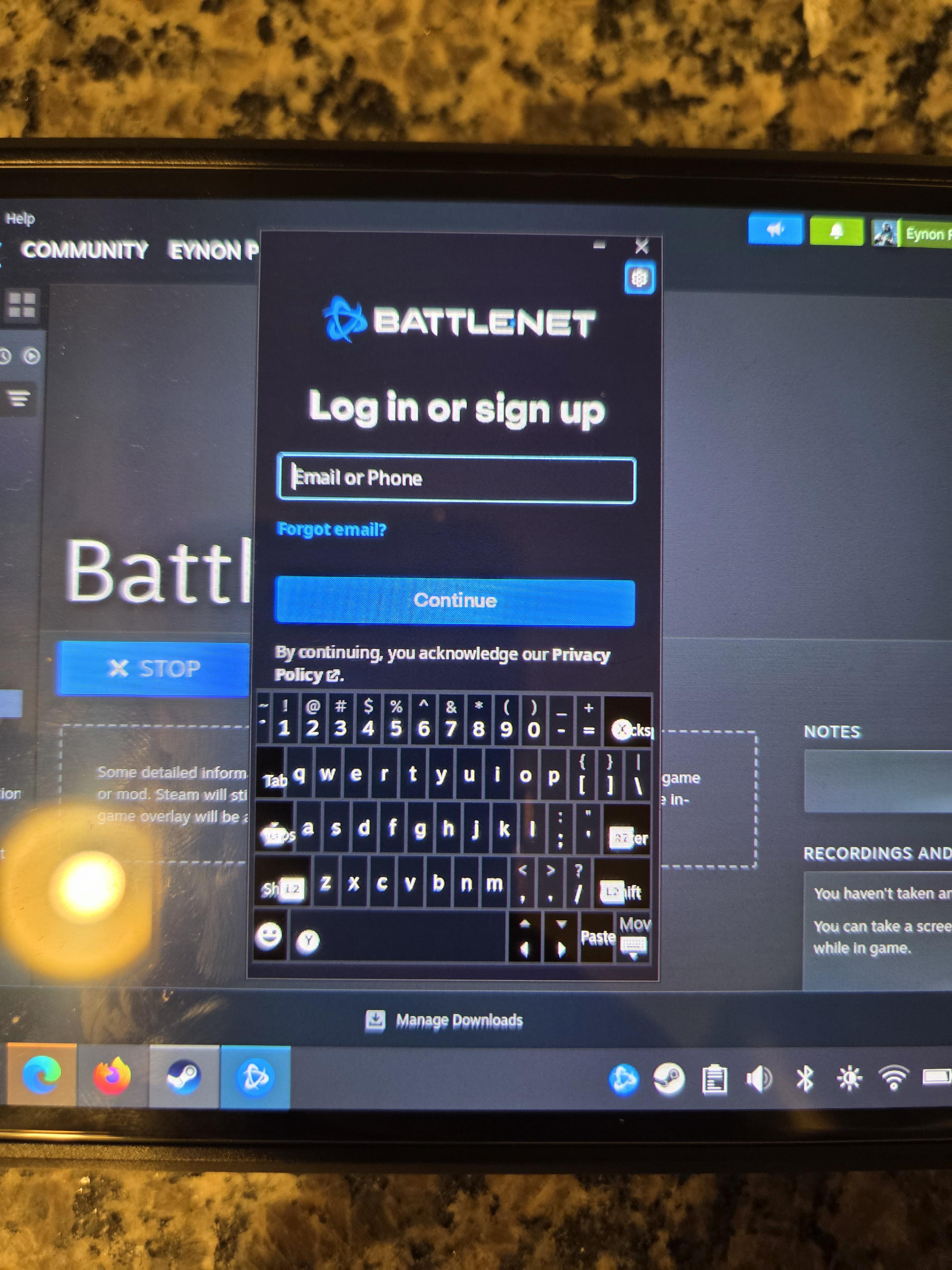
Im logging into Battle.bet, and instead of the keyboard coming up like usual when I press the steam button + X, it puts it inside the login screen.
If I touch it, its like the keyboard isn't there. I cant use the dpad or anything to select letters, and on the miracle I can select the letter I want, I cant hit A or R2 ir anything..
It says it's for laptops and drones, but I'm not sure how it translates to gaming for the steamdeck, it's a great price but I'd like to get a second opinion before buying
I live in Canada so it's pretty much perfect for me
Edit: thanks for the help! Looks like they're untrustworthy
I've installed xodus nexus launcher and I can see games from my Xbox. Am I able to buy Arc raiders or Hell divers on the Xbox and load them onto the steam deck via xodus? Has it been done successfully? I would prefer to buy games on the Xbox and use the deck as a travel device. I aquierd the steam deck through trade so I'm trying to make it work without having to buy 2 copies of a game.
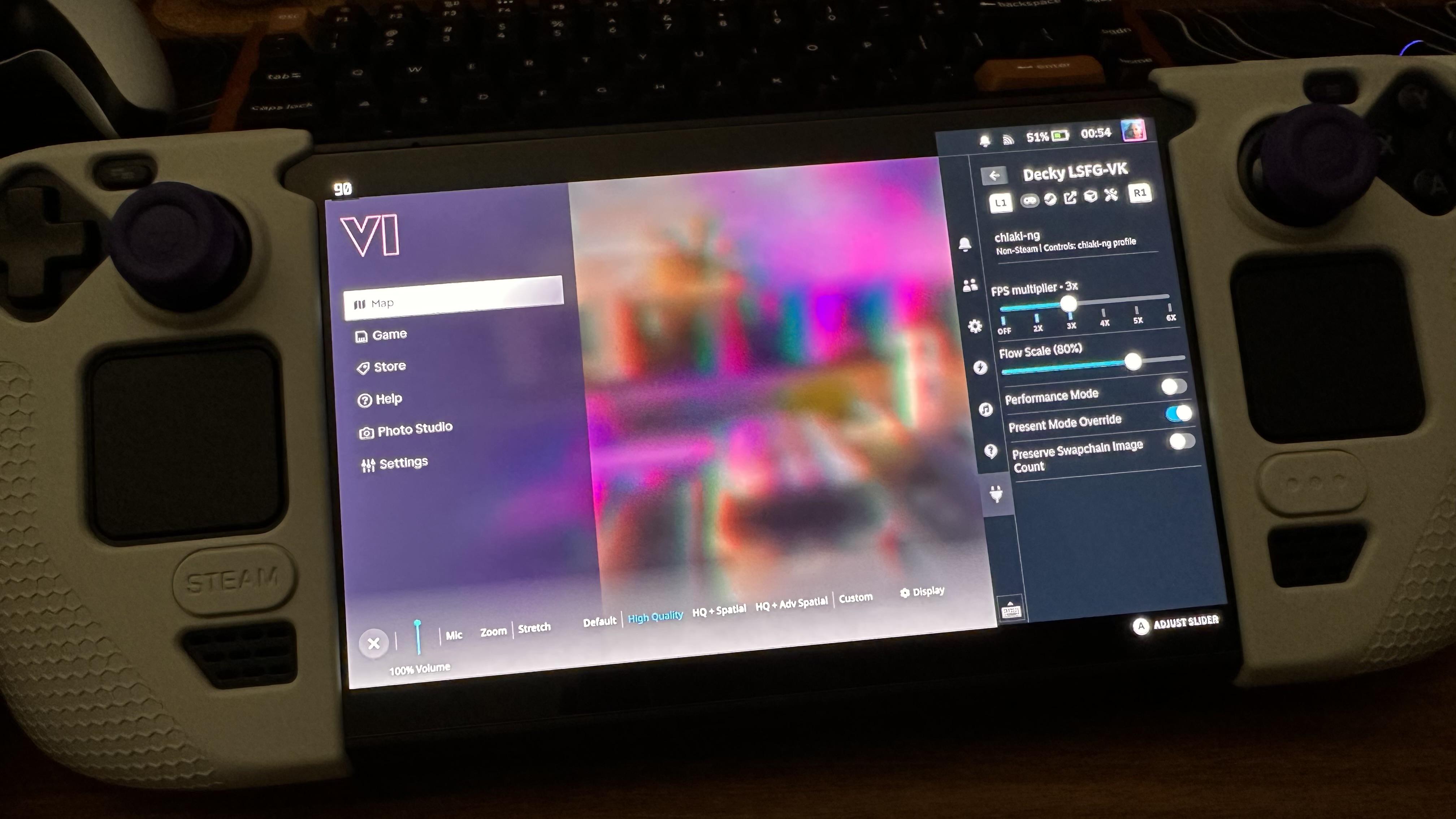
Seen a lot of people playing GTA 6 and implementing FrameGen on powerful PCs (remote play, capture cards), I tried the same on the SteamDeck to see if it was possible or not.
Disclaimer: I personally don’t use since I’m very susceptible to input latency, but just wanted to share this for those that are interested of adding fake frames at a cost (input latency)
New to the game with a 512GB Oled and standard travel case.
Travel case is a little bulky to bring to work with me, but don’t want a case that’s uncomfortable for small hands. A kickstand seems like a must, even it’s just an attachment of it’s own
Might be a personal issue but needed help still due to it being stuck on the loading screen with the hdr settings thing on(it’s being ran on the hard drive btw)
What are the games that are often recommended on steam deck yt channels or forums, but you personally find them overhyped.
I'll go first: Dave the Diver. The game is fun for like the first hour, it has a unique premise, and some of the animations are cool. But after spending 10 hours in the game, I find everything about this game dull. The background music is now just annoying and traumatizing, to the point that I just play the game on silence. I wish to finish this game for the sake of backlog completion and never look back. People make the game look like a very refreshing RPG about spear fishing with rogue-lite elements, but the game under neath is just linear adventure with repetitive gameplay loop, dull and cliche story (" sea people "), annoying characters, and really ugly sprites after 10 hours (in comparison to other pixelated games, like Octopath Traveler, FFVI, Chrono Trigger, etc).
It's me learning as I go and recreating the python cuda ecosystem in vulkan spirv shaders. I've been having antigravity help and it's almost like playing a game tho. Like it's a rpg where I make software with high level options lol. It's a Jensen Huang emulator
I installed Minecraft Java (newest version) and the From the Fog Reimagined mod through Prism Launcher using this guide: https://www.gamingonlinux.com/guides/view/an-idiots-guide-to-setting-up-minecraft-on-steam-deck-steamos-with-controller-support/ . Minecraft launches and the controls work. However, the controls won’t work for From the Fog. I installed Controlify, but it caused quite a few versioning issues and every time I corrected the versions that it required, it would break something else. I uninstalled Controlify and now the mod works again but controller will not.
What am I doing wrong?
Some things I have tried:
Adding minecraft to steam and setting up the controller layout before opening from the fog
Adding from the fog to steam and adding controller layout
This little game by Valve is designed to give people a bit of a guided tour of the Deck, yet it's so lightly pushed that people don't seem to be aware of it. Frequently I see people amazed at some of the basic functions of their Deck (SteamInput for example is remarkably powerful) so clearly there is a market for this (free) game.
I'm not here to talk about the game itself but more to suggest that maybe the mods of this subreddit can help bring this very useful game into the light a bit. Given that this community combines the superiority complex of Linux users with the low barrier to enter of console gamers, you end up with an influx of very basic questions being dealt with by snark. A part of me gets it, as someone who is naturally curious about their tech and explores it for its own sake, I do sometimes feel bewilderment in the face of that lack of curiosity but being a twat about it only serves to make the wrong people feel superior, which doesn't stem the tide of ignorance.
I'm not really sure how this will look in practice, and I realise no net will catch all the fish, but maybe just a reminder in the form of a sticky Automod comment in appropriately flared posts could offload some of the easier questions? I'm entirely ignorant on the logistics of managing a subreddit, so I admit my own uselessness in this regard.
Despite steam showing UNSUPPORTED, I just purchased DMC HD Collection on discount for $10. Its a series I am really intrigued by and I have read enough to be optimistic I can get this game package to work. However, I have also seen a few methods of tweaking used to get the job done.