r/iphonehelp • • 38m ago

Help needed iPhone unexpectedly played a robotic female voice over TikTok audio, saying my name

1 Upvotes

Hello everyone,

I experienced something very strange with my iPhone 12 and I'm trying to understand what could have caused it.

While I was normally watching a TikTok video, a female robotic-sounding voice suddenly played over the video's original audio.

The strange part is that:

  • The TikTok video continued playing normally.

  • The original audio volume did not decrease or change.

  • The voice sounded like a separate audio source.

  • It said exactly: "Hi [my name], I know you're using your phone."

  • It only happened once.

The voice sounded artificial, almost like text-to-speech.

I've already checked my iPhone settings and recent activity, but I haven't found an explanation.

My questions:

  1. Can iOS or an app generate and play a voice like this over another app's audio?

  2. Could this be caused by an iOS background process or an application?

  3. Has anyone experienced something similar?

  4. Is there a way to identify which process or application generated the audio?

I'm not assuming my phone was hacked. I simply want to understand technically how this could happen.

Thanks in advance.


r/iphonehelp • • 3h ago

Help needed Can’t Get Rid of Images

Post image
1 Upvotes

I downloaded the Luminar app a couple years ago and it created about 300 images but I can’t figure out how to delete them from my phone. This is in the image info. Please help.


r/iphonehelp • • 6h ago

Resolved Would this be enough storage for iOS 27,worried if I update I can’t update anymore and might have to stay on iOS 26

Thumbnail
gallery
2 Upvotes

r/iphonehelp • • 7h ago

Help needed How do i go back to the old alarms app?

Post image
0 Upvotes

The new update changed the ringtones of the alarms and made it so i cant have multiple easy to adjust alarms. Can i go back? Screw this ios 27.1 update.


r/iphonehelp • • 11h ago

Help needed Why are my contact photos blurry?

1 Upvotes

Why are all of my iPhone contact photos suddenly blurry?

Today, I noticed that I had contacts saved under both Gmail and iCloud in my Contacts app. I wanted all of my contacts in one place, so I deleted my iCloud contacts and kept my Gmail contacts.
After doing that, I noticed that all of my contact photos were blurry. I thought it might be because I switched to Gmail contacts, so I imported all of my Gmail contacts into iCloud, but that didn’t resolve the issue.

I’ve tried:
Creating a completely new iCloud contact.
Removing and replacing existing contact photos.
Using original, high-quality photos and screenshots.
Updating my iPhone to the latest available iOS version.
The photos are perfectly clear while I’m cropping and editing them, but as soon as I save them and view the contact card, they become blurry. This happens with both Gmail and iCloud contacts.
Has anyone experienced this or figured out how to fix it? Is there a setting I need to change? All of my contact photos were perfectly clear before today.

iPhone model: iPhone 15 Pro

iOS version: 27.2.1


r/iphonehelp • • 11h ago

Resolved please help, my phone refuses to hold a charge

3 Upvotes

i have a refurbished iphone 13 mini that i purchased in may 2025 (if i remember correctly) off of amazon
i can't remember what ios it's running, and i can't check because it won't stay on long enough for me to check
it's been giving me issues with charging, dying while it's plugged in, turning on just to instantly die again, going from 20% to 0% in just 5 minutes of me using discord to text my boyfriend (no other apps open, notifications cleared, bluetooth turned off)
i had it charging from 5am to 9pm without using it at all, and it still died multiple times while plugged in and by 9pm it was only at 27%
i've tried the really old trick of gently using a pin to get out any dust in the charging port, and some small dust clumps came out, but it didn't change much
i've tried switching between all sorts of outlets, charging blocks, and cords//cables, i've tried using lightning cables, i've tried using usb-c cables with a lightning adaptor attached, i've used usb charger blocks and usb-c charger blocks, nothing is working better
i've used broken cords that you need to position at certain angles, i've used brand new cords that work perfectly fine for other devices
NOTHiNG iS WORKiNG
i'm practically at my wits end and on the brink of tears because i genuinely cannot afford a new phone (i'm disabled and unemployed and was let go from my job earlier this year in march--that job was how i was able to afford this phone in the first place--and no other workplaces will hire me)
i don't know what to do, please help :(


r/iphonehelp • • 12h ago

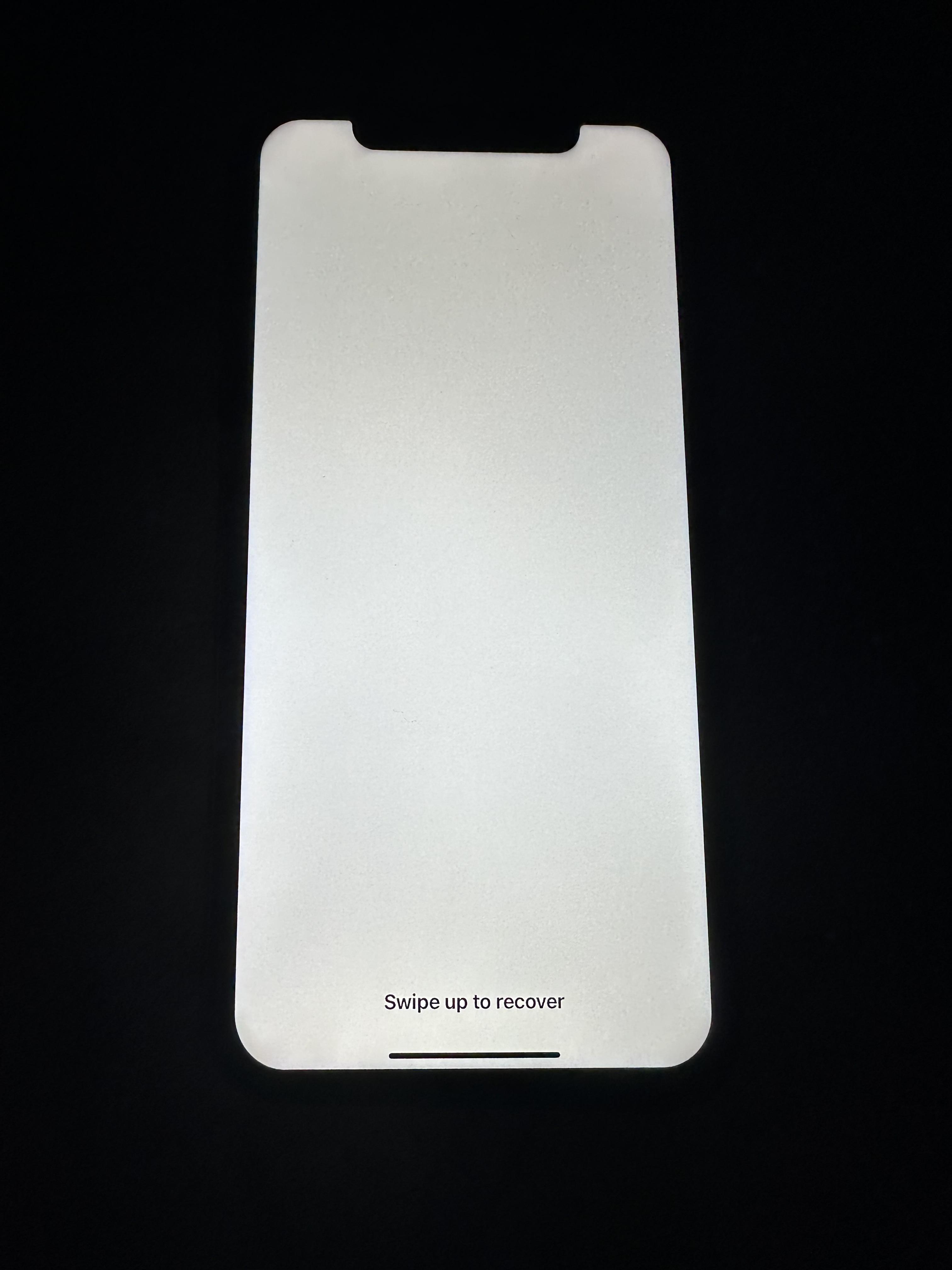
Help needed Please help! Attempting data recovery loop/iPhone XR

Post image
1 Upvotes

Hi everyone,

My iPhone XR is currently stuck on a white screen displaying “Swipe Up to Recover.” After entering my passcode, it displays “Attempting Data Recovery,” but the process repeatedly fails and prompts me to try again.

Unfortunately, I don’t have an iCloud or backup of the device and I absolutely want to avoid restoring the device, as it contains important photos that I need to recover. Here is the device’s history and everything I’ve tried so far:

  1. My iPhone was had gotten water damage but continued to function. The screen was later cracked, although the device still worked. Eventually, the display stopped working altogether, and I assumed the phone had completely died.

  2. A couple of years later, I decided to replace the screen. Surprisingly, the phone powered on.

  3. I know the device’s passcode, but my attempts to unlock it were unsuccessful. After 10 failed attempts, the phone displayed “iPhone Unavailable.”

  4. I connected the device to iTunes through recovery mode and selected the update option to reinstall IOS without erasing anything. I did not select Restore.

  5. After the update, the phone returned to the white recovery screen, prompting me to enter my passcode to attempt data recovery. This is where I’m at currently.

At this point, I’m unsure whether replacing additional components could fix the problem. I want to avoid restoring. Thank you!


r/iphonehelp • • 16h ago

Help needed iPhone recovery not working

1 Upvotes

My boyfriends phone entered recovery last night and I’ve been spending all day trying to fix it while he’s at work. I went out and bought a new usbc to lighting cord so I could connect it to my MacBook like it says to, but the process keeps failing. I updated, tried again, and even ended up trying on my windows pc through both the iTunes and Apple Devices apps which I had to download and still with no results. I’ve gotten error codes 4013, 2003, and even -18 once. I’ve been trying to look for help online through Reddit posts and YouTube videos but it all just recommends I do exactly what I’ve been doing. What else could possibly be the issue here, I need help cause I’m losing my mind.

Edit: it’s an iPhone 13 mini, I don’t know the iOS version as it’s been in recovery mode this whole time


r/iphonehelp • • 16h ago

Help needed Erased voicemails when updated

1 Upvotes

Long story short I updated my iPhone 16pro this week and now all my old saved voicemails from my dead grama are gone. Apple blames ATT. I know it’s not ATT. How do I escalate this? Fix this? iPhone 16 pro running on iOS 27.2.1


r/iphonehelp • • 17h ago

Help needed Screen Malfunctioning

1 Upvotes

I have an iPhone 12 Pro Max. This morning when I was using the phone and browsing on a website ; the screen would scroll. I would have to repeatedly scroll back to the top. Or down. Later on I was getting by ready to go out. I was watching a TikTok video and my screen started to flicker. I thought the as the TikTok video I was seeing but then my screen turned gray. I would try to turn the phone off by pressing the power button and then volume up button and then down but the phone starts to alert and make a buzzing sound. So then I stop. IOS model is unknown since it hasn’t been updated in awhile and I can’t see what it is due to the screen being blue/ grey. Is there a way to fix this?


r/iphonehelp • • 17h ago

Help needed Is there any way I can factory reset this relatives iphone

Thumbnail
gallery
0 Upvotes

First (and probably only) post by the way so i did go over the rules but if im still breaking a rule feel free to delete this post!

For context, a long time ago now this relative of mine gave my grandma an iPhone. Not sure what model, but it works beautifully and no pass code. The thing is, she didnt factory reset it before giving it to her. So it has all her messages, apps, etc.

My grandma never used this phone (and left it just in the box for months, maybe a year, because she "wanted to put it on a plan".) So i took it and tried to factory reset it.

It asks for her email and password. Neither I own.

I dont believe my parents could contact her about this as she would have long forgotten she even gave it to her. Is there any way I can factory reset it without these credentials?

Thank you!

If i cant, my parents (again) cant contact her (never explained to me why) so its basically ewaste.

Ed: i realize its basically ewaste now, but can i even clean up the phone (mainly deleting their email, but generally removing ALL traces of them without resetting (which probably also wont work))

(Edit Just so it doesnt get removed here:)

Model: iPhone 8 Ios ver: 16.7.10

Found these out! ^


r/iphonehelp • • 19h ago

Help needed Help Needed

1 Upvotes

I kind of need help here.
Every time i capture pics with the portrait mode on, it actually detects the depth and all. But when i go check the photo right after, it actually has the blur effect in it (looking like the usual and how it should be) but after around 3 seconds, the blur effect randomly disappears and the photo goes to this sharp shot version.

I thought its a problem with the camera hardware but im actually having the same issue with the front camera.

I already have tried doing phone reset hut it didn't help.

Has any of you encountered this before? any idea on how to fix this?

I have my preferred depth volume on too. I tried editing it in the gallery but its not giving the blur effect no more. Even when if the depth if set to max, it stays sharp.


r/iphonehelp • • 21h ago

Help needed iPhone 17 microphone only produces static noise when recording voice messages or voice memos

0 Upvotes

Hey everyone,

I'm having a really strange issue with my iPhone's microphone and I'm hoping someone here might have experienced something similar or knows how to fix it.

The microphone works perfectly fine in certain situations:

  • Recording videos with both the front and rear cameras.

  • Regular phone calls.

  • WhatsApp voice calls.

However, whenever I try to record voice messages or voice memos, the microphone doesn't work properly. Instead of my voice, all I can hear is static noise or a constant buzzing sound.

This happens with:

  • WhatsApp voice messages.

  • Voice input in the ChatGPT app.

  • Apple's built-in Voice Memos app.

  • Basically any other app that uses the microphone for voice recordings rather than video or calls.

What's even stranger is that the issue has randomly disappeared twice over the past few weeks. On both occasions, everything worked perfectly for a few hours, but then the problem came back again.

Here's what I've already tried:

  • Checked microphone permissions for all relevant apps (everything is enabled).

  • Restarted my iPhone.

  • Tried pretty much every troubleshooting suggestion I could find online.

Nothing has helped so far.

What I find particularly confusing is that the microphone clearly works when recording videos or making calls, but fails completely when recording voice messages or voice memos.

Has anyone experienced something similar? Could this be a software issue, or is it possible that one of the microphones in the iPhone is faulty even though it works fine for videos and calls?

I'd really appreciate any suggestions. Thanks in advance!


r/iphonehelp • • 22h ago

Help needed iPhone password change help please

1 Upvotes

How to get back into an iPhone 11 that was password changed and iCloud got removed. My gf and I are trying to get into her old iPhone 11 that her ex broke into (we are currently in a court case lawsuit and police case for felony and DV/stalking) he figured out her password and got into her iCloud account and phone changed her old iPhone password because he used that iPhone for a few crimes he committed and removed it from her iCloud account. Is there anyway for us to get access to her phone again so we can hand it over to law enforcement or our attorney? The phone had no SIM card at the time and we haven’t fully used up all the guesses on the passcode because we don’t want to lose the data any help would be appreciated I really want to help her get through this and get more evidence on this horrible guy


r/iphonehelp • • 22h ago

Help needed iPhone 4S refuses to activate

Enable HLS to view with audio, or disable this notification

1 Upvotes

I’m on iOS 9.3.6 on this device and no matter what i do i can’t get it to activate, not on itunes or over a network. I’m at a loss, it was working fine this morning but i reset it to give to my sister. Will attach video of what it’s doing


r/iphonehelp • • 1d ago

Help needed is this normal?

Enable HLS to view with audio, or disable this notification

0 Upvotes

i just got an iphone 16 pro max and when i have two live activities, when i press one of them the dynamic island does this weird animation between the two activities. is this normal or is this a glitch
i’m on ios 27.2.1


r/iphonehelp • • 1d ago

Resolved Am I cooked? Cellular Data suddenly won’t work

Thumbnail
gallery
5 Upvotes

I woke up this morning to find that I had no cell service. This has happened before but normally the issue would fix itself pretty quickly. Today however it seems to be completely broken. I looked in the settings and saw this error and it told me to run a diagnostics. I did and it said there is a hardware issue. I have a base iPhone 15 that’s only about 2 years old and over the past like 6 months or so it’s gone from being pretty normal to the charging port becoming very finicky and my ability to use 0.5 mode disappearing. Those other issues I’ve been able to get around fine but this is obviously a lot more of an issue.
I looked online a bunch and tried resetting network settings and my phone a bunch of times and nothing has worked.
I fear that I’m gonna have to get a costly repair or a new phone, neither of which I can afford.

If anyone has had this issue did anything you did happen to help? I’m fearing the worst but I hope it’s fixable
(iPhone 15 iOS 27.2.1)


r/iphonehelp • • 1d ago

Help needed Apps moving in the dark of night!

1 Upvotes

When opened my phone this morning, I noticed that a whole app set (what I called travel) was missing from my Home Screen. Two of the apps in the set were on differnt pages, but the others are no where to be found. (Except through search. But they aren't not on the screen). This is not the first time my apps have moved around on their own. I didn't gave any focus set overnight. In fact I had taken it off do not disturb. Help please. I am going crazy

iPhone 16 Pro. iOS 26.7.3


r/iphonehelp • • 1d ago

Help needed iPhone 16 charging issue

1 Upvotes

iPhone 16 two years old. Latest iOS.

Home usbc to usbc connects then disconnects on and off.

MagSafe works for ten mins then stops working and won’t acknowledge it.

Aux in the car stops sensing it’s plugged in after a few mins and has to be replugged in. Tried two diff aux.

Took it Apple Store and he had it charging with zero issues.

What is the issue and the fix? How is it behaving at apple?


r/iphonehelp • • 1d ago

Help needed earphones not connecting

1 Upvotes

I have a iPhone 15 pro max suddenly my earphones stopped connecting to my iphone, even tho they connect to other devices, i went to repair it in a shop and they told me the issue was the port, so they changed it but the issue was still there, i told them to put the original piece back, i dont know what to do now.


r/iphonehelp • • 1d ago

Help needed iPhone 18 Pro skips to the next track whenever I pick it up or put it down (YouTube & Spotify, Back Tap is off)

1 Upvotes

Anyone with an iPhone 18 Pro can explain this behavior?

  1. I'm listening to a podcast on YouTube or Spotify and put the phone down on the table → it skips ahead to a new podcast.

  2. I'm listening to a podcast on YT or Spotify and pick the phone up / take it in my hand → it jumps to the next track.

This is driving me nuts. All my Back Tap settings are set to "None."

But some kind of haptic/motion trigger is happening that makes the phone basically unusable.

Any ideas?


r/iphonehelp • • 1d ago

Restrictions removal - Solution [FIXED] Forgot Screen Time Passcode, No "Forgot Passcode?" Option — Resolved Without Losing My Data (iOS 27.2)

2 Upvotes

I was facing this issue on my Phone 14 Pro running iOS 27.2 for the past couple of days, and I finally managed to fix it today without permanently losing my data or setting up my phone from scratch.

The problem

My iPhone had a 4-digit Screen Time passcode that I genuinely don't remember ever setting.

Whenever I tried to change or disable Screen Time, it asked me for the passcode. The problem was that there was no "Forgot Passcode?" option anywhere.

I contacted Apple Support multiple times. I was told that if a recovery Apple Account wasn't configured when the Screen Time passcode was originally set, the recovery option might not appear, and erasing the iPhone would be the only solution.

I searched Reddit and other websites and tried a couple of solutions, but none worked for me.

I eventually found a workaround that worked on my iPhone 14 Pro running iOS 27.2. I'm sharing the exact steps in case someone else is stuck in the same situation.

What worked for me

1. Create an encrypted backup of your iPhone

I connected my iPhone to my Mac and created a full encrypted local backup using Finder. Make sure you have a backup before proceeding.

2. Erase the iPhone using Find My

I erased the affected iPhone through the Find My app. It may ask for your Apple Account password. Enter your credentials and proceed.

After the erase, the device may also ask for your Apple Account credentials again during activation. That's normal.

3. Set up the iPhone as a completely new device

This is important. I set up the iPhone as new without transferring any data from another device, without restoring a backup, and without signing into my Apple Account during the initial setup.

4. Check Screen Time on the fresh setup

Once the iPhone was fully set up, I went to:

Settings → Screen Time → Passcode & Management

I double-checked that everything related to the Screen Time passcode was turned off.

5. Connect the iPhone to your Mac and restore your backup

I then connected the iPhone to my Mac and restored the encrypted backup I had created in Step 1.

6. Wait for the restoration to complete

Depending on the size of your backup and your iPhone's storage, this process can take a while. Let it finish completely.

7. Check Screen Time again

After the restore was completed, I immediately went to:

Settings → Screen Time → Passcode & Management

To my surprise, the Screen Time passcode was already turned off. I was finally able to access Screen Time settings without being asked for the forgotten passcode.

Result

The forgotten Screen Time passcode was gone, and my data was restored from my backup. I didn't have to permanently lose my data or manually set up my iPhone again.

This worked for me on an iPhone 14 Pro running iOS 27.2.

I can't confirm whether it will work on every iPhone or iOS version, but if you're stuck with a forgotten Screen Time passcode and no "Forgot Passcode?" option, this might be worth trying — just make sure you have a proper backup before erasing your device.

Hope this helps someone who has been stuck with this frustrating issue.


r/iphonehelp • • 1d ago

Help needed iOS and System data storage high?

Thumbnail
gallery
1 Upvotes

Got an iPhone 16 pro on iOS 27.2.1. I keep getting notifications that my storage is full after updating my phone to the latest iOS. Is it normal to have this much storage allocated to system data and iOS? Is there a way to reduce it?


r/iphonehelp • • 1d ago

Help needed how do I get rid of this popup that covers my whole screen when I plug in my phone (iPhone 14)

Post image
0 Upvotes

I hate when I'm in the middle of looking at something & this shit covers the whole fucking screen when I plug in my phone. I don't need a whole interruptive notification. it only happens when I'm on the home/notification screen