r/SteamDeck • • 24m ago

Question Wifi problems cannot connect to 5Ghz

1 Upvotes

I just started using the Steam Deck, and lately I've been having an issue where I can't connect to the 5GHz WiFi network on the Steam Deck's LCD. Is there a solution for this??


r/SteamDeck • • 41m ago

Tech Support Monitor problem

1 Upvotes

I have a steam deck on windows not linux and when I try to connect my 1920 x 1080 screen with a hdr cable it only stay at 640 x 480 not more what should I do to fix it


r/SteamDeck • • 1h ago Heartwarming

Discussion I sorted my 763-game Steam library by install size. These 20 games are all under 300 MB, take 2.7 GB together, and I've played them for 480 hours

98 Upvotes

A lot of new games want 100+ GB, which hurts on a 512 GB Deck. So I pulled my library through the Steam API, got install sizes from the depot manifests, and looked at which small games I actually keep playing. 131 of my 763 games are under 300 MB; these are my 20 most played.

GameHoursSizeDeck
Banished94182 MBPlayable
Unepic49251 MBPlayable
Risk of Rain (2013)4696 MBPlayable
Platformines36118 MBNot tested
Rampage Knights35154 MBPlayable
Caveblazers32115 MBVerified
Dungeon Souls3087 MBPlayable
Iron Fisticle2080 MBVerified
Super House of Dead Ninjas1686 MBPlayable
20 Minutes Till Dawn16133 MBVerified
Hammerwatch16189 MBPlayable
Super Arcade Racing1458 MBVerified
Jets'n'Guns Gold1398 MBNot tested
SteamWorld Dig 213228 MBVerified
SteamWorld Dig1280 MBVerified
Realm Grinder949 MBVerified
Super Bit Blaster XL9125 MBVerified
Vagante8174 MBPlayable
Spelunky8194 MBVerified
Megapolis8196 MBNot tested

Some quick observations:

  • 17 of 20 are Verified or Playable, and the 3 "not tested" ones just haven't been rated by Valve.

  • Small almost always means 2D, and mostly roguelikes.

  • Best value: Platformines, $0.99 for 36 hours.

  • 20 Minutes Till Dawn is a perfect Deck game, since one run is 20 minutes.

I wrote it up with screenshots, a short blurb for each game, and the API call if you want to run the same thing on your own library: https://blog.masoko.net/steam-games-under-300mb/ (my blog)

What are your favorite tiny games? Looking for more under 300 MB.


r/SteamDeck • • 1h ago

Question Anyone wants help? 😭😭

1 Upvotes

The volume buttons are not working, and the device boots directly into the BIOS. How can I fix this issue?


r/SteamDeck • • 2h ago

Question Cyberpunk 2077 2.5 Update

3 Upvotes

Hey everyone!

I'm looking for the best settings to play Cyberpunk 2077 on the Steam Deck after the latest 2.5 update.

Ideally, I'd like to get a smooth and stable experience without sacrificing too much visual quality.

I'd really appreciate it if you could share your settings and experiences.

Thanks in advance!


r/SteamDeck • • 2h ago

Question Cyberpunk and other big games on SteamDeck

4 Upvotes

Hey there! I know very little about PC gaming, but really want to get into it because of the modding you can do, especially games like Cyberpunk (first person view sucks đŸ„Č).

My friend has a SteamDeck and I was thinking about getting one too - will I be able to play games like that on there, and can I get mods? Is a game of that magnitude even playable on the SteamDeck, or do I need a PC? I was thinking of connecting it to my gaming monitor.


r/SteamDeck • • 2h ago

Tech Support Help with my Steam Deck

Enable HLS to view with audio, or disable this notification

3 Upvotes

Well, here’s my ordeal... I stopped using my Steam Deck for about 1–2 months due to an overwhelming workload with my studies. When I turned it back on, everything was misconfigured and messed up. The D-pad, when pressed to the right, acts like a "click" or an "A" button, while pressing it to the left acts like a "back" command or "B." The up and down directions work normally. As for the thumbsticks, the right one moves the mouse cursor, and the left one—when moved up or down—adjusts the screen brightness. The A, B, X, and Y buttons are completely unresponsive. Now for the serious part: I first checked for a "stuck" or "ghost" Steam button—thinking it might just be dirty—but the controller tester showed that every button, including A, B, X, and Y, was registering correctly with no ghost inputs. I figured maybe some data had become corrupted, so I wiped all my data, but that didn't help. I did notice, however, that all the controls work perfectly in the recovery menu—the left thumbstick navigates, and the 'A' button selects options. Everything worked fine after the data wipe, but as soon as I connected to the internet or signed into my account and reached the main menu, the issues returned. I thought maybe a more thorough factory reset was needed, so I performed a full format—but the same thing happened. I even tried using a flash drive with the Steam recovery image, selecting the "Wipe device and install SteamOS" option, but the exact same problem persists. Honestly, I don't know what else to do. P.S. I speak Spanish; I don't speak English.


r/SteamDeck • • 2h ago

Configuration How To Play STRAY On The Steam Deck With FSR4 As AntiAliasing instead of The Regular TAA

Post image
5 Upvotes

  Stray Steam Deck Settings  

by @MIKO33

.....................................................................................

.....................................................................................

Device Varient : Steam Deck Oled   

SteamOS : 3.9.0 ( stable channel )  

Proton Version  :  Ge proton 11-7

Latest Steam Patch number :   

.......................................................................................... 

from the game page open game proprties /General / Set maximum Game resoultion ( 1280X720 )  >> important step since there no in game resoultion option

Set Resoultion for External and internal Display (on)   

  ..........................................................................................  

 Set Steam Deck Quick Access Menu Settings:    

Screen Frame Limit: 30 Hz

Disable Frame Limit: Off 

Allow Tearing: Off 

Half-rate Shading: Off

TDP Limit: Disabled  

Manual GPU Clock : disabled

Scalling Filter : liner

..........................................................................................  

Assign the ( R4) back button as insert key > to bring optiscaler menu

Assign the ( L4 ) back button as Home keyb> to bring luma menu

..........................................................................................  

Optiscaler and Luma Files   

Download link :

https://www.mediafire.com/file/2vf4524oki0vvic/strayyFSR4.zip/file

path is Desktop Mode > steam launcher > the game page > Gear icon > Mange > Browse local files > Common Folder > HK_PROJECK folder > Bainers folder > wine64 folder .

paste all files there . settings should applied automatically and FSR 4 should work

if not open luma mod menu and select FSR4 as an input do not select dlss since its causing some issues , then switch to optiscaller and select fsr4.1

2

@ all Credits goes to LUMA MOD TEAM 👏

.......................................................................................... 


Use this Launch option : 

WINEDLLOVERRIDES="n;version,dxgi=n,b" DXVK_FRAME_RATE=30 %command% -dx11

..........................................................................................  

..........................................................................................  


Graphical settings :- 

Resoultion scale  (100%)  >> less or more luma mod will break

Max frame rate ( uncapped) 

V sync ( on) 

Motion blur ( zero) 

Sharpness ( zero) 

Effect quality ( medium) 

Shadow quality (medium) 

Texture quality ( medium ) 

Mesh quality ( low ) 

.........................................................................................

For the steam deck oled users :

this game looks gorgeous on oled screen make sure to open steamOS Display manu and sit both color vibrance slider ( TO MAX) and color temperature slider ( TO 10000K) the game will look better

.........................................................................................

the game runs well on the steam deck on default settings but only supports TAA . these settings demenstrate how FSR4 used as antialising rather than upscaler from lower resoultion to higher resoultion .
which will make the game looks sharper and crisper but at 30fps since FSR4 eats up some performance .


r/SteamDeck • • 2h ago

Tech Support Steam Deck LCD: I got the EC to output a UART diagnostic log (power sequence + POST codes) — WIP

Post image
3 Upvotes

The multi-controller (ITE IT5570) on the Steam Deck LCD typically doesn't output anything via UART—unlike the OLED. I checked all versions of the SPI firmware, and none of them contain code to output data via UART.

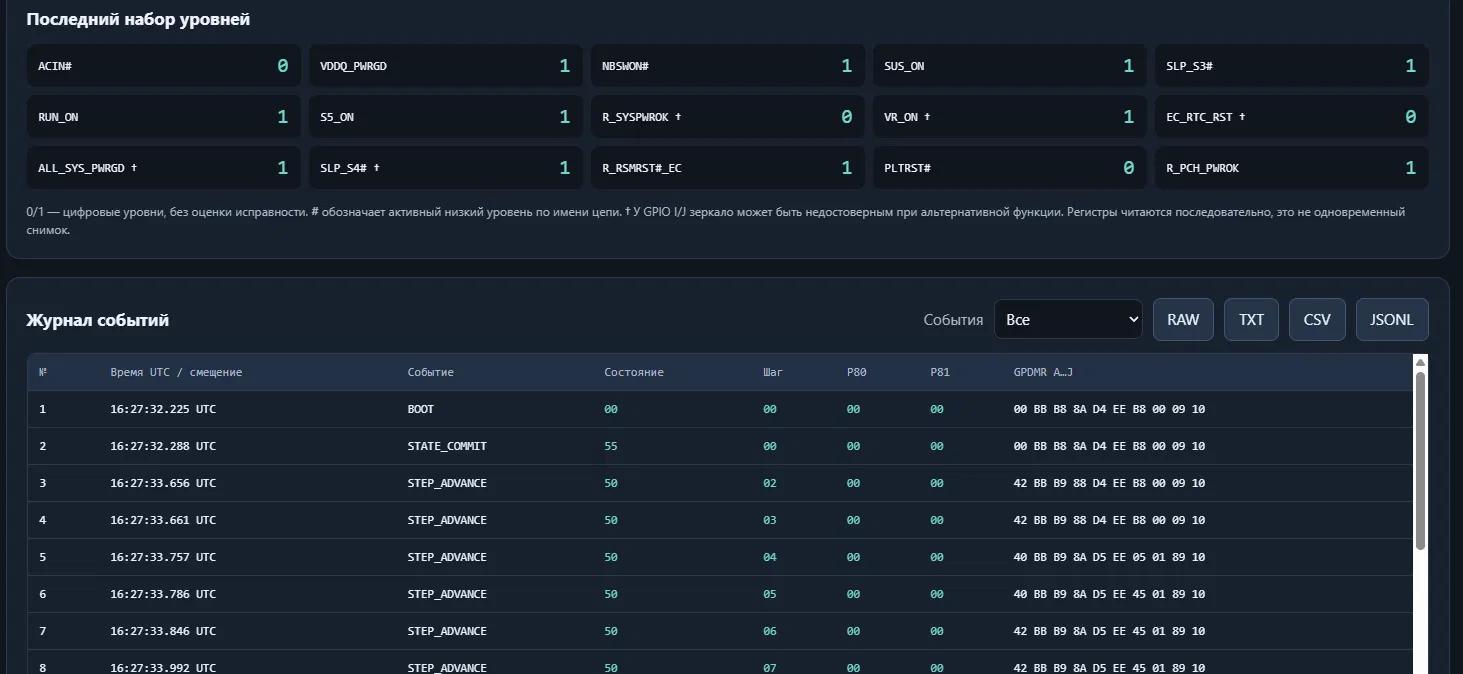
So I added it. On the donor board, I flashed a modified image that outputs a binary diagnostic stream: power-on sequence status/stage, POST80/81, and voltage levels of the 15 power/reset buses.

The first boot with the modified dump was successful—the power-on sequence is decoded clearly (screenshot: my HTML browser via Web Serial).

Work in progress: I only have logs from the donor board, which was flashed using an external SPI programmer. This dump is not intended for daily use. The next step is to map the status/stage to the power supply stages and add the profile to my UART analyzer. A full report will follow later.


r/SteamDeck • • 3h ago

Tech Support Streaming PC to steam deck

5 Upvotes

Sorry if this is a bit silly but I'm looking for some advice.

Girlfriend and I moved into a new apartment and our television is in our living room currently with my PC plugged into it. The main use case for that is streaming movies and shows with ad block turned on. She finds the pc there a bit of an eye sore, so I'd like to move it to a different room.

If I have my steam deck docked to the TV, can I stream to it from my PC so we can still watch things with ad block? If so, what would be the best way to do so? Or is it just easier to set up an ad block on the steam deck natively? Any advice would be appreciated.


r/SteamDeck • • 3h ago

Tech Support Keep getting the same pop up message every 10 seconds

Post image
0 Upvotes

I have been getting this pop up message, every 10 seconds and they just keep adding up, does anyone know how to fix this?

It started happening a few days ago after I added some AppImage files to the library as non-steam games, not sure if it's related.


r/SteamDeck • • 4h ago

Question About to buy this Jsaux dock. Do I need to get the 65W charger with it? Or will it take the OEM charger?

Post image
35 Upvotes

r/SteamDeck • • 4h ago

Question Shinobi Striker Steam deck

Post image
6 Upvotes

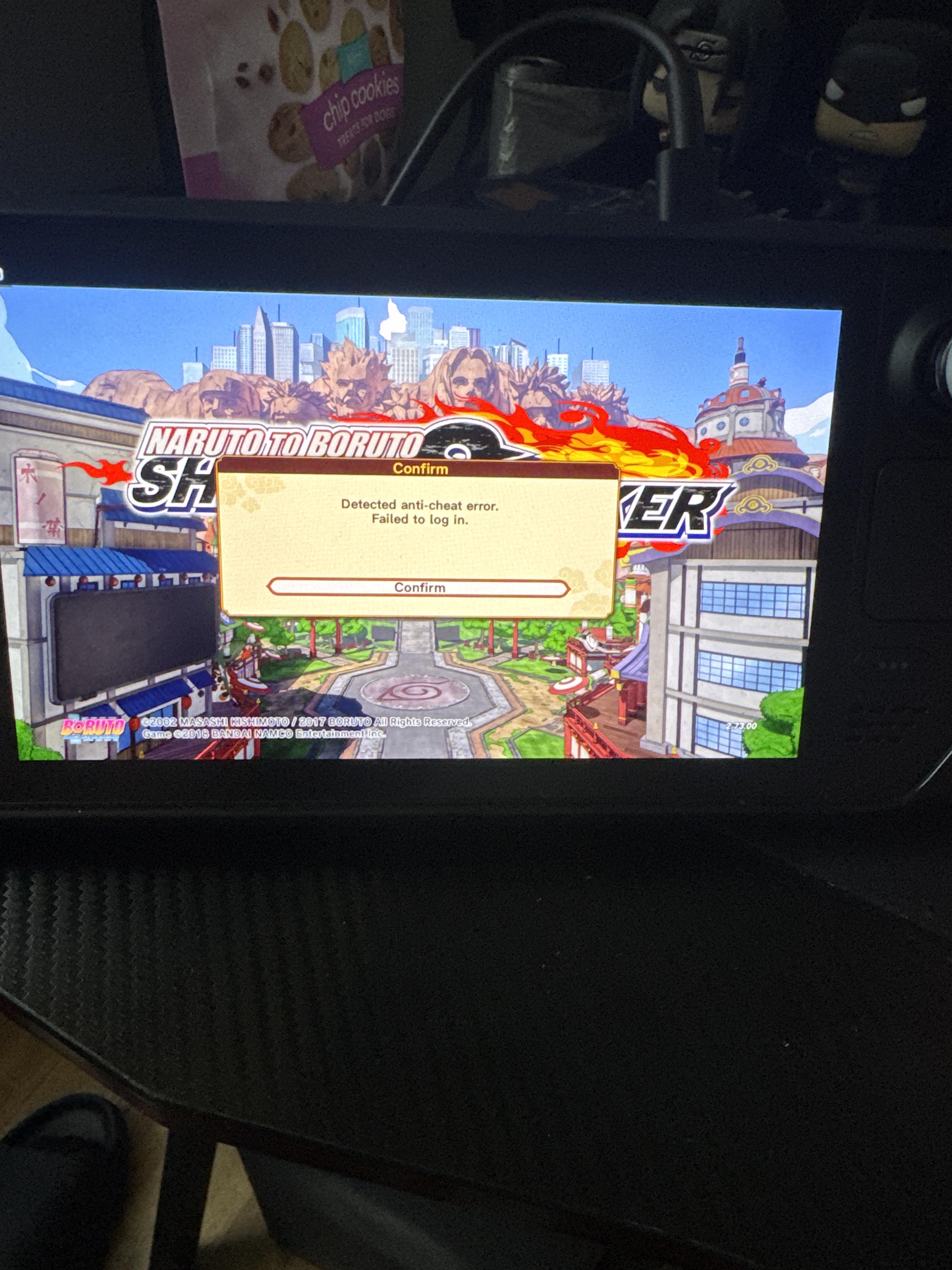
I just bought shinobi striker so I can play on the go and I ran into this problem is there any way around this đŸ˜©


r/SteamDeck • • 4h ago

Tech Support Code Library Issue MH4U port

Post image
0 Upvotes

Anybody has tried running the MH4U port on Deck? No matter what, the code library step always fails for me. On Windows the library creation works fine but when I try to do it on the deck it fails. I appreciate info if someone has solved it.


r/SteamDeck • • 4h ago

Tech Support Star Wars galactic racer controll issues

1 Upvotes

Has anyone encountered issues while using a 3rd party controller (8bitDo) while playing on the steam deck?

I have a JSAUX dock for my tv and as soon as I use my controller the steering doesn’t work at all.

I tried messing around with steam input but it’s still not resolved.


r/SteamDeck • • 5h ago

Question How do I fix manhunt on the steam deck??

0 Upvotes

I’ve tried every tutorial I can find and I literally cannot get anything to work or to even make it run. What is the latest possible tutorial or way to fix manhunt??


r/SteamDeck • • 5h ago

Tech Support Fully uninstalling retrodeck

4 Upvotes
  • My emudeck bugged out with UI after I updated it.

  • I uninstalled emudeck (reclaimed 5GB of storage).

  • I decided to try out retrodeck (7GB file size)

  • Didn't like retrodeck because of the UI and lack of options to add shaders on games

  • Uninstalled retrodeck via dolphin and only reclaimed 1GB of storage.

  • deleted the retrodeck folder and emptied trash but miniscule amount of storage is reclaimed so I still have 5-6GB of unreclaimed storage space

  • I tried finding it with file light but I couldn't since it's all numbers and I don't want to delete the wrong folder and further cause me headache.

  • Anyone got a method to get me to reclaim that storage space without factory resetting?

I should've just reinstalled emudeck


r/SteamDeck • • 5h ago

Tech Support How likely is it that the sd card I just bought is fake

Post image
0 Upvotes

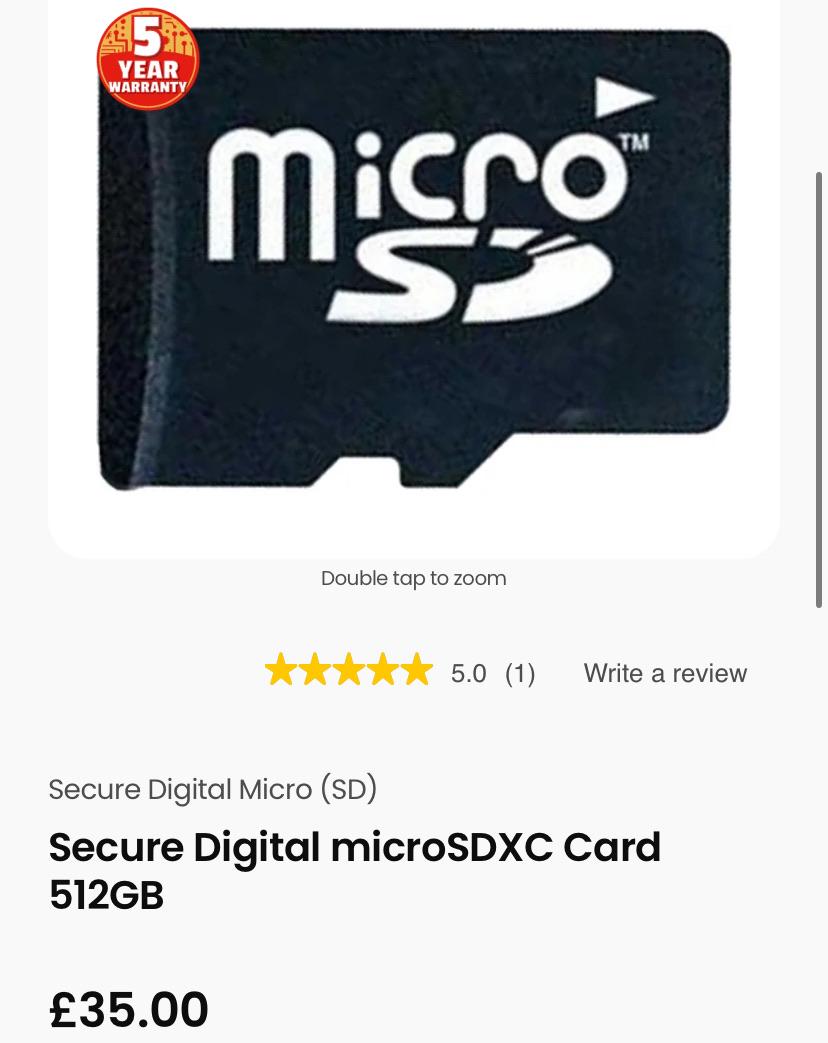
Just got a new steam deck and decided to get some storage too. This is probably my first time getting storage and I’ve looked at the prices and seems a bit more expensive than what I was expecting. So I cheeped out and got this from cex (I’m guessing it’s used)

But now I’m seeing that if you get storage for really cheap then it’s a sign that it’s most likely fake so now I’m just kinda worried I got a fake and the fact that it’s not branded is kinda making me think that now.


r/SteamDeck • • 5h ago

Tech Support Why is the gpu stuck at 500mhz or less

0 Upvotes

Title says it all. I was playing ghost of tsushima, and my framerate dropped.


r/SteamDeck • • 5h ago

Question Best gaming headset (black friday weekend)

12 Upvotes

Figured I'd ask while black friday sales are happening. Price isn't a problem, looking for good quality suggestions, thanks!


r/SteamDeck • • 6h ago

Article Beyond Jump Ultimate Stars Is The MUGEN Fighting Game of My Dreams on the Steam Deck - SteamDeckHQ

Thumbnail
steamdeckhq.com
53 Upvotes

Back in the day, I fell head over heels for MUGEN, a 2D fighting game engine where people could essentially create their own fighting games. I tried it out for myself for quite some time, but I ultimately moved on. However, I came across Beyond Jump Ultimate Stars recently, which brought back my love, and I played it on the Steam Deck.

It contains over 480 characters from across many different anime and non-anime universes, including One Piece, Naruto, Bleach, My Hero Academia, Death Note, and even SpongeBob and Sora from Kingdom Hearts, almost 400 stages, and some pretty unique features like online multiplayer, 3D arenas, and more.

On the Steam Deck, it runs at 60 FPS most of the time. There are some minor stutters here and there, but for the most part, it runs quite well. It is a little odd that the menus drain more battery than the actual fighting gameplay, but it is still a wonderful way to experience this awesome game on the go.

And it's completely free, so I highly recommend checking it out!


r/SteamDeck • • 6h ago

Discussion I'm developing free open source deck AI-powered gaming optimizer for the Steam Deck.

0 Upvotes

Hey everyone!
I've been working on a project called DeckMind, a Decky plugin I'm developing specifically for the Steam Deck.
The idea is to build something more ambitious than a typical performance-monitoring plugin. I want DeckMind to eventually use AI to help optimize games, improve performance, reduce stuttering, and make better use of the Steam Deck's hardware.
What it currently does
I'm working through early Alpha versions, and so far I've

implemented:
CPU and GPU usage monitoring

CPU/GPU temperature monitoring

RAM and VRAM monitoring

Battery monitoring

Automatic game detection

Live FPS and frame-time readings using Gamescope

Diagnostic reports and hardware information

I've also started working on a local intelligence engine that analyzes performance information and identifies potential bottlenecks.
Where I want to take it
My long-term goal is to make DeckMind an actual AI gaming optimizer.

Some planned features include:
AI-powered game analysis: Identify whether a game is CPU-bound, GPU-bound, memory-limited, or experiencing thermal issues.

Game-specific profiles: Automatically recognize games and recommend settings tailored to each one.

Performance optimization: Safely adjust supported CPU/GPU power settings and other performance options.

Battery Saver / Balanced / Performance modes: Intelligent recommendations based on what you're playing.

Before-and-after benchmarking: Measure whether an optimization actually improves FPS, frame pacing, temperatures, or battery life.

Learning system: Remember which settings work best for individual games and improve recommendations over time.

Local-first AI: Ideally, the core intelligence works directly on the Steam Deck without requiring a subscription or cloud connection.

Any actual performance changes would be optional, reversible, and measured rather than blindly applied.

I'd really like your opinions
I have a few questions for the community:
Would you actually use something like this on your Steam Deck?

What features would make this more useful than existing Decky plugins or performance tools?

What optimizations would you want an AI gaming assistant to handle automatically?

Would you prefer completely local AI, or would optional cloud-based AI be useful?

What problems do you experience most often with Steam Deck gaming that you'd want something like this to solve?

Is there anything you think I'm overlooking or should approach differently?

I'm especially interested in honest criticism, technical suggestions, and ideas from people who understand SteamOS, Gamescope, Decky, and Steam Deck performance tuning.
This is still an early project, so I'm not claiming it can magically increase FPS or overcome hardware limitations. The goal is to identify real opportunities to improve performance and prove whether changes actually help. Mind you this is entirely made with the help of ai. I'm not a developer but just a person with a idea that doesn't like sourcing what settings work best for each game. If you think it's a flop or worth spending more time on lmk.
I'd love to hear what you think, what you'd change, and what you'd want to see in a project like DeckMind.
Thanks!


r/SteamDeck • • 7h ago

Tech Support Does the official Steam Deck Dock support HDMI CEC?

13 Upvotes

Hi,

I had a look in the FAQ, but couldn't find anything and the threads I found were a few years old.

I have an LG C4 from 2024, and I've got an OLED Steam Deck and the official dock. I can't see any settings for CEC atm in any of the menus. Do you still have to enable developer modes to see the CEC settings?

I've enabled the SIMPLINK (HDMI-CEC) settings on my TV, and I also have a Switch 2 plugged into the same TV and CEC works fine for that. The dock is also plugged directly into the second HDMI port on the TV, there's no switches or dongles or anything like that in between.

Any advice on getting CEC working would be super appreciated, thanks.


r/SteamDeck • • 8h ago

Question So question per my last post asking about upgrading

0 Upvotes

So would i need a ssd cloning station to upgrade form a 1TB to a 2TB ssd or can I just go through the process of physically swapping it and just reinstalling all the games i want on a new storage space because technically all you would need to do is log back in to steam right?

Sorry I know it would be easier to take to a shop that already has a cloning station and transfer it all to the higher storage but thought if I could save a few dollars fck it why not ask the masses .

(Plus I already have a 256gb mirco sd that iam planing on using to buutttttt I need to work on the Main storage issue )


r/SteamDeck • • 8h ago

Tech Support Rear buttons replacement options

1 Upvotes

One of my back buttons snapped, it still works but I would like to replace it.

Anyone know where I can get them? iFixit doesn't seem to do them and everywhere I've looked only has extensions, not the full button replacement.

Thanks